
Start with Git and SemVer today. For most engineering teams, a /prompts/ folder in your existing repo plus MAJOR.MINOR.PATCH frontmatter on every prompt file is the fastest path to auditable, rollback-ready prompt version control. If your team includes non-engineers editing prompts, add a lightweight prompt registry. At enterprise scale, a managed platform like Amazon Bedrock Prompt Management handles metadata, serverless testing, and access controls out of the box.
Quick chooser:
- Small team (1–5 engineers): Git-only. A
/prompts/folder, SemVer frontmatter, andgit revertas your rollback. - Medium team (cross-functional, 5–30 contributors): Git plus a prompt registry or lightweight database-backed store so product managers and content writers can edit without touching the repo directly.
- Large/enterprise: A dedicated prompt-management platform with channels, approval gates, audit logs, and SDK-based runtime fetching.
Three actions to take in the next 24–72 hours:
- Create a
/prompts/directory in your repo and move all prompt strings there. - Add a YAML frontmatter block to each file with
id,version(SemVer),author,model, andrationale. - Assemble a golden testset of 10–20 representative input/output pairs and commit it alongside the prompts.
Key Takeaways
Prompt versioning with Git and SemVer is the practical baseline every production LLM team needs before adding any dedicated tooling.
| Point | Details |
|---|---|
| Git + SemVer baseline | Start with a /prompts/ folder, YAML frontmatter, and MAJOR.MINOR.PATCH rules before evaluating managed platforms. |
| Test before you promote | A golden testset of 10–20 cases and a CI regression runner blocks regressions before they reach production. |
| Runtime decoupling | Fetch prompts from a registry at runtime with version pinning so prompt updates never require an app redeploy. |
| Rollback options vary by need | git revert gives a full audit trail; feature-flag swaps are faster but require additional logging for GDPR traceability. |
| Hanadkubat production wiring | Hanadkubat's fixed-price AI integration engagements include SemVer prompt workflows, GDPR-aware logging, and EU-resident inference from day one. |
Table of Contents
- What is prompt versioning and why does it matter for production?
- What metadata should you record for every prompt version?
- Which technical approach fits your team: Git, custom registry, or managed platform?
- How does prompt version control work in production: promotion, canaries, and rollback?
- How do you test prompt versions before deploying them?
- How do you store, serve, and run versioned prompts in practice?
- How to set up a minimum viable prompt-versioning workflow in a day
- Practical best-practices checklist for your runbook
- From the field: production wiring, timeline, and common pitfalls
- Fixed-price AI integration that includes production prompt wiring
- Sources
- FAQ
What is prompt versioning and why does it matter for production?
Prompt versioning is the practice of tracking every change to an LLM prompt as a discrete, immutable record with a unique identifier, author, timestamp, and model context. Humanloop defines prompt management as the systematic approach to creating, storing, versioning, and optimizing prompts to ensure traceability and safe iteration at scale. Versioning is the foundation that makes the rest of that possible.
Without it, production systems degrade silently. A developer tweaks a prompt to improve tone, the new wording changes the JSON structure the downstream parser expects, and suddenly your API returns 500 errors at 2 AM. No one knows which change caused it because the prompt lived in a config file with no history. That scenario is not hypothetical.
The production risks break into four categories:
Silent quality regressions. A wording change that looks harmless can shift model behavior in ways that only surface at scale or with edge-case inputs. Without a version record, you cannot bisect the regression.
Broken downstream parsers. If your prompt instructs the model to return structured JSON and you change a field name, every consumer of that output breaks. SemVer MAJOR would have flagged this as a breaking change before it hit production.
Audit gaps under GDPR and the EU AI Act. Both frameworks require traceability of automated decisions. If you cannot show which prompt version produced a given output, you have a compliance gap. Immutable version records close it.
Deploy coupling. When prompts live inside application code, a copy change requires a full app release. Decoupling prompts into a versioned registry means you can update and roll back a prompt without touching the deployment pipeline.
What metadata should you record for every prompt version?
Consistent metadata is what turns a folder of text files into a traceable system. The schema below is copy-pasteable as YAML frontmatter:
id: "summarizer-v2"
version: "2.1.0"
author: "anna.mueller@example.com"
date: "2026-03-15"
model: "gpt-4o"
model_hash: "sha256:abc123"
temperature: 0.3
max_tokens: 512
channel: "staging"
rationale: "Added explicit JSON schema instruction to fix parser failures"
expected_output_delta: "Field 'summary_length' now always present"
test_results: "tests/summarizer-v2-1-0.json"
tenant_id: null
SemVer applied to prompts:
- MAJOR (e.g.,
1.0.0→2.0.0): The output format or downstream contract changes. A field is renamed, removed, or the response structure shifts. Consumers must update. - MINOR (e.g.,
2.0.0→2.1.0): New capability or instruction added that does not break the existing output contract. A new optional field, a new persona instruction. - PATCH (e.g.,
2.1.0→2.1.1): Wording fix, typo correction, or tone adjustment with no structural change.
A few practical notes. Keep explanatory context out of the prompt itself. Put rationale and change history in an external CHANGELOG.md or a linked test-results file. The frontmatter should stay minimal: version, routing fields, and model reference. Anything longer belongs in documentation, not in the prompt header that the runtime reads on every call.
For multi-tenant systems, tenant_id lets you track which tenant is running which version and roll back selectively without affecting others.
Which technical approach fits your team: Git, custom registry, or managed platform?
Three approaches dominate in practice. The right one depends on team size, who edits prompts, and how much operational overhead you can absorb.
| Dimension | Git-based | Custom DB/Registry | Managed Platform |
|---|---|---|---|
| Best team size | Small (1–10 engineers) | Medium, cross-functional | Large / enterprise |
| Immutability & audit logs | Via commit history; manual tagging | Configurable; depends on implementation | Built-in; tamper-evident logs |
| Deployment & promotion | Manual branch/tag workflow | Custom channels (staging/stable) | Native channels, approval gates, canary |
| CI/CD integration | Native (GitHub Actions, GitLab CI) | Custom scripts or webhooks | SDKs + APIs; varies by vendor |
| Testing & evaluation | External test runner on PR | Depends on build | Built-in side-by-side comparison |
| Governance & access control | Repo permissions | Role-based; custom | Fine-grained RBAC, department-level metadata |
| Cost / operational overhead | Near zero | Medium (build + maintain) | Subscription or AWS usage cost |
Git-based is the right starting point for most engineering teams. Braintrust frames it well: prompts in repos, PRs for edits, git revert as a simple rollback. The audit trail is your commit history. The main limitation is that non-engineers cannot easily edit prompts, and there is no native concept of "promote to stable."
Custom DB/registry solves the non-engineer problem. You build a small API that stores prompt versions in a database, exposes a GET /prompt/{id}/{version} endpoint, and lets product managers edit via a UI. The cost is the build and maintenance burden. Open-source community projects like promptzy show what early feature sets look like: version history, tagging, shared libraries, and storage backends. Maturity varies.
Managed platforms like Amazon Bedrock Prompt Management handle the full lifecycle: side-by-side prompt comparisons, metadata tracking (author, department), and serverless runtime testing via Bedrock APIs. PromptForge takes a similar approach with immutable snapshots, latest and stable channels, and atomic promotions so prompt updates never require an app redeploy. The tradeoff is vendor lock-in and cost.
How does prompt version control work in production: promotion, canaries, and rollback?
A safe promotion workflow has five stages. Skipping any one of them is where production incidents come from.
- Draft. Author writes the new prompt version locally with updated frontmatter. Version bumped per SemVer rules.
- Staging (latest channel). PR opened. CI runs format validators and the regression suite against the golden testset. PR is blocked on failures.
- Review and approval. A second engineer reviews the expected output delta and test results annotated on the PR. For GDPR-sensitive or EU AI Act-regulated outputs, a compliance sign-off step is added here.
- Canary. The new version is promoted to a small cohort (5–10% of traffic). Monitor for 15–30 minutes before full promotion.
- Stable. Tag the commit with the SemVer string. Update the
channelfield tostable. The registry serves this version to all consumers.
Threada's guidance adds linking prompt versions to analytics events so you can correlate a version bump with downstream product metrics.
Rollback options and their tradeoffs:
git revert: Fastest for Git-only teams. Creates a new commit that restores the previous version. Full audit trail, but requires a CI run and deploy cycle.- Feature-flag swap: Instant. Flip the flag and the runtime fetches the previous version without a deploy. Requires a feature-flag system like LaunchDarkly already in place. Ideal for zero-downtime rollbacks and tenant-scoped releases.
- Environment override: Set the
PROMPT_VERSIONenv variable to the previous SemVer string. Fast, but leaves no explicit audit record unless you log the override.
Pro Tip: For GDPR-regulated outputs or EU AI Act high-risk systems, use git revert or a registry-level rollback that writes an immutable audit event. Feature-flag swaps are faster but may not satisfy the traceability requirement without additional logging.
How do you test prompt versions before deploying them?
Testing before promotion is what separates teams that ship confidently from teams that find out about regressions from users. The test harness has five components:
| Component | What it checks | Pass/fail signal |
|---|---|---|
| Golden testset | 10–20 representative input/output pairs | Similarity score above threshold |
| Format validator | JSON schema, required fields, data types | Zero schema violations |
| Similarity check | Cosine or BLEU score vs. golden answers | Score above configured threshold |
| Hallucination detector | Factual grounding, citation accuracy | Zero flagged outputs |
| Latency test | p95 response time under load | Within 20% of baseline |
A practical production approach pairs the golden testset with a semantic changelog listing version, date, author, change type, and expected output delta. That changelog entry becomes the PR description, so reviewers know exactly what behavior is expected to change.
CI pipeline pattern (pseudo-code):
on: [pull_request]
jobs:
  prompt-regression:
    steps:
      - run: python validate_schema.py prompts/
      - run: python run_golden_testset.py --threshold 0.85
      - run: python check_latency.py --p95-max 2000ms
      - if: failure()
        run: echo "::error::Prompt regression detected — merge blocked"
Annotate the PR with the expected output delta from the frontmatter and the test results JSON path. Reviewers see the diff, the expected behavior change, and the test pass/fail in one place. For teams building AI content workflows, this same harness applies to content-style prompts where format and tone consistency matter as much as factual accuracy.
How do you store, serve, and run versioned prompts in practice?
Avoid embedding prompts directly in application code. It couples prompt changes to app releases, makes rollback expensive, and scatters version history across commits mixed with unrelated code changes.
The better pattern is runtime fetch with version pinning. Your application calls a registry endpoint at startup or per-request:
prompt = registry.get(id="summarizer", version="2.1.0", channel="stable")
Pin the version explicitly in non-production environments so a staging deploy always runs the version under test. In production, pin to stable and let the registry serve whatever version is currently promoted there. This is the decoupling model PromptForge describes: channels handle the routing, and your app code never needs to change when a prompt is updated.
Variable interpolation deserves care. Do server-side interpolation of variables (user input, context, retrieved documents) rather than passing raw user strings into the prompt template on the client. This reduces prompt injection risk and keeps the template itself clean and testable.
Multi-model compatibility: treat a model change as a MAJOR version bump. A prompt tuned for GPT-4o may produce structurally different output on Claude 3.5 Sonnet. Record the model and model_hash in frontmatter, and run your full regression suite whenever the model changes, not just when the prompt text changes. The GitHub ecosystem around braintrustdata shows how teams store prompts in repos and wire them into CI/CD for exactly this kind of cross-model gating.
How to set up a minimum viable prompt-versioning workflow in a day
This sequence works for a small-to-medium engineering team starting from zero.
- Create
/prompts/in your repo. One file per prompt, named{prompt-id}.mdor{prompt-id}.yaml. Move all prompt strings there immediately. - Add frontmatter to every file. Use the schema from the core concepts section:
id,version,author,date,model,channel,rationale. - Write your SemVer rules in a
PROMPTS.mddoc. One page. MAJOR/MINOR/PATCH definitions for your team. Link it from the repo README. - Add a PR check. A simple GitHub Action that runs a schema linter on changed prompt files. Block merge on missing required fields.
- Build your golden testset. 10–20 cases in a
/tests/prompts/folder. Each case: input, expected output, and the fields you validate (format, key phrases, schema). - Wire the regression runner into CI. Run it on every PR that touches
/prompts/. Annotate the PR with pass/fail and the expected output delta from frontmatter. - Define your staging channel. The
channel: stagingvalue in frontmatter routes to your test environment. Promote tochannel: stableafter canary passes. - Add rollback hooks. Document the rollback command (
git revert <commit>or registry API call) in your runbook. Test it before you need it.
What to log on every LLM call:
{
  "prompt_id": "summarizer-v2",
  "prompt_version": "2.1.0",
  "model_id": "gpt-4o",
  "model_hash": "sha256:abc123",
  "response_id": "chatcmpl-xyz",
  "timestamp": "2026-03-15T14:22:00Z"
}
Store these logs in a queryable store (Postgres, BigQuery, or your observability platform). When a regression surfaces, you can join on prompt_version to isolate exactly which version produced which outputs. This is the audit trail that satisfies GDPR traceability requirements and EU AI Act documentation obligations. For teams building on scalable app architectures, this logging pattern fits naturally into the same observability stack you already run.
Practical best-practices checklist for your runbook
Copy this into your team's release runbook:
- SemVer discipline: bump MAJOR on any output-format or downstream-contract change, MINOR for new capabilities, PATCH for wording fixes only.
- Immutable versions: once a version is tagged and promoted to stable, never edit it. Create a new version instead.
- PR gating: every prompt change goes through a PR with CI checks. No direct commits to the main branch for prompt files.
- Golden testset size: maintain at least 10 cases; 20 is better for production prompts with structured output requirements.
- Monitoring targets: watch p95 latency, parsing failure rate, and fallback counts during and after every canary.
- Rollback readiness: test your rollback path before each major release. The rollback command is in the runbook, not in someone's head.
- Access controls: restrict who can promote to
stable. Engineers can draft; a senior engineer or tech lead approves promotion. - Documentation rules: every version has a
rationalefield and a changelog entry. No version ships without both.
From the field: production wiring, timeline, and common pitfalls
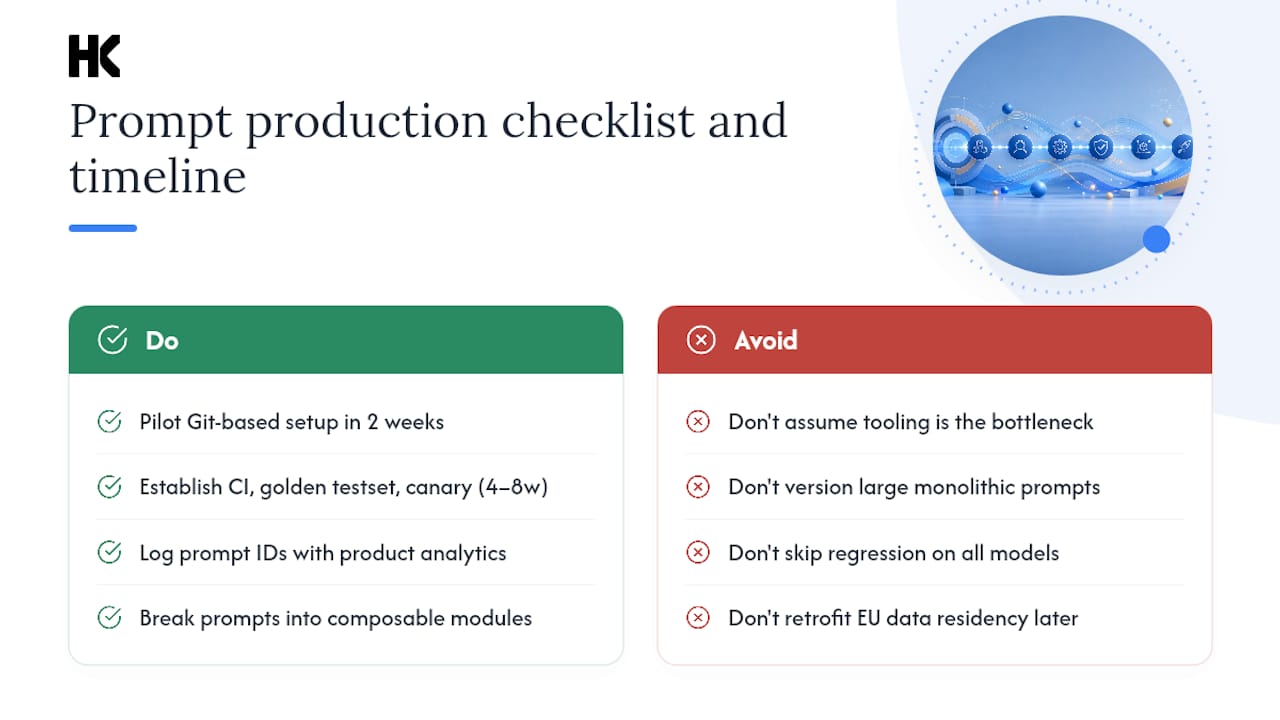
Most teams can pilot a Git-based prompt-versioning setup in two weeks. A stable, team-wide process with CI gating, a golden testset, and a canary workflow typically takes four to eight weeks. The bottleneck is almost never the tooling. It is getting agreement on SemVer rules and building the first golden testset.
A few wiring details that only surface in production:
Link prompt IDs to analytics events. Log prompt_version alongside your product analytics events (conversion, engagement, error). When a prompt change ships, you can see its effect on product metrics, not just model metrics. Threada's production guidance makes this explicit: treat prompt versions as first-class release artifacts with the same observability you give to code deploys.
Keep prompts small. A 4,000-token system prompt is hard to version meaningfully because every change touches a large surface area. Break large prompts into composable modules, each versioned independently. This also makes multi-model testing tractable.
Test multi-model effects explicitly. A PATCH-level wording fix on GPT-4o can be a MAJOR-level behavioral change on a different model. Run your regression suite against every model in your production matrix when the model list changes, not just when the prompt text changes.
Pro Tip: For EU-regulated outputs, store your prompt version logs in an EU-resident data store from day one. Retrofitting data residency onto an existing logging pipeline is significantly more expensive than building it in correctly at the start.
The cost of skipping this is higher than you think
Every team I have seen skip prompt versioning eventually pays for it. Not in theory. In a 2 AM incident where no one can answer "which prompt is running in production right now?" or in a GDPR audit where the question is "what instruction produced this automated decision?" The answer to both is the same: an immutable version record tied to every LLM call.
The staged rollout matters too. Do not try to implement everything at once. Start with Git and SemVer. Add a golden testset. Wire CI. Then, when the team has the discipline, add a registry or managed platform. The teams that skip straight to a managed platform without the underlying discipline end up with an expensive tool and the same operational chaos.
Fixed-price AI integration that includes production prompt wiring
Prompt versioning is one of the first things Hanadkubat wires into every AI integration engagement. The alternative is shipping a feature that works in the demo and breaks in production three weeks later with no audit trail and no clean rollback path. Hanadkubat's fixed-price AI integration track covers production-ready LLM features shipped in 2-week sprints (€4,500), including SemVer prompt workflows, GDPR-aware logging, and EU-resident inference for sovereignty-conscious clients. No retainer, no hourly billing, no junior team. You work directly with the engineer writing the code. Hanadkubat to scope your production AI integration in a single session.
Sources
- Semver
- Amazon Bedrock Prompt Management
- AI Prompt Management Platform for Production Teams | PromptForge
- What is Prompt Management?
- What is prompt versioning? Best practices for iteration without ...
FAQ
What is prompt versioning in plain terms?
Prompt versioning means treating every change to an LLM prompt as a tracked, immutable record with a unique identifier, author, timestamp, and model context, so you can audit, reproduce, and roll back any version.
When should you bump the MAJOR version on a prompt?
Bump MAJOR any time the output format or downstream contract changes, such as renaming a JSON field or removing a required key, because consumers of that output will break without updating.
Do you need a dedicated prompt registry, or is Git enough?
Git is enough for small engineering teams. Add a registry when non-engineers need to edit prompts or when you need native channels (staging/stable) and atomic promotions without touching the deployment pipeline.
How does prompt versioning help with GDPR compliance?
Immutable version records tied to every LLM call let you show exactly which prompt instruction produced a given automated decision, which is the traceability GDPR and the EU AI Act require for regulated outputs.
What is the minimum viable golden testset size?
Ten to twenty representative input/output pairs covers most production prompts; structured-output prompts with strict schema requirements benefit from the higher end of that range.