

TL;DR:
- Most app failures occur because the architecture cannot handle success, causing databases to buckle and response times to rise. Building scalable apps requires starting with a modular monolith, fixing the database through indexing and connection pooling, and implementing request-based autoscaling to respond to real user metrics effectively. Observability tools are essential for proactive scaling decisions, while premature microservice adoption can overcomplicate growth; scaling should follow actual growth signals, not architectural trends.
Most apps don't fail because the idea was wrong. They fail because the architecture couldn't survive success. When traffic spikes, databases buckle, response times climb, and what worked at 500 users becomes a liability at 50,000. Knowing how to create scalable apps before you hit that wall is what separates teams that capitalize on growth from teams that scramble to survive it. This guide covers the concrete decisions, from architecture choices to database tuning to infrastructure automation, that determine whether your app scales gracefully or collapses under pressure.
Table of Contents
- Key takeaways
- How to create scalable apps: architecture foundations
- Database performance: fix this before anything else
- Infrastructure scaling: autoscaling and load balancing
- Scaling AI-driven and async applications
- Observability: know when and what to scale
- My take on premature complexity
- Build your app to scale from day one
- FAQ
Key takeaways
| Point | Details |
|---|---|
| Start with a modular monolith | A well-structured single codebase handles early growth without the overhead of distributed systems. |
| Fix the database first | Most early scaling failures trace back to unindexed queries and connection exhaustion, not infrastructure limits. |
| Use request-based autoscaling | Scaling on requests per second and P95 latency responds faster and more accurately than CPU thresholds. |
| Delay microservices deliberately | Premature migration adds complexity without proportional benefit for teams under 30 engineers. |
| Observe before you optimize | Collect real metrics on load, latency, and behavior before making any architectural change. |
How to create scalable apps: architecture foundations
The first decision in building scalable applications is one most teams get wrong. They see microservices working at Netflix or Uber and assume that's the target. It isn't. Those companies have hundreds of engineers. You probably don't.
Scalability comes in two forms. Vertical scaling means adding more resources to a single server: more CPU, more RAM. It's fast to implement and works well early. Horizontal scaling means adding more servers and distributing load across them. It requires stateless application design but offers near-unlimited headroom.
Before you decide on either, pick an architecture that fits your current team size and can evolve without a full rewrite:
- Monolithic architecture: One codebase, one deployment. Fast to build, easy to reason about. Becomes a problem when it turns into a big ball of mud with no module boundaries.
- Modular monolith: Still one codebase, but with strict internal module separation and defined API boundaries between domains. This is the pragmatic starting point for most startups. It offers organizational clarity without the distributed system tax.
- Microservices: Independent deployable services per domain. Suited for organizations with 50+ engineers running multiple teams. Adds network complexity, service discovery, and failure modes that are genuinely hard to manage.
The modular monolith wins at early stages because it keeps deployment simple while allowing you to extract services later when you actually have the operational capacity to run them. Define your module boundaries clearly, enforce them through code review, and you'll have a codebase that can evolve without a rewrite.
Pro Tip: Write explicit API contracts between your internal modules from day one. These contracts become the seams you'll cut along when you eventually extract a service. Teams that skip this step pay for it later with months of untangling.
For features for scalable apps, stateless service design is non-negotiable. Sessions should live in Redis or a database, not in memory on the server. Any server instance should be able to handle any request. This single constraint enables everything else in the scaling stack.

Database performance: fix this before anything else
Here's what most scaling articles skip: the bottleneck is almost never your application server. It's your database.
Most early-stage scaling failures trace to unindexed columns, N+1 query patterns, and connection exhaustion. Adding indexes can take a query from seconds to milliseconds. That one fix buys months of headroom at no infrastructure cost.
The priority order for database optimization:
- Audit your slow query log. Find the top 10 slowest queries. Most apps have three or four queries responsible for 80% of their database load.
- Add missing indexes. Every column used in a WHERE clause, JOIN, or ORDER BY that runs frequently should be indexed. Start here before anything else.
- Implement connection pooling. Tools like PgBouncer sit between your app and PostgreSQL, reusing connections rather than opening a new one per request. This alone resolves connection exhaustion for most apps.
- Add read replicas. Read replicas offload up to 60% of database read traffic. In one documented case, offloading reads dropped primary CPU load from 82% to 34%.
- Introduce caching carefully. Redis with a cache-aside pattern reduces repeat read load. But note: caching doesn't fix slow queries. If the underlying query is expensive, the cache miss will still hurt you. Use proper TTL values and mutex locks to prevent cache stampedes.
| Strategy | Best for | Complexity | When to apply |
|---|---|---|---|
| Query indexing | Any app with slow reads | Low | Immediately |
| Connection pooling | Apps with high request rates | Low | Before infrastructure changes |
| Read replicas | Read-heavy workloads | Medium | After indexing is done |
| Caching (Redis) | Repeated read patterns | Medium | Once queries are fast |
| Sharding | Write-heavy, massive datasets | Very high | When single-node truly fails |
On sharding specifically: most startups never need it. Proper indexing and read replicas handle millions of users. A single well-tuned PostgreSQL instance can support traffic for up to 100,000 users before you need to rethink the data layer. Sharding is a multi-month project. Delay it until data size or write volume genuinely exceeds single-node capacity.
Pro Tip: Run EXPLAIN ANALYZE on any query taking over 100ms. PostgreSQL will show you exactly what it's doing and whether an index would help. This five-minute exercise regularly surfaces fixes that eliminate weeks of infrastructure work.
Infrastructure scaling: autoscaling and load balancing
Once your database is healthy, infrastructure scaling becomes the next lever. The mechanics of how to scale web apps at the infrastructure layer are well-established, but the details matter.
Horizontal scaling places stateless app instances behind a load balancer. Any server can serve any request because session state lives externally. The load balancer distributes traffic across instances, and you can add or remove instances without downtime.
| Scaling type | Mechanism | Cost profile | Limit |
|---|---|---|---|
| Vertical | Bigger server | Fixed, higher per tier | Single-machine ceiling |
| Horizontal | More servers + load balancer | Pay-per-instance | Near-unlimited |
| Autoscaling | Dynamic instance count | Matches actual demand | Configured min/max |
Autoscaling is where most teams leave performance on the table. Traditional CPU-based autoscaling has a lag problem: CPU climbs, the alarm fires, new instances provision, and by the time they're live the damage is done. Request-based autoscaling solves this by responding to live HTTP metrics.
Request-based autoscaling reacts to requests per second and P95 latency within a 5-minute window. It scales out when request thresholds are exceeded and scales back in when demand normalizes. This is faster and more cost-effective than waiting for CPU to signal distress.
Key infrastructure practices for scalable app development:
- Set minimum instance counts to handle baseline traffic without cold-start delays
- Store all session and state data in Redis or your database, never in application memory
- Use health checks on your load balancer to route away from unhealthy instances automatically
- Configure P95 and P99 latency alerts, not just average response time, since averages hide tail latency problems
Scaling AI-driven and async applications
Standard request-response architecture assumes work completes in under a second. AI inference doesn't. A single LLM call can take 10 to 30 seconds, and that breaks synchronous design at scale.
Asynchronous architectures using message queues and WebSockets solve this by decoupling the work from the HTTP connection. The client submits a job, the server returns a job ID immediately, and a worker processes the job asynchronously. The client receives results via WebSocket streaming or polling.
Practical patterns for scaling AI inference workflows:
- Message queues (Redis, RabbitMQ): Jobs enter a queue, workers pull from it at their own capacity. The queue absorbs traffic spikes without overloading your inference layer.
- WebSocket streaming: Stream partial token results back to the client as they generate. Users see output appearing in real time, which dramatically improves perceived performance even if total latency is the same.
- Token-aware rate limiting: Standard rate limiting counts requests. AI apps need to count tokens, because a 10-token request and a 10,000-token request cost completely different amounts of compute. Token-aware rate limiting controls actual cost, not just request volume.
- Worker autoscaling: Scale your inference workers independently from your API layer. This lets you add GPU capacity during peak hours without scaling your entire stack.
Pro Tip: Set a hard timeout on your async job queue. Jobs that never complete should expire and return a clear error to the client. Without this, stuck jobs pile up, queue depth climbs, and new jobs wait behind jobs that will never finish.
For teams building EU-facing AI applications, GDPR-aware architecture means keeping inference on EU-resident infrastructure. This is increasingly a sales requirement in the DACH market, not just a compliance checkbox. You can read more about production AI architecture in this MLOps pipeline automation guide from MLflow.
Observability: know when and what to scale
You cannot make good scaling decisions without data. This sounds obvious, but most teams add infrastructure reactively after something breaks, rather than proactively based on what metrics are telling them.
Observability-driven design uses metrics, logs, and traces together. Metrics tell you what happened. Logs tell you why. Traces show you where time was spent in a request. All three are necessary for confident architectural decisions.
The tools that deliver this at scale:
- Prometheus + Grafana: Collects and visualizes time-series metrics. Set dashboards for request rate, error rate, and latency before you need them.
- OpenTelemetry: Vendor-neutral instrumentation standard. Instrument once, send traces anywhere.
- Structured logging: Log in JSON with consistent fields (user ID, request ID, duration). Makes filtering in production actually practical.
- Google Cloud observability or equivalent: Managed solutions reduce operational overhead for teams without dedicated SRE capacity.
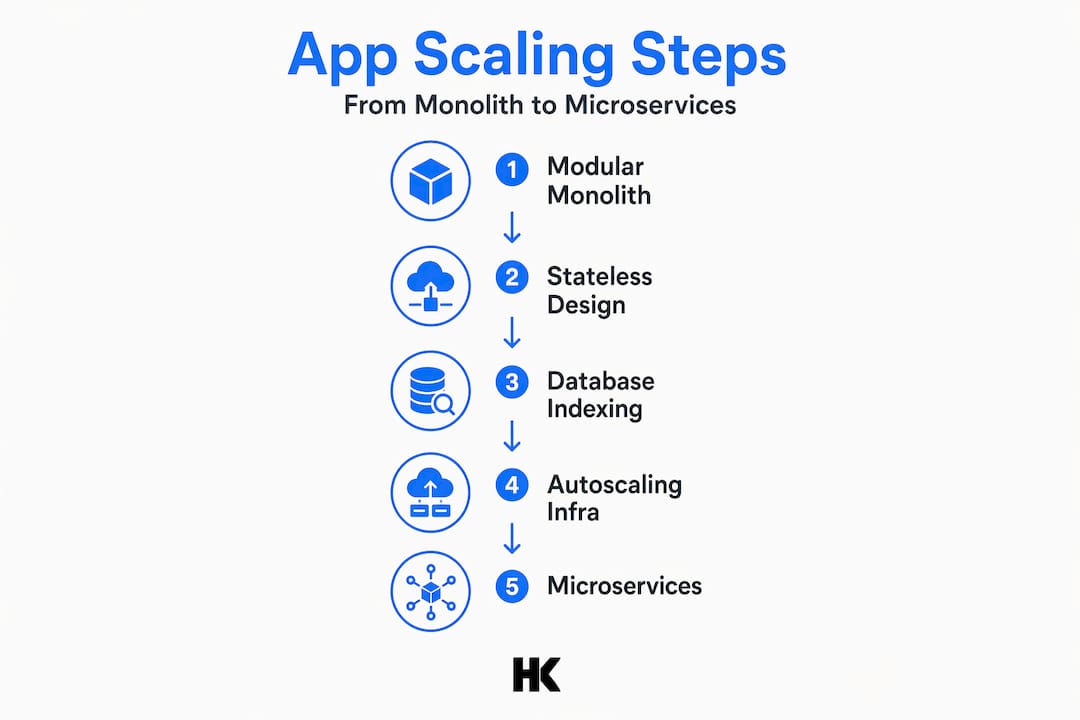
Observe three signals before deciding to migrate from a modular monolith to microservices: distinct services needing independent deployment schedules, teams blocked by each other's code, and specific modules consuming disproportionate resources. If none of these are true, you don't need microservices yet.
The scalability checklist for B2B SaaS founders covers these trigger points in detail and is worth reviewing before committing to any major architectural change.
My take on premature complexity
I've worked on infrastructure at BMW, Deutsche Bahn, and Bundesrechenzentrum Austria. I've also built and shipped my own SaaS products. The pattern I see most often with early-stage teams is not under-engineering. It's over-engineering in the wrong direction.
Founders read about microservices, stand up eight separate services before they have 200 users, and then spend 80% of their engineering time on infrastructure coordination instead of product. The modular monolith approach is not a compromise. It's the right call for teams under 30 engineers in nearly every situation I've encountered.
What I'd tell any technical founder right now: fix your database first, always. Then design for horizontal scaling with stateless services. Then add observability so you know what's actually happening. Only after all of that should you consider splitting services, and only because a specific module needs independent scaling or deployment, not because microservices sound more serious.
Scaling should follow real growth signals, not architectural ambition. The teams I've seen scale successfully, from hundreds to hundreds of thousands of users, all shared one trait: they let data tell them when to change, not engineering ego.
— Hanad
Build your app to scale from day one
If you're building a B2B SaaS product and want to ship something that holds up at scale without over-engineering it from the start, Hanadkubat offers fixed-price MVP builds from €18,000, with architecture decisions made by an engineer who has done this at BMW, Deutsche Bahn, and in his own products. No project managers between you and the code. No guesswork on architecture.
The SaaS MVP development guide walks through exactly how to scope a product that ships fast and scales later without a full rewrite. If your current codebase is already showing signs of strain, the rescue and scale engagement starts at €4,500 and begins with a clear diagnosis of what's actually breaking and why.
FAQ
What is the best architecture for a scalable app?
A modular monolith is the best starting point for most teams. It provides clear boundaries without the operational overhead of distributed systems, and microservices become relevant only at 50+ engineers or when independent deployment schedules genuinely require it.
How do I know when my database is the bottleneck?
Check your slow query log and look for queries taking over 100ms. Connection count near your pool limit and high primary CPU load are also clear signals that database optimization should come before any infrastructure changes.
What is request-based autoscaling and why does it matter?
Request-based autoscaling scales your app on live HTTP metrics like requests per second and P95 latency rather than CPU usage. It reacts faster to real user load and avoids the lag inherent in CPU-triggered scaling.
How do AI apps need to scale differently?
AI apps with long inference times require asynchronous processing via message queues and WebSocket streaming. Token-aware rate limiting is also necessary because token volume, not request count, drives actual compute cost.
When should I start adding observability tools?
Before your first production incident. Set up Prometheus, Grafana, and structured logging during initial development. Scaling decisions made without metrics are guesses, and observability-driven design is what separates teams that scale proactively from those that react to outages.