
TL;DR:
- A deployment pipeline automates the process from code commit through build, test, and deployment, reducing manual errors.
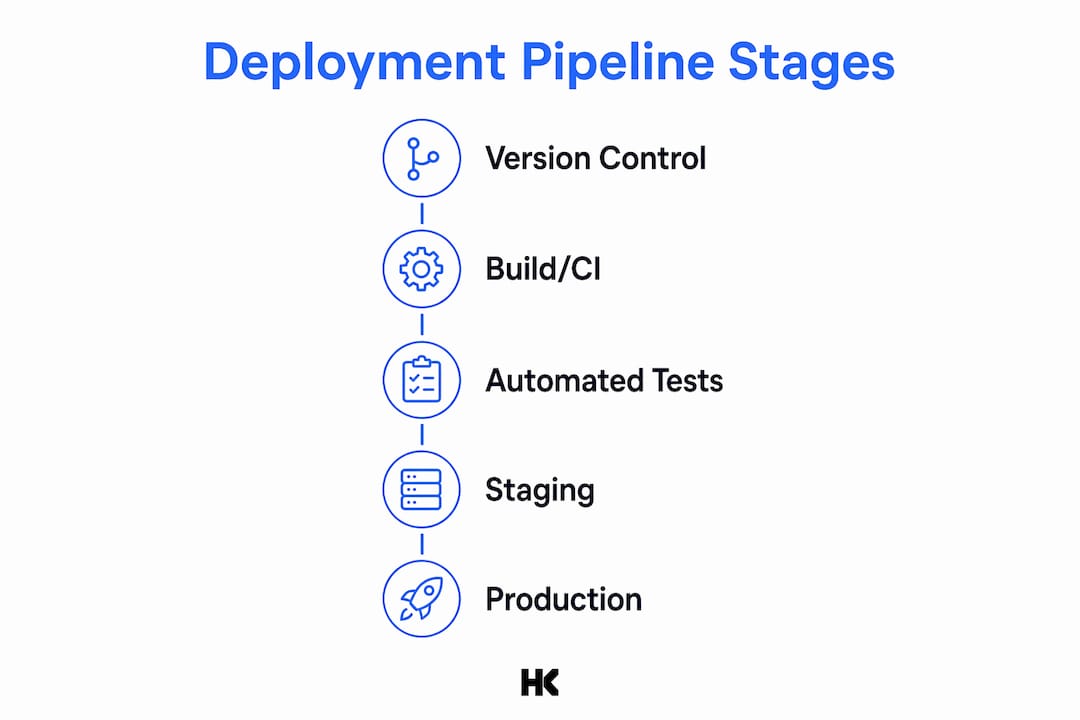
- Its stages include version control triggers, build and testing, artifact storage, staging deployment, performance testing, and monitoring with feedback.
A deployment pipeline is an automated, repeatable sequence that takes a code revision from version control through build, test, and deployment stages to production, enforcing quality gates and traceability at every step. The goal is simple: remove the manual, error-prone handoffs that slow releases and introduce defects.
TL;DR: A well-designed pipeline delivers faster feedback loops, lower-risk releases, and an auditable promotion trail from commit to production. The canonical stages are: version control trigger, build/CI (compile + unit tests), automated acceptance tests, staging deployment, performance and security tests, production deployment, and monitoring/feedback. Most teams implement 4–6 of these depending on their release cadence and risk tolerance.
Table of Contents
- What is a deployment pipeline in the context of CI/CD?
- The canonical stages of a deployment pipeline
- What tools do you need at each pipeline stage?
- Which release strategy fits your pipeline?
- How to design and build a deployment pipeline
- Senior-engineer checklist: what stable pipelines actually require
- What are the real benefits and trade-offs of automated pipelines?
- Key Takeaways
- The gap between pipeline theory and what actually ships
- Hanadkubat can help you build or stabilize your pipeline
- Useful sources
- FAQ
What is a deployment pipeline in the context of CI/CD?
Three terms get conflated constantly, and the confusion costs teams real time. Here is the clean separation.
Continuous Integration (CI) is the practice of merging code frequently and running automated build and test checks on every commit. It answers: "Does this change break anything?"
Continuous Delivery (CD) extends CI by automating the release process so that every validated build is ready to ship to production. A human still decides when to push the button.
Continuous Deployment removes that human gate entirely. As Octopus Deploy explains, advanced implementations automatically push validated changes to production in real time as each change passes validation.
The deployment pipeline is the end-to-end implementation that makes all three practices operational. It is the automation scaffold that connects your version control system to your production environment.
| Dimension | Continuous Delivery | Continuous Deployment |
|---|---|---|
| Production release trigger | Manual approval | Automated on passing validation |
| Human gate | Yes, before production | No gate after staging |
| Risk profile | Lower; team controls timing | Higher; requires excellent test coverage |
| Best fit | Regulated industries, complex releases | High-velocity SaaS, mature test suites |
| Rollback approach | Planned, rehearsed | Must be fully automated |
A single commit's journey looks like this: A developer pushes to a feature branch in Git. A pull request merge to main triggers GitHub Actions or GitLab CI. The CI job compiles the application, runs unit tests, and builds a Docker image. That image gets pushed to Artifactory or Nexus. A staging deployment job pulls the image, applies Terraform to provision the environment, and runs acceptance tests. If everything passes, a production job deploys via a canary release while Prometheus and Datadog watch error rates and latency. Failure at any gate stops the pipeline and notifies the team.
The canonical stages of a deployment pipeline
Each change creates a build that progresses through a defined sequence of tests and deployments. Here is what each stage actually does.
-
Commit / version control trigger. A push or merged pull request in Git (GitHub or GitLab) fires the pipeline. Branch protection rules, required reviewers, and signed commits belong here. Ownership: the developer and the platform team.
-
Build / CI. The CI server (Jenkins, GitHub Actions, GitLab CI, or CircleCI) compiles source code, resolves dependencies, and runs unit tests and static analysis (linters, SAST tools). Target execution time: under 5 minutes. Slow builds kill commit frequency.
-
Unit tests and static analysis. These run inside the CI job, not as a separate deployment. They cover the test pyramid's base: fast, isolated, deterministic. Tools like SonarQube or Semgrep handle static analysis; your test framework handles unit coverage.
-
Automated acceptance tests. Integration tests, contract tests, and end-to-end tests run against a deployed environment. This is the most expensive stage in time and infrastructure. Flaky tests here are the single biggest pipeline killer.
-
Artifact storage. A passing build produces an immutable artifact: a Docker image, a JAR, or a binary. That artifact gets pushed to a registry (Artifactory or Nexus) and tagged with the commit SHA. Immutability matters: the same artifact that passed staging is what goes to production.
-
Staging / independent deployment. The artifact deploys to a production-like environment. Terraform or another IaC tool provisions infrastructure. Smoke tests and exploratory testing happen here. Cloud-native pipelines assign specific workspaces or targets per stage, and stage definitions are often immutable once created.
-
Performance and security tests. Load tests (k6, Locust) and dependency vulnerability scans (Trivy, Snyk) run here. These are slow by nature, so they run after staging deployment, not during the fast CI stage.
-
Production deployment. The validated artifact deploys using your chosen release strategy. Kubernetes handles orchestration; your deployment tool (Octopus Deploy, Argo CD) manages the rollout.
-
Monitoring and feedback. Prometheus scrapes metrics; Datadog aggregates logs and traces. Automated rollback triggers fire if error rates spike past a defined threshold. This stage closes the feedback loop back to the development team.
Pro Tip: The test pyramid applies directly to pipeline stage ordering. Fast, isolated unit tests run in CI (seconds). Slower integration tests run post-build (minutes). Performance and security tests run post-staging (potentially hours). Never run a 20-minute test suite in your commit stage — developers will stop committing frequently, and your pipeline loses its core value.
What tools do you need at each pipeline stage?

A typical implementation spans five tool categories: source control, build/CI, containerization, configuration management/IaC, and monitoring. Here is how the major tools map to pipeline roles.
| Tool | Role in pipeline | Deployment model | Learning curve | Best fit |
|---|---|---|---|---|
| Git (GitHub / GitLab) | Version control, trigger source | SaaS or self-hosted | Low | All teams |
| Jenkins | CI orchestration | Self-hosted, open-source | High | Enterprise, complex pipelines |
| GitHub Actions | CI/CD orchestration | SaaS | Low–Medium | Small to mid-size teams |
| GitLab CI | CI/CD orchestration | SaaS or self-hosted | Medium | Teams wanting one platform |
| CircleCI | CI/CD orchestration | SaaS | Low–Medium | Cloud-native teams |
| Docker | Containerization / packaging | Self-hosted or SaaS | Medium | All containerized workloads |
| Kubernetes | Container orchestration / deployment | Self-hosted or managed cloud | High | Cloud-native, microservices |
| Terraform | IaC / environment provisioning | Self-hosted or SaaS (Terraform Cloud) | Medium–High | Multi-cloud, IaC-first teams |
| Octopus Deploy | Deployment automation | SaaS or self-hosted | Medium | Enterprise, complex release workflows |
| Artifactory / Nexus | Artifact registry | Self-hosted or SaaS | Medium | Enterprise artifact management |
| Prometheus | Metrics / observability | Self-hosted | Medium | Kubernetes-native monitoring |
| Datadog | Full-stack observability | SaaS | Low | Teams wanting managed observability |
Hosted vs. self-hosted is a real trade-off, not a marketing question. GitHub Actions and CircleCI give you cost predictability on smaller workloads and zero operational overhead. Jenkins gives you full control and no per-minute pricing, but someone on your team owns the infrastructure, upgrades, and plugin compatibility. For EU-based teams with data residency requirements, self-hosted runners or GitLab self-managed are often the only compliant option. Octopus Deploy sits in an interesting middle ground: it handles complex multi-environment release workflows that GitHub Actions handles awkwardly, particularly for enterprise teams with approval chains and audit requirements.
Which release strategy fits your pipeline?
The pipeline delivers the artifact; the release strategy decides how traffic shifts to the new version. Each approach has a specific use case.
Blue/green deployment runs two identical production environments. Traffic switches from blue (current) to green (new) in one step. Rollback is instant: flip traffic back. The catch is database migrations. If your schema change is not backward-compatible, you cannot run both versions simultaneously without a migration strategy (expand/contract pattern). Best for stateless services with clean schema practices.
Canary releases route a small percentage of traffic (say, 5–10%) to the new version while the rest stays on the current one. Prometheus and Datadog watch error rates and latency on the canary slice. If metrics stay clean, you gradually increase traffic. If they degrade, you route everything back. This is the right strategy for high-traffic services where a full blue/green switch carries too much blast radius.
- Risk: requires traffic-splitting infrastructure (Kubernetes ingress controllers, service meshes like Istio, or a load balancer with weighted routing)
- Mitigation: define clear promotion thresholds (error rate below 0.1%, p99 latency under 200ms) before you start the rollout
Rolling deployments replace instances one by one. Kubernetes handles this natively. No extra infrastructure needed, but you run two versions simultaneously during the rollout window. For stateful services or APIs with breaking changes, this creates compatibility headaches.
Feature flags decouple deployment from release entirely. You ship code to production with the feature disabled, then enable it for specific user segments via a flag service (LaunchDarkly, Unleash). This lets you test in production safely and kill a feature without a rollback. The operational cost is flag debt: flags that never get cleaned up accumulate and make the codebase harder to reason about.
Zero-downtime deployments require infrastructure that supports blue/green or canary patterns. Without it, you negotiate release windows with stakeholders to protect SLAs.
How to design and build a deployment pipeline
Start by mapping your current manual process on a whiteboard. Every step a human performs manually is a candidate for automation. Do not automate everything at once.
Step 1: Build the minimal pipeline first. A fast CI job (build + unit tests, under 5 minutes) and a smoke test against staging is more valuable than a complex pipeline that nobody trusts. Get this running and stable before adding stages.
Step 2: Define your promotion model. How many environments do you need? Development, staging, and production is the minimum. Some teams add a QA environment or a performance testing environment. Each environment should be provisioned by Terraform or another IaC tool so it is reproducible and not a snowflake.

Step 3: Adopt pipeline-as-code. Your pipeline definition lives in a YAML file in the same repository as your application code. GitHub Actions uses .github/workflows/, GitLab CI uses .gitlab-ci.yml, and Jenkins uses a Jenkinsfile. Version-controlling your pipeline means changes go through code review, and you can roll back a broken pipeline the same way you roll back broken application code.
Step 4: Add quality gates incrementally. After the minimal pipeline is stable, add integration tests, then security scanning, then performance tests. Each gate should have a clear pass/fail threshold. A gate with no defined threshold is not a gate.
A compact pipeline YAML for a containerized service typically defines three jobs: a ci job that builds and tests on every push, a staging job that deploys to staging on merge to main and runs acceptance tests, and a production job that deploys to production on a manual trigger or automatically after staging passes. The staging job depends on ci; the production job depends on staging. That dependency chain is the pipeline.
Design principle: Make early stages fast and deterministic. If your CI stage takes 15 minutes, developers batch commits to avoid waiting, which means larger changesets, harder debugging, and slower feedback. Optimize the commit stage ruthlessly. Move slow validations to later stages and gate releases on them asynchronously — but never ship to production without those gates completing.
Step 5: Wire in observability from day one. Prometheus metrics and Datadog dashboards should be part of your production deployment job, not an afterthought. Define your rollback trigger threshold before you deploy, not after an incident.
Senior-engineer checklist: what stable pipelines actually require
Most pipeline failures are not tool failures. They are process failures that a tool cannot fix. Adopting a vendor tool without simplifying internal manual steps is one of the most common causes of pipeline adoption failure.
Checklist for a stable pipeline:
- Fast CI stage: build and unit tests complete in under 5 minutes
- Immutable artifacts: every build produces a tagged, immutable artifact stored in a registry
- Environment parity: staging mirrors production in configuration, not just topology
- Observability: metrics, logs, and traces are wired before the first production deploy
- Automated rollback: a defined trigger (error rate, latency spike) fires a rollback without human intervention
- Security scanning: dependency vulnerability scans and SAST run in the pipeline, not as a manual quarterly audit
- Documented promotion rules: written criteria for what passes each gate, reviewed by the team
Common pitfalls engineers hit:
- Flaky tests in the acceptance stage that fail intermittently with no code change — teams start ignoring failures, which defeats the purpose of the gate
- Build times creeping past 20 minutes because nobody owns pipeline performance
- Credential sprawl: API keys and secrets hardcoded in pipeline YAML files or environment variables with no rotation policy
- Brittle IaC that works in one environment and fails in another due to undocumented state drift
- Over-automation without visibility: pipelines that deploy automatically but have no alerting when something goes wrong
For a small team (2–5 engineers), the minimal viable pipeline is: Git + GitHub Actions for CI, Docker for packaging, a single staging environment provisioned with Terraform, and Datadog or Prometheus for production monitoring. That covers the critical path. Add complexity only when a specific gap causes a real problem.
Pro Tip: Treat your pipeline as a product. Assign ownership. Track build time, test pass rate, and deployment frequency as KPIs. A pipeline nobody owns becomes a pipeline nobody trusts.
The SaaS security checklist covers the specific vulnerability scanning and secret management practices that belong in a production pipeline.
What are the real benefits and trade-offs of automated pipelines?
Automated pipelines are primarily a risk-management strategy: removing human touchpoints reduces deployment failures caused by human error and helps protect SLAs. The deployment pipeline pattern ties together configuration management, CI, and test/deployment automation to improve quality and reduce delivery time and cost.
Core benefits:
- Faster feedback: developers know within minutes whether a commit broke something
- Fewer human errors: automated steps do not skip a checklist item because it is 6 PM on a Friday
- Auditable promotion: every artifact has a commit SHA, a test result, and a deployment timestamp
- Smaller deploys: frequent automated releases mean smaller changesets and easier debugging
- Cost savings at scale: automation replaces repetitive manual work that grows linearly with team size
Trade-offs you should plan for:
- Maintenance cost: pipelines need ongoing care as dependencies, tools, and environments change
- Brittle tests: a test suite with 15% flakiness is worse than a smaller, reliable one
- Vendor lock-in: heavy use of a single CI/CD platform's proprietary features makes migration expensive
- Operational burden: self-hosted CI infrastructure (Jenkins, self-managed GitLab) requires dedicated maintenance
Prioritization principle: Optimize for fast feedback first. A 3-minute CI stage that catches 80% of defects is more valuable than a 45-minute pipeline that catches 95%. Get the short CI loop working and trusted, then expand coverage to integration, performance, and security gates. Chasing complete coverage before the basics are stable is how teams end up with pipelines they disable.
When manual gates still make sense: regulated industries (finance, healthcare, government) often require a human approval step before production. The pipeline handles everything up to that gate automatically; the human approves the promotion. That is Continuous Delivery, not Continuous Deployment, and it is the right choice for those contexts.
Key Takeaways
A deployment pipeline is the automation scaffold connecting version control to production, and its value comes from the quality gates it enforces at every stage, not just the speed it provides.
| Point | Details |
|---|---|
| Core definition | A pipeline automates build, test, and deployment stages to remove manual, error-prone handoffs. |
| CI/CD relationship | CI validates commits; Continuous Delivery automates release readiness; Continuous Deployment removes the final human gate. |
| Stage order matters | Fast, deterministic checks run early; slow validations (performance, security) run after staging deployment. |
| Immutable artifacts | Tag every build with a commit SHA and store it in Artifactory or Nexus; the same artifact that passes staging goes to production. |
| Measure pipeline health | Track lead time, change failure rate, mean time to recovery, and build/test duration as core KPIs. |
| Hanadkubat's approach | Fixed-price pipeline audits and implementation engagements deliver pipeline-as-code, IaC, and observability wiring in weeks. |
The gap between pipeline theory and what actually ships
Most articles on deployment pipelines describe the ideal state: every stage green, every test deterministic, every environment perfectly mirrored. Real pipelines are messier. The acceptance test suite has three tests that fail randomly. The staging environment has a slightly different database version than production. The Terraform state file has drifted because someone made a manual change during an incident six months ago.
The engineers who build reliable pipelines are not the ones who implement every best practice on day one. They are the ones who pick the two or three things that cause the most pain and fix those first. Usually that is build time and flaky tests. Fix those, and the rest of the pipeline becomes easier to trust and extend.
The other thing most guides understate: observability is not optional. A pipeline that deploys automatically but has no alerting is not safer than a manual process. It is faster at creating incidents you cannot diagnose. Wire Prometheus or Datadog before your first automated production deploy, define your rollback threshold, and test the rollback before you need it.
Pro Tip: Do not automate your way to production before you can observe what happens there. Invest in dashboards and rollback mechanisms before you invest in the next pipeline stage. Speed without visibility is just faster failure.
Hanadkubat can help you build or stabilize your pipeline
If your team is running deployments manually, dealing with a fragile pipeline that nobody trusts, or trying to add security gates and observability to an existing setup, that is exactly the kind of engagement Hanadkubat handles.
The work is fixed-price and scoped upfront. A pipeline audit (€1,500) maps your current delivery process, identifies the highest-risk gaps, and delivers a prioritized implementation plan. A pipeline MVP engagement (from €4,500) delivers pipeline-as-code, Terraform-provisioned environments, artifact registry setup, and basic observability wiring, shipped in 2–4 weeks. Larger stabilization projects cover security scanning integration, multi-environment promotion rules, and automated rollback configuration.
Hanad has built and shipped these systems at BMW, Deutsche Bahn, and Bundesrechenzentrum Austria, and in his own SaaS products. You work directly with the engineer doing the work. To scope an engagement, visit hanadkubat.com.
Useful sources
- InformIT — "What Is a Deployment Pipeline?" — the canonical Humble/Farley definition; best for understanding the build-test-deploy sequence and the original pattern rationale.
- Octopus Deploy — Continuous Delivery and Deployment Pipelines — covers CI/CD distinctions, stage design principles, and the fast-early/slow-late design rule.
- PagerDuty — What Is a Deployment Pipeline? — authoritative checklist of canonical stages and release strategies; good for blue/green and canary pattern reference.
- ContinuousDelivery.com — Implementing Patterns — Jez Humble's pattern library; best for understanding the historical evidence for automation benefits and the configuration management / pipeline integration pattern.
- GitHub — What Is a DevOps Pipeline? — practical overview of where manual approval gates fit and how cadence choices map to pipeline design.
- BMC Software — Deployment Pipeline: CI/CD in Software Engineering — solid overview of the five tool categories and how they map to pipeline stages.
- Microsoft Fabric — Get Started with Deployment Pipelines — platform-specific implementation guide; useful for cloud-native stage assignment, workspace targeting, and IaC-based environment provisioning.
FAQ
What are the main stages of a deployment pipeline?
The canonical stages are: version control trigger, build/CI (compile + unit tests), automated acceptance tests, staging deployment, performance and security tests, production deployment, and monitoring/feedback. Most teams implement 4–6 of these depending on their release cadence and risk tolerance.
What is the difference between CI and a deployment pipeline?
CI (Continuous Integration) is one stage of the pipeline: it automates build and test on every commit. The deployment pipeline is the full end-to-end sequence from version control to production, of which CI is the first major gate.
The four stages most commonly cited are: version control and build (CI), automated testing, staging deployment, and production deployment. Monitoring and feedback is often added as a fifth stage to close the loop back to the development team.
How do you set up a deployment pipeline for a small team?
Start with Git and GitHub Actions for CI, Docker for packaging, a single Terraform-provisioned staging environment, and one observability tool (Datadog or Prometheus) for production. Get that minimal pipeline stable before adding integration tests, security scanning, or additional environments.
What KPIs measure deployment pipeline health?
The four core metrics are: lead time for changes (commit to production), change failure rate (percentage of deployments causing incidents), mean time to recovery (how fast you restore service after a failure), and build/test duration (how long the CI stage takes). Tracking these consistently tells you whether pipeline changes are actually improving delivery.