
TL;DR:
- A reliable deployment process ensures environment parity, thorough testing, and active monitoring before releasing software. Using appropriate strategies like blue-green, canary, or rolling deployments minimizes downtime and risk. Proper planning, feature flags, and immediate post-deployment checks are essential to prevent failures and ensure smooth product launches.
The product deployment process is the systematic sequence of steps that moves software from a development environment to end users in a controlled, repeatable way. It covers everything from code commits and automated testing through staging validation, production release, and continuous monitoring. For B2B SaaS founders and technical leaders, getting this process right is not optional. A poorly executed deployment causes downtime, data loss, and customer churn that no post-mortem can fully repair.
What are the core stages of the product deployment process?
The standard deployment process follows five distinct stages: development, testing, staging, production deployment, and continuous monitoring. Each stage has a specific job, and skipping one creates compounding risk in the stages that follow.

Development is where engineers write and commit code. The goal here is not just working code but code that passes automated linting, unit tests, and peer review before it ever leaves the local environment.
Testing catches bugs in a pre-production environment that mirrors real conditions. Functional tests, integration tests, and regression suites all run here. Teams that skip thorough testing at this stage consistently pay for it in production incidents.
Staging is the final rehearsal. The staging environment should be identical to production in configuration, data shape, and infrastructure. Any divergence between staging and production is where surprises hide.
Production deployment is the actual release to live users. This stage requires a clear rollback plan, a communication protocol for stakeholders, and defined success criteria before the first command runs.
Continuous monitoring begins the moment code hits production. Monitoring key metrics such as error rates and response times catches issues before they reach a critical threshold.
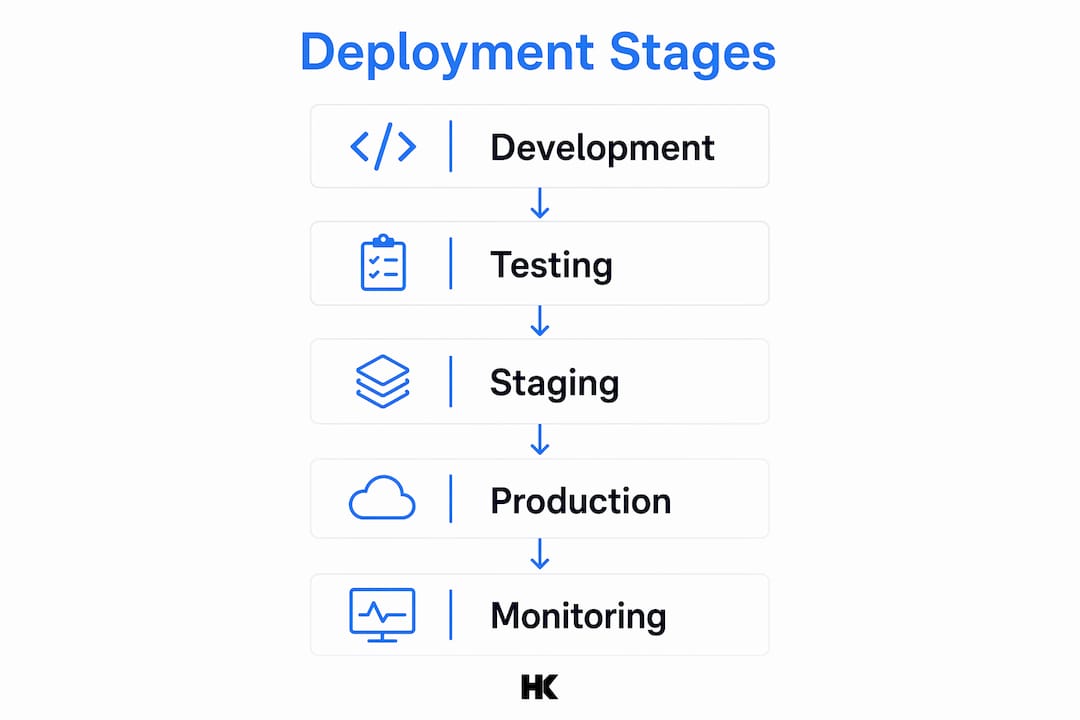
| Stage | Primary goal | Key checkpoint |
|---|---|---|
| Development | Write and review code | All unit tests pass, peer review complete |
| Testing | Validate functionality | No critical bugs, regression suite green |
| Staging | Pre-production rehearsal | Environment parity confirmed, smoke tests pass |
| Production deployment | Release to live users | Rollback plan ready, stakeholders notified |
| Continuous monitoring | Detect and resolve issues | Alerts configured, on-call team assigned |
Readiness reviews documented and updated before each stage reduce risk and increase deployment success. A formal review checks that product documentation, support runbooks, and infrastructure are all aligned before the team proceeds.
Which deployment strategies are best suited for reliable SaaS product launches?
Three deployment strategies dominate reliable SaaS product launches: blue-green, canary, and rolling deployments. Choosing the wrong one for your context is a direct cause of deployment failures, downtime, and lengthy rollbacks.
Blue-green deployment
Blue-green runs two identical production environments in parallel. Traffic switches from the "blue" (current) environment to the "green" (new) environment in a single step. The benefit is near-zero downtime and an instant rollback path. The cost is double the infrastructure during the transition window. This method suits teams with strict uptime SLAs and the budget to run parallel environments.
Canary deployment
Canary releases route a small percentage of live traffic to the new version first. The team monitors error rates and performance on that subset before expanding the rollout. This approach catches issues that staging never surfaces because it uses real user behavior as the test signal. Canary is the right choice when the change carries meaningful risk and the team needs real-world validation before full exposure.
Rolling deployment
Rolling updates replace instances of the old version incrementally, one batch at a time. Availability stays high throughout because the old version continues serving traffic while the new version rolls out. The tradeoff is a longer deployment window and a more complex rollback if something goes wrong mid-roll.
Pro Tip: Early-stage teams with limited infrastructure budget should default to rolling deployments. Teams with enterprise SLAs and parallel infrastructure should use blue-green. Canary fits any team shipping high-risk changes to a large user base.
| Strategy | Downtime risk | Rollback speed | Infrastructure cost | Best for |
|---|---|---|---|---|
| Blue-green | Near zero | Instant | High (double infra) | Strict SLA, low risk tolerance |
| Canary | Low | Moderate | Low to medium | High-risk changes, large user base |
| Rolling | Low | Slow to moderate | Low | Budget-conscious teams, gradual rollout |
A deployment strategy mismatch can cause deployment failures, downtime, or lengthy rollbacks. The table above is a starting point, not a permanent assignment. Revisit your strategy choice as your team and infrastructure scale.
How to prepare your environments and plan for deployment success
Environment parity is the single most common failure point in B2B SaaS deployments. When staging and production differ in configuration, dependency versions, or infrastructure shape, bugs that staging never caught appear in production within hours of release.
Infrastructure as Code (IaC) solves this directly. Tools like Terraform or AWS CloudFormation define environments as version-controlled configuration files. Every environment gets built from the same source of truth, which eliminates configuration drift between staging and production. IaC also makes environment setup auditable and repeatable, which matters when you need to spin up a clean environment fast after an incident.
CI/CD pipelines automate building, testing, and deploying code, replacing manual commands with repeatable, auditable runs triggered by code merges. A well-configured pipeline catches broken builds before they reach staging and enforces the same test suite on every commit. For B2B SaaS teams, this consistency is the difference between a predictable release cadence and a chaotic one.
A solid deployment planning checklist covers the following before any production release:
- Code freeze date confirmed and communicated to all engineers
- All automated tests passing in the staging environment
- Rollback procedure documented and tested, not just written
- Database migration scripts reviewed and reversible where possible
- Stakeholder communication drafted and scheduled
- On-call engineer assigned and briefed on the deployment scope
- Monitoring alerts configured for the new feature or service
- Support team briefed on expected user-facing changes
Skipping any item on this list is a calculated risk. Teams that treat the checklist as optional tend to learn its value the hard way, usually at 2:00 AM on a Friday.
What are best practices for executing and monitoring production deployments?
The most important concept in safe production execution is the separation of deployment from release. Deploying code to servers and activating features for users are two different events. Feature flags make this separation concrete. Code ships to production in a disabled state, and the team activates it for specific user segments when ready. This eliminates the "big bang" launch risk and gives teams precise control over exposure.
Automated tests during deployment serve as a live safety net. Smoke tests run immediately after deployment to confirm the application starts and core paths function. If a smoke test fails, the pipeline stops and triggers rollback automatically. This is not a nice-to-have. It is the mechanism that prevents a bad deployment from becoming a production incident.
Pro Tip: Schedule production deployments during your lowest-traffic window and assign one engineer as the deployment lead with explicit authority to call a rollback. Cross-functional coordination breaks down when no single person owns the decision.
Post-deployment monitoring requires more than dashboards. The team needs active observability, meaning alerts fire before users report problems. Key metrics to track after every release include:
- Error rate compared to the pre-deployment baseline
- P95 and P99 response times for critical API endpoints
- Database query latency and connection pool utilization
- Memory and CPU usage across all affected services
- User-facing conversion rates for any changed flows
Continuous monitoring is not an afterthought. It is a core component of the deployment process. Teams that configure observability before deployment, not after an incident, catch issues in minutes rather than hours. Developer tools like Agent Cohort support deployment workflow visibility for teams building AI-integrated products.
The enterprise-grade engineering practices that make production deployments stable are not reserved for large organizations. B2B SaaS teams of any size can apply them with the right process discipline.
Key Takeaways
A reliable product deployment process requires environment parity, a documented rollback plan, and continuous monitoring configured before the first line of code reaches production.
| Point | Details |
|---|---|
| Follow the five-stage process | Development, testing, staging, production, and monitoring each serve a distinct purpose. |
| Match strategy to risk | Blue-green for strict SLAs, canary for high-risk changes, rolling for budget-conscious teams. |
| Use IaC for environment parity | Infrastructure as Code prevents configuration drift between staging and production. |
| Separate deployment from release | Feature flags let you ship code safely and activate features for users on your own schedule. |
| Monitor before users complain | Configure error rate and latency alerts before deployment, not after an incident surfaces. |
What I've learned shipping deployments that cannot fail
Most deployment failures I've seen at companies like BMW and Deutsche Bahn did not come from bad code. They came from bad process. The code was fine. The environment was different. The rollback plan existed in someone's head, not in a runbook. The on-call engineer was not briefed.
The most persistent misconception I see in B2B SaaS founders is conflating deployment with release. They ship code and immediately assume users have the feature. Feature flags break that assumption in the best possible way. You can deploy on Tuesday and release to 5% of users on Thursday after you've watched the metrics. That gap is where confidence lives.
The other thing most teams underinvest in is the post-deployment window. The first 30 minutes after a production deployment are the highest-risk period in any release cycle. I've watched teams deploy successfully and then walk away from their monitors. That's when the edge cases surface. Staying present, watching the metrics, and having a clear rollback trigger defined in advance is what separates a smooth launch from a 3:00 AM incident.
Continuous improvement matters more than perfection on any single deployment. Run a short retrospective after every release. What slowed you down? What alert fired too late? What step in the checklist was unclear? Teams that iterate on their deployment process ship faster and with fewer incidents within two or three release cycles.
— Hanad
Hanadkubat's approach to production-ready SaaS delivery
Hanadkubat works directly with B2B SaaS founders and technical leaders in the DACH region and internationally to build and ship products that hold up in production. The work covers SaaS MVP builds from €18,000 with 4–12 week timelines, AI feature integration in 2-week sprints at €4,500, and rescue engagements for teams with fragile codebases from €4,500.
Every engagement follows the same principle: code ships with a deployment process attached, not bolted on afterward. If your team is preparing for a production release or needs to fix a deployment process that keeps breaking, the full service overview at hanadkubat.com covers what's available and at what price. For teams evaluating AI integration alongside deployment readiness, the technical resource index outlines the architecture and compliance context Hanadkubat works within.
FAQ
What is the product deployment process?
The product deployment process is the structured sequence of stages that moves software from development to live users, including testing, staging, production release, and monitoring. Each stage has defined checkpoints to catch issues before they reach customers.
What is the difference between deployment and release?
Deployment moves code to a server. Release activates that code for users. Feature flags separate the two events, letting teams ship safely and control user exposure independently.
Which deployment strategy has the lowest downtime risk?
Blue-green deployment carries near-zero downtime risk because traffic switches instantly between two parallel environments, with an immediate rollback path if the new version fails.
Why does environment parity matter for deployments?
When staging and production environments differ in configuration or dependencies, bugs that staging never caught appear in production. Infrastructure as Code prevents this by building all environments from the same version-controlled source.
How soon after deployment should monitoring begin?
Monitoring should begin the moment code reaches production. The first 30 minutes carry the highest risk, and alerts for error rates and response times should be configured before the deployment runs, not after an issue surfaces.