

TL;DR:
- SaaS stabilization involves designing redundancy, automating failover, and embedding reliability into engineering processes. It is essential for maintaining high uptime and customer trust in B2B SaaS products, especially with multi-region deployments. Continuous stability efforts, including monitoring and disciplined deployment pipelines, prevent incidents and support long-term growth.
SaaS stabilization is defined as the practice of designing redundancy, automating failover, and embedding reliability work into your engineering processes as a continuous priority. For B2B SaaS teams, knowing how to stabilize SaaS is not a one-time project. It is the difference between retaining enterprise customers and losing them to a competitor after a single bad incident. This guide covers the architectural foundations, deployment practices, and operational habits that move a product from fragile to dependable.
How to stabilize SaaS: technical foundations first
The gap between 99% and 99.9% uptime is not a rounding error. At 99%, a system can be down for 4–9 hours per year. Moving to a high-availability architecture cuts that to under one hour annually. That difference is the boundary between a product enterprise buyers will sign annual contracts for and one they will not.
The architectural shift requires four concrete changes:
- Load balancers distribute traffic across multiple application instances. A single application server is a single point of failure. Two instances behind a load balancer are not.
- Multi-region active-active deployments keep your product serving traffic even when an entire cloud region goes down. Active-active multi-region deployments are the standard for 99.9% uptime targets.
- Automated failover detects a failed node and reroutes traffic without human intervention. Manual failover adds minutes of downtime. Automated failover adds seconds.
- Circuit breakers and retry logic prevent a slow downstream service from cascading into a full outage. A circuit breaker trips when error rates exceed a threshold and stops sending requests to the failing service.
Graceful degradation is the underused strategy here. When a non-critical service fails, the product should still serve its core function. A B2B analytics dashboard that loses its export service should still display data. Designing for partial failure is what separates products that "have an incident" from products that "go down."
Pro Tip: Prioritize redundancy for customer-facing systems first. Your internal admin panel can tolerate a restart. Your customer's core workflow cannot.

How do you balance speed with stability during scaling?
Speed and stability are not opposing forces. Teams that invest in stability ship faster over the long term because they spend less time on manual firefighting and fear-driven regression testing. The problem is that the payoff is delayed, which makes stability work easy to defer.
The practical fix is to treat stabilization as a first-class item on your "Now-Next-Later" roadmap, not a separate backlog that never gets touched. Here is how to structure that:
- Identify your incident frequency. If your team is resolving more than one production incident per sprint, stabilization belongs in "Now." That frequency signals a codebase that is actively slowing you down.
- Allocate capacity explicitly. Reserve a fixed percentage of each sprint for stability work. A common starting point is 20% of engineering capacity. The exact number matters less than the consistency.
- Focus on customer-facing systems first. Stability investment on core user workflows improves retention directly. Stability investment on internal tooling improves developer experience. Both matter, but the order matters more.
- Track mean time to recovery (MTTR) and deployment frequency. MTTR tells you how long failures hurt your customers. Deployment frequency tells you whether stability work is actually unblocking your team or just consuming capacity.
- Watch for slower developer velocity as a warning sign. When engineers start adding extra manual checks before deploying, they are compensating for a system they do not trust. That is a stability problem, not a process problem.
Stabilization initiatives belong in roadmaps alongside feature work, tied to clear objectives. "Reduce P1 incidents by 50% this quarter" is a roadmap objective. "Fix tech debt" is not.
Pro Tip: Use MTTR and deployment frequency as your two primary stability metrics. If MTTR is rising and deployment frequency is falling, your codebase is accumulating risk faster than you are paying it down.
What does a stable deployment pipeline look like?
Multi-tenant SaaS platforms carry a specific deployment risk that single-tenant products do not. A bad release can affect every customer simultaneously. The architecture of your deployment pipeline is the primary control for that risk.
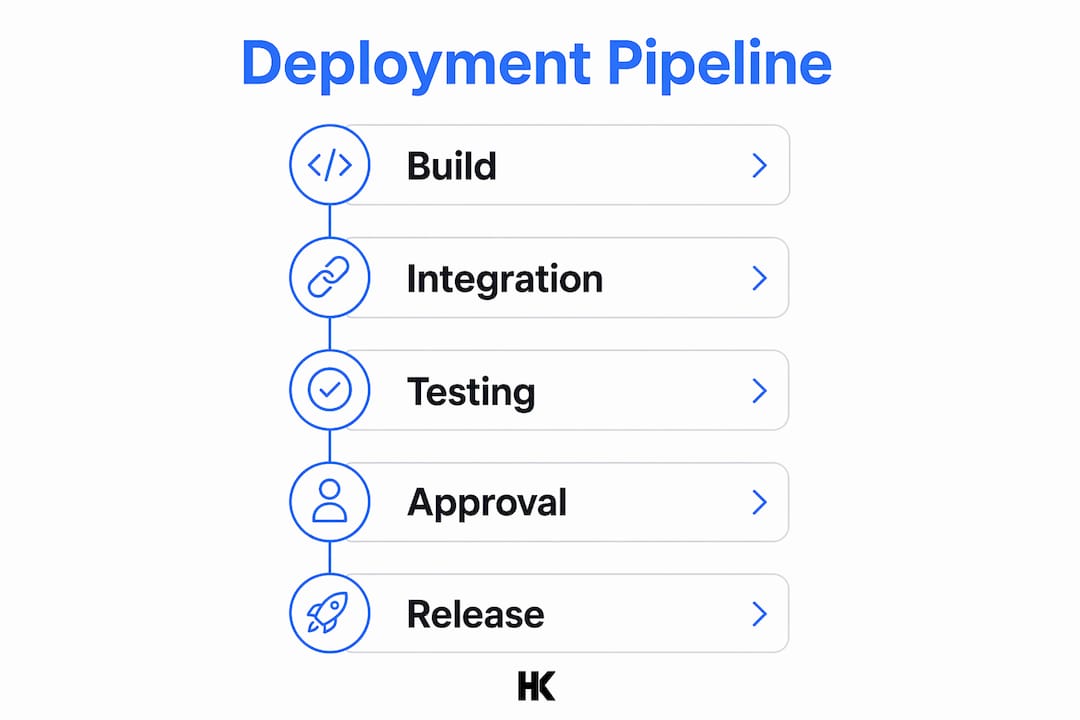
Separating core platform code from tenant-specific configurations is the foundational rule. Platform code changes go through full CI/CD pipelines with automated tests. Tenant configuration changes go through a separate, lighter path. Mixing the two means a configuration change for one customer can trigger a full platform regression test suite, and a platform release can accidentally overwrite tenant settings.
The key practices for a stable pipeline are:
- Synthetic tenant datasets for integration testing. Real tenant data cannot be used in test environments. Synthetic datasets that mirror real tenant complexity catch the bugs that simple test fixtures miss.
- Contract testing between services. When Service A calls Service B, a contract test verifies that both sides agree on the API shape. This catches breaking changes before they reach production.
- Progressive delivery with feature flags. Release a change to 1% of tenants, monitor error rates and latency, then roll forward or roll back. Automated pipelines with rollback capabilities reduce human error and accelerate safe releases.
- Automated policy checks and approval gates before production. These are not bureaucratic checkpoints. They are automated verifications: does this release pass security scans, does it have a rollback plan, does it have a monitoring runbook?
| Pipeline stage | Risk control |
|---|---|
| Build | Unit tests, static analysis, dependency scanning |
| Integration | Contract tests, synthetic tenant datasets |
| Staging | Load tests, migration rehearsal, chaos injection |
| Production | Progressive delivery, automated rollback triggers |
The discipline here is defaulting to the safe path. Every release should require a deliberate action to skip a gate, not a deliberate action to add one.
Why does continuous monitoring matter for SaaS reliability?
Monitoring is the feedback loop that makes every other stability practice work. Without it, you are flying blind between deployments. With it, you catch degradation before it becomes an outage.
Tracking error rates, response times, and resource utilization with alert thresholds set below failure levels gives your team time to act. An alert at 80% memory utilization is useful. An alert when the server crashes is not. The goal is to detect the trend, not the event.
Chaos engineering takes monitoring further by deliberately injecting failures into your system. You kill a database replica, drop network packets between services, or terminate an application instance. If your failover works, you confirm it. If it does not, you find out in a controlled test rather than during a customer incident. For B2B SaaS teams serving enterprise clients, chaos testing is not optional. It is the only way to verify that your redundancy actually works under real failure conditions.
Caching adds a specific reliability tradeoff. A cache reduces database load and improves response times, but a stale cache can serve incorrect data. The right answer depends on your consistency requirements. For a B2B dashboard showing historical reports, a 60-second cache is fine. For a financial transaction status, it is not. Define your consistency requirements per feature, not per system.
For teams exploring AI-powered testing tools, automated test generation and anomaly detection can reduce the manual overhead of maintaining comprehensive test suites as your product grows.
Key Takeaways
SaaS stability requires architectural redundancy, disciplined deployment pipelines, and continuous monitoring working together as a system, not as isolated fixes.
| Point | Details |
|---|---|
| Uptime tiers require architecture changes | Moving from 99% to 99.9% uptime means switching to high-availability, multi-region deployments. |
| Stability accelerates delivery | Teams that invest in stability reduce firefighting and ship faster over time. |
| Separate platform and tenant code | Isolating tenant configuration from platform releases prevents one change from breaking all customers. |
| Monitor trends, not events | Set alert thresholds below failure levels to catch degradation before it becomes an outage. |
| Stabilization belongs on the roadmap | Treat stability as a first-class objective with measurable targets, not a reactive backlog. |
Stability is not a tax on your roadmap
I have worked with B2B SaaS teams at BMW, Deutsche Bahn, and Bundesrechenzentrum Austria, and I have built my own SaaS products end-to-end. The pattern I see most often is not teams that ignore stability. It is teams that treat it as a separate concern, something to address after the next feature ships.
That framing creates a boom-bust cycle. You ship fast, incidents accumulate, customers complain, and then you spend two sprints doing nothing but firefighting. The team loses confidence in the codebase. Deployments slow down. The product that was supposed to grow starts to stall.
The teams that avoid this cycle are the ones that allocate stability work every sprint, not in a panic sprint after a major outage. They track MTTR and deployment frequency the same way they track feature velocity. They treat a rising incident rate as a product risk, not just an ops problem. Speed on an unstable platform is just vibration. It looks like progress until something breaks.
If you are building a B2B SaaS product and your early technical decisions are not accounting for reliability, the cost compounds fast. The right time to embed stability into your process is before your first enterprise customer signs, not after your first enterprise outage.
— Hanad
Hanadkubat's approach to SaaS reliability and growth
Hanadkubat works directly with B2B SaaS founders and technical leaders across DACH and the EU on exactly these problems: fragile codebases, stuck products, and teams that need to ship reliably without slowing down.
Whether you need a full SaaS MVP built to production standards or a rescue engagement for a product that has accumulated too much instability to move fast, Hanadkubat offers fixed-price engagements starting at €4,500, delivered in weeks. You work directly with the engineer writing the code, not a project manager. For teams that want to go deeper on platform reliability, the stage-by-stage scaling playbook on the Hanadkubat blog covers the full arc from early product to enterprise-grade infrastructure.
FAQ
What is SaaS stabilization?
SaaS stabilization is the practice of designing redundancy, automating failover, and embedding reliability work into engineering processes as a continuous priority. It reduces downtime and prevents customer-impacting incidents.
How much uptime does a B2B SaaS product need?
Enterprise B2B buyers typically expect 99.9% uptime, which translates to under one hour of downtime per year. Achieving that level requires high-availability architecture with multi-region deployments.
How do you improve SaaS reliability without slowing down development?
Allocate a fixed percentage of each sprint to stability work and track MTTR alongside feature velocity. Teams that invest consistently in stability ship faster over time by reducing manual firefighting.
What is the biggest deployment risk for multi-tenant SaaS?
The biggest risk is a single release affecting all tenants simultaneously. Separating platform code from tenant configuration and using progressive delivery with automated rollback controls that risk directly.
How does chaos engineering help with SaaS uptime?
Chaos engineering deliberately injects failures, such as killing a database replica or dropping network traffic, to verify that failover and redundancy mechanisms work before a real incident occurs.