

TL;DR:
- App stabilization involves implementing continuous quality practices and architectural improvements to ensure 98% app stability. It requires integrating QA into daily workflows, conducting stabilization sprints, and using monitoring tools to proactively detect issues. Prioritizing high-impact fixes and managing technical debt help maintain reliable and performant software long-term.
App stabilization is the process of making software reliable and performant through systematic quality practices and architectural improvements. The industry standard targets 98% app stability by integrating QA into daily development rather than treating it as a final phase. That number is not a vanity metric. It represents the threshold where user retention holds, crash rates drop, and engineering teams stop fighting fires. Knowing how to stabilize your app means combining continuous QA, targeted refactoring, and real-time monitoring into a single, repeatable discipline.
What do you need before you start stabilizing your app?
Stabilization is not a task you bolt on at the end of a sprint. It requires specific tooling, team alignment, and architectural readiness before any meaningful progress happens.
The most critical prerequisite is treating QA as part of daily development. Teams that run QA only before release accumulate instability silently. By the time crashes surface in production, the root causes are buried under weeks of new commits. Automated testing pipelines, crash reporting tools, and build-time stability analyzers need to be in place before you start any stabilization work.
Quick-fix prerequisites before deeper work:
- Clear app cache and restart the device. Routine maintenance like this resolves about 70% of app crashes across major platforms. That leaves 30% tied to memory issues, storage bugs, or architectural problems that require deeper fixes.
- Restart the device entirely. Device restarts flush RAM and reset system stacks, eliminating many transient crashes quickly.
- Audit your test coverage. If your automated test suite covers less than core user flows, you are flying blind.
- Set up crash reporting. You cannot fix what you cannot measure.
| Prerequisite | Purpose | Example tools |
|---|---|---|
| Automated test suite | Catch regressions before production | JUnit, Espresso, XCTest |
| Crash reporting | Surface runtime failures with context | Firebase Crashlytics, Sentry |
| Build-time stability analyzer | Identify recomposition and compile issues | Compose Stability Analyzer |
| CI/CD pipeline | Run tests on every commit automatically | GitHub Actions, Bitrise |
| Feature flags | Isolate risky changes from stable code | LaunchDarkly, custom toggles |
Pro Tip: Set a stability baseline before touching any code. Export your crash-free user rate and ANR rate from your crash reporting tool. Without a baseline, you cannot tell whether your stabilization work is actually moving the needle.
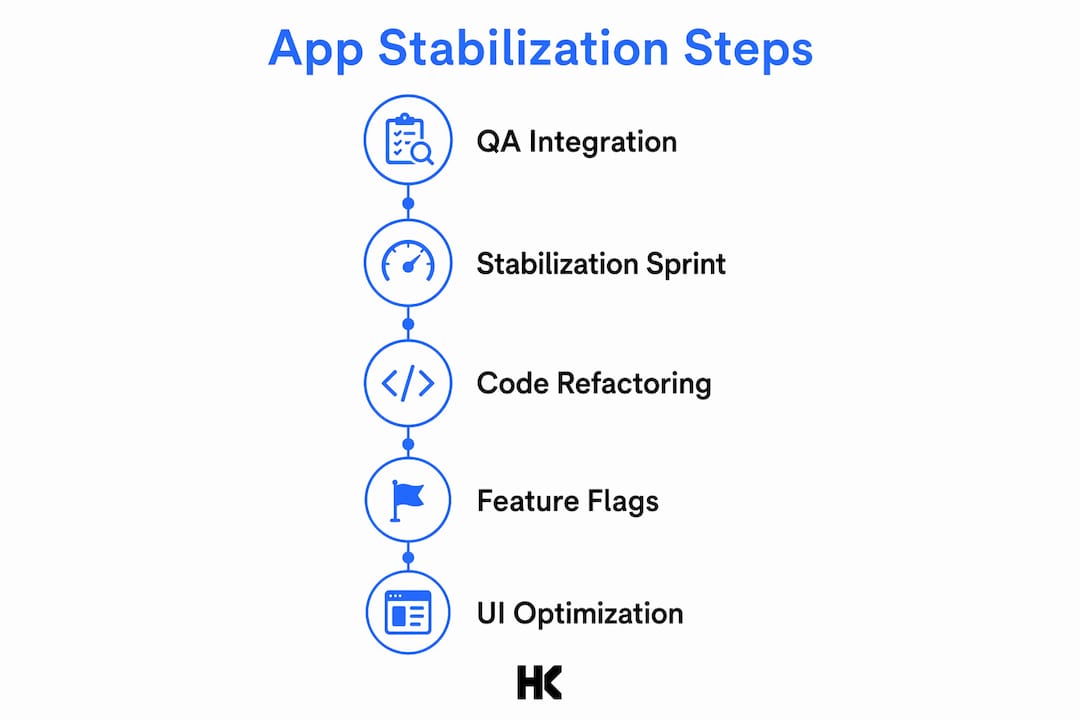
How to stabilize your app in five concrete steps
App stabilization follows a clear sequence. Skipping steps creates the illusion of progress while the underlying instability compounds.

1. Integrate QA into every sprint, not just release week. Automated tests must run on every pull request. This is non-negotiable. Teams that defer QA to release week consistently ship fragile code because defects accumulate faster than they get fixed. Continuous integration pipelines with automated unit, integration, and UI tests catch regressions at the point of introduction, not three weeks later.
2. Run a dedicated stabilization sprint. Stabilization sprints freeze feature development and focus entirely on bugs, flaky tests, and technical debt. This is the engineering equivalent of a pit stop. You are not falling behind. You are restoring the velocity that debt has been quietly stealing. A two-week freeze with a focused team can eliminate months of accumulated instability.
3. Refactor brittle code and reduce technical debt. Brittle code is code that breaks under conditions the original author did not anticipate. Identify the modules with the highest crash frequency and the lowest test coverage. Refactor those first. Do not refactor everything at once. Targeted refactoring on high-impact areas delivers measurable stability gains without introducing new risk.
4. Use feature flags to isolate risk. Feature flags let you ship code to production without exposing it to all users. When a new feature causes instability, you disable the flag rather than rolling back an entire release. This pattern is especially valuable for teams shipping frequently. It separates deployment from release, which is one of the most effective app stability tips available to modern engineering teams.
5. Address recomposition inefficiencies in modern UI frameworks.
If your team uses Jetpack Compose, recomposition is a specific and measurable source of instability. 80% of Compose performance issues come from three causes: unstable list parameters, state reads placed too high in the composition tree, and high-frequency state updates without derivedStateOf. That is a short list with a large impact. Fix those three patterns and you eliminate the majority of UI-layer instability in Compose-based apps.
Pro Tip: Freeze your feature roadmap for at least one sprint every quarter. Teams that never stop to stabilize end up spending more time on incident response than on shipping. The math always catches up.
How to maintain app stability through ongoing monitoring
Stabilization is not a one-time project. It is an ongoing practice. The teams that maintain high stability rates are the ones with real-time visibility into what their app is doing in production.
Real-time monitoring of crashes, ANRs (Application Not Responding events), and OOMs (Out of Memory errors) creates a proactive feedback loop. Teams that monitor these signals know about problems before users file support tickets. That gap between detection and user impact is where your reputation lives.
Core monitoring practices:
- Track crash-free user rate as your primary stability KPI. Aim for 98% or above.
- Set up alerts for ANR rate spikes. ANRs signal thread blocking, which often precedes full crashes.
- Monitor OOM events separately from crashes. Memory pressure builds gradually and shows up in monitoring before it causes failures.
- Review crash reports by frequency and affected user count, not just recency. Fix the crash that hits 10,000 users before the one that hit 12 users last Tuesday.
For apps built on event-driven architectures, stability under load requires specific patterns. Batching UI updates and using idempotent writes are the two most effective techniques for handling real-time event loads without destabilizing the UI layer. Buffer incoming events, throttle how often the UI redraws, and drop low-priority events when the queue backs up. These patterns prevent the cascading failures that make event-driven apps brittle under traffic spikes.
| Monitoring signal | What it indicates | Response |
|---|---|---|
| Crash-free rate below 98% | Systemic instability | Trigger stabilization sprint |
| ANR rate spike | Thread blocking or deadlock | Profile main thread, audit I/O calls |
| OOM events rising | Memory leak or allocation spike | Run memory profiler, audit bitmaps |
| Recomposition count spike | UI layer inefficiency | Audit state reads and list parameters |
What mistakes cause app instability and how do you fix them?
Most instability problems are not random. They follow predictable patterns that teams repeat because no one stops to name them.
The most common mistakes:
- Reactive bug hunting without a stabilization strategy. Fixing crashes one by one without addressing root causes is the definition of a treadmill. You stay busy but the instability rate does not improve.
- Ignoring flaky tests. A flaky test is a test that sometimes passes and sometimes fails without code changes. Teams that ignore flaky tests lose trust in their test suite and stop running it. That is when real regressions start shipping.
- Chasing non-impactful stability warnings. Many Jetpack Compose stability warnings are false alarms. Focusing on compiler warnings that do not cause actual recomposition waste is a distraction. Use build-time analysis to distinguish real performance problems from noise.
- Skipping memory leak detection. Memory leaks do not crash apps immediately. They degrade performance gradually until the app becomes unusable. Tools like LeakCanary for Android surface these before they reach production.
Stabilization is about achieving reliable app behavior, not zero crashes. Proactive monitoring and alerting systems are what separate teams that maintain stability from teams that react to it.
When a feature causes instability in production, the fastest fix is a feature flag disable, not a hotfix release. Hotfixes introduce new code under pressure, which creates new risk. Disabling a flag takes seconds and requires no deployment. Build this capability before you need it, not during an incident.
Pro Tip: When troubleshooting unstable UI recompositions, add the Layout Inspector's recomposition count overlay before touching any code. You need to see which composables are recomposing excessively before you can fix them. Guessing wastes hours.
Understanding why startups fail at technical delivery often comes down to exactly these patterns: no stabilization discipline, no monitoring, and no process for managing technical debt before it becomes a crisis.
Key Takeaways
App stability requires continuous QA integration, real-time monitoring, and deliberate stabilization sprints to maintain a 98% crash-free rate in production.
| Point | Details |
|---|---|
| Set a stability baseline first | Export crash-free rate and ANR rate before making any changes. |
| Run dedicated stabilization sprints | Freeze features quarterly to eliminate bugs and technical debt without distraction. |
| Monitor crashes before users report them | Track OOMs, ANRs, and crash-free rate in real time with alerting thresholds. |
| Use feature flags for safe releases | Disable unstable features instantly without a full rollback or hotfix deployment. |
| Fix high-impact crashes first | Prioritize by affected user count, not recency, to maximize stability gains. |
What I've learned about stabilization after shipping production systems
Most teams treat stabilization as a cleanup task. They schedule it after a bad release or when the crash rate gets embarrassing. That framing is the problem.
Stabilization is a discipline, not a reaction. The teams I have worked with at BMW and Deutsche Bahn did not wait for production fires to think about stability. They built monitoring, automated testing, and architectural guardrails into the development process from the start. The result was not zero incidents. It was fast detection and fast recovery when incidents happened.
The hardest part of stabilization for most engineering teams is not technical. It is organizational. Getting product stakeholders to agree to a feature freeze for a stabilization sprint requires making the cost of instability visible. Crash rates, ANR rates, and support ticket volume are the numbers that make that case. When you can show that 15% of your engineering capacity is going to incident response instead of new features, the conversation changes.
I have also seen teams waste significant time chasing Compose stability warnings that turned out to be false positives. The Compose Stability Analyzer is a useful tool, but it requires interpretation. Not every warning represents a real performance problem. Focus on measured recomposition counts in the Layout Inspector, not just compiler output.
The teams that maintain high stability long-term are the ones that treat it as a continuous practice. They run stabilization sprints on a schedule, not in response to crises. They monitor production constantly. And they build scalable app architecture that makes stability easier to maintain as the codebase grows.
— Hanad
Hanadkubat's engineering support for fragile and growing codebases
If your app is losing stability as it scales, or your team is spending more time on crashes than on features, that is a solvable engineering problem.
Hanadkubat works directly with B2B SaaS teams and technical founders across the DACH region and EU to fix fragile codebases and build production-ready systems. The rescue and scale engagement starts at €4,500 and covers exactly the kind of stabilization work described in this article: crash analysis, architectural review, automated testing setup, and monitoring implementation. No project managers. No junior handoffs. You work directly with the engineer writing the code. See the full scope of engineering services at hanadkubat.com.
FAQ
What is app stabilization?
App stabilization is the process of making software reliably performant through integrated QA, architectural improvements, and real-time monitoring. The industry target is a 98% crash-free user rate.
How do I fix app crashes quickly?
Clearing the app cache and restarting the device resolves about 70% of crashes on major platforms. Persistent crashes require crash reporting tools and root-cause analysis.
How often should teams run stabilization sprints?
At minimum, one stabilization sprint per quarter. Teams shipping frequently may need one every six weeks to prevent technical debt from accumulating into a crisis.
What causes most Jetpack Compose performance issues?
80% of Compose recomposition problems come from unstable list parameters, state reads placed too high in the composition tree, and high-frequency updates without derivedStateOf.
When should I use feature flags for stability?
Use feature flags any time you ship a change that carries meaningful risk. They let you disable a feature in production instantly without a hotfix deployment or full rollback.