
Helpdesk support is the organizational function that logs, triages, and resolves user IT issues to keep people productive. It serves as the single point of contact between end users and IT, whether those users are internal employees hitting a VPN error at 8 AM or external customers locked out of a SaaS product. The core goal is straightforward: restore productivity as fast as possible. Three metrics define whether a help desk is doing that well: first-call resolution (FCR), mean time to repair (MTTR), and customer satisfaction (CSAT). ITIL provides the service management framework most U.S. organizations use to structure these operations.
- First-call resolution (FCR): Percentage of tickets closed on the first contact, no follow-up needed.
- MTTR: Average time from ticket open to confirmed resolution.
- CSAT: User satisfaction score collected after ticket closure.
Table of Contents
- What is a help desk, and how does it differ from a service desk or desktop support?
- What types of help desks exist, and which model fits your organization?
- How are helpdesk teams structured, and who owns what?
- What features does help desk software need to cover?
- Why does a help desk matter, and what KPIs prove it?
- Operational best practices that actually move the metrics
- How do you choose the right help desk platform?
- The help desk as a data hub: what practitioners see that others miss
- What skills and certifications do help desk roles require?
- How AI and automation are changing helpdesk work
- How to implement help desk software without losing a month to onboarding
- How to build a training program that keeps help desk quality consistent
- How workflow management and collaboration tools affect help desk efficiency
- Communication strategies that actually work in helpdesk support
- Measuring satisfaction beyond the CSAT score
- Compliance and data privacy in U.S. help desk operations
- Key Takeaways
- The mistake most help desks keep making
- Fixed-price AI integration for help desks that need to move faster
- Useful sources
- FAQ
What is a help desk, and how does it differ from a service desk or desktop support?
A help desk is reactive by design. It receives incidents, logs them as tickets, and resolves them. A service desk does something broader: it aligns IT services with business goals across the full service lifecycle, handling change requests, service catalog management, and problem records alongside incidents. If your team only resolves tickets, you have a help desk. If it also owns service strategy and continuous improvement cycles, it operates as a service desk.
Desktop support is a different function again. It handles physical hardware: a laptop that won't boot, a monitor with a bad display cable, a workstation that needs reimaging. Help desk technicians typically work remotely via phone, chat, or remote-access tools. Desktop support technicians show up in person.
- Help desk: — Remote, software/account/access issues, logical troubleshooting.
Small organizations often combine all three into one team. At 50 seats, one technician handles a password reset, then walks across the office to swap a keyboard. At 500 seats, those functions split cleanly because routing hardware incidents into a standard help desk queue causes reclassification delays and unnecessary truck rolls that inflate MTTR.
What types of help desks exist, and which model fits your organization?
The model you choose depends on who you're serving, how many tickets you're handling, and whether you want to own the function or outsource it.
- Internal/employee-facing: IT support for staff. Covers password resets, device provisioning, software access, VPN, and network connectivity. A 50–250 seat company typically runs one to three Tier 1 analysts here.
- External/customer-facing: Support for paying customers of a product or service. SaaS companies often run this alongside internal IT, with different SLAs and a knowledge base tuned to product features rather than corporate IT policy.
- Managed service provider (MSP) helpdesk: An outsourced model where a third-party MSP provides IT helpdesk services under contract. Common for companies under 100 seats that can't justify a full-time IT hire.
- Shared-services helpdesk: One centralized team serves multiple business units or subsidiaries. Efficient at scale but requires strict ticket categorization to route correctly across departments.
Team-sizing signals worth tracking: if your Tier 1 queue consistently runs more than 150 tickets per analyst per month, you're understaffed. If peak hours (Monday mornings, post-patch Tuesdays) spike volume by more than 40% above baseline, you need either staggered shifts or automation handling the routine intake.
How are helpdesk teams structured, and who owns what?
Most U.S. IT organizations use a three-tier model. Each tier has a defined scope, and tickets escalate only when the current tier can't resolve within its SLA window.
- Tier 1 — Help Desk Analyst: First contact. Handles password resets, account unlocks, basic software troubleshooting, printer issues, and guided device setup. Owns ticket creation, initial categorization, and user communication. Target FCR: 70–80% of all incoming tickets.
- Tier 2 — Help Desk Specialist/Support Specialist: Handles escalated tickets requiring deeper access: Active Directory/Entra ID changes, MDM enrollment and policy conflicts, application errors, and network-adjacent issues. Also responsible for knowledge base updates and mentoring Tier 1 analysts. Tier 2 roles often include account provisioning workflows and imaging tasks.
- Tier 3 — Engineering/Infrastructure: Handles root-cause analysis for recurring incidents, server-side issues, security events, and vendor escalations. Rarely touches individual user tickets; instead, they close problem records that prevent future incidents.
- Team Lead/Help Desk Manager: Owns SLA compliance, staffing schedules, escalation policy, and weekly ticket reviews. Reports KPIs to IT leadership and drives the continuous-improvement cadence.
Escalation triggers should be explicit, not judgment calls:
- Tier 1 escalates to Tier 2 if the issue requires elevated permissions, affects more than one user, or remains unresolved after 30 minutes of active troubleshooting.
- Tier 2 escalates to Tier 3 if the issue is infrastructure-related, involves a security event, or requires vendor engagement.
- Every escalation must include a ticket note summarizing steps already taken. Tier 3 should never receive a blank ticket.
What features does help desk software need to cover?
The short answer: ticketing, multichannel intake, automation, a knowledge base, SLA management, and integrations with the tools your team already uses. Modern help desk systems centralize all of this into a unified inbox and add analytics to track ticket lifecycles.
- Ticketing: Unique ticket IDs, status tracking, priority fields, and assignment rules.
- Multichannel intake: Email, live chat, phone logging, and ideally SMS or a self-service portal. Users submit tickets the way they prefer; the system normalizes them.
- Knowledge base: Searchable articles that let users self-resolve before submitting a ticket. Reduces Tier 1 volume when maintained properly.
- SLA management: Configurable response and resolution targets by priority level, with automated alerts before breach.
- Automation and routing: Rules that assign tickets by keyword, category, or requester group. Macros and templates for common replies cut handle time on repetitive issues.
- Reporting and analytics: Ticket volume trends, FCR rates, MTTR, SLA adherence, and agent performance dashboards.
Integration categories that matter most:
- IAM: Active Directory or Microsoft Entra ID for identity verification and account actions.
- MDM: Microsoft Intune or Jamf for device status and remote wipe.
- Collaboration: Microsoft Teams or Slack for ticket notifications and agent communication.
- Monitoring/alerting: Tools like PagerDuty or Datadog that auto-generate tickets from infrastructure alerts.
Security basics to verify before signing a contract: role-based access control, full audit logs, encryption at rest and in transit, and relevant compliance attestations (SOC 2 Type II, HIPAA if you're in healthcare, NIST 800-53 for federal-adjacent work).
Pro Tip: Ask vendors for their API rate limits before you sign. Integrations that look clean in a demo often hit throttling limits in production when ticket volume spikes.

Why does a help desk matter, and what KPIs prove it?
Every minute a user's workstation is down is a measurable productivity cost. A typical provider's marketed remote fix rate is 90%, meaning most tickets are resolved without dispatching an on-site technician, reducing downtime and incident costs. The math is straightforward once you know your average fully-loaded hourly cost per employee.
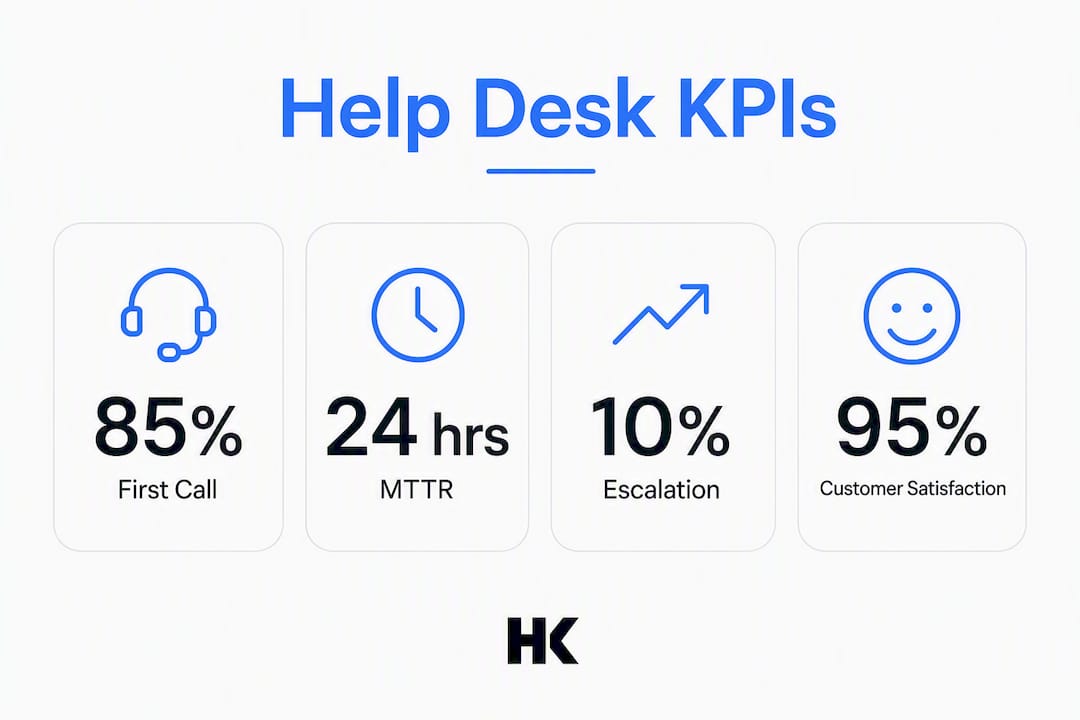
Primary KPIs to track:
- First-call resolution (FCR): The single strongest predictor of user satisfaction. Higher FCR means fewer callbacks, less re-open rate, and lower cost per ticket.
- MTTR: Tracks how long incidents actually take to close, not just how fast you acknowledge them.
- Response time: Time from ticket submission to first agent reply. SLA-governed.
- SLA adherence rate: Percentage of tickets resolved within the committed window.
- CSAT/NPS: Post-resolution surveys. Short (one to two questions) and sent within 24 hours of closure.
- Backlog age: Tickets older than your SLA window are a leading indicator of staffing or routing problems.
Practitioners emphasize first-call resolution and high remote-fix rates because each minute of workstation downtime is measurable business cost. That makes automation and accurate triage high-value investments. — Sentry Cloud IT
Measurement caveats: FCR numbers are only meaningful if your ticket categorization is accurate. A ticket closed as "resolved" that reopens within 48 hours should count as a failed first-call resolution. Track re-open rate alongside FCR to catch this.
Operational best practices that actually move the metrics
Good intentions don't improve FCR. Documented rules do.
- Define triage categories upfront. Every ticket should land in one of five to eight categories (account access, hardware, software, network, security, other) at submission. Miscategorized tickets are the primary driver of reclassification overhead and inflated MTTR.
- Enforce mandatory ticket fields. At minimum: affected user, device type, error message or symptom, and business impact. Two mandatory fields cut the back-and-forth that delays resolution.
- Set knowledge base ownership. Every Tier 2 specialist owns a set of articles. When a ticket reveals a gap, the resolving analyst creates or updates the article before closing the ticket, not after.
- Design SLAs by priority, not by requester. A VP's password reset is Priority 3. A production outage affecting 50 users is Priority 1. Seniority-based SLA exceptions destroy queue integrity.
- Run a weekly ticket review. Fifteen minutes, same time each week. Review the five oldest open tickets, the five most re-opened tickets, and any SLA breaches. This is where problem records get created.
- Build an escalation matrix, not an escalation culture. Analysts who escalate everything to Tier 2 because it's easier inflate costs and slow resolution. The matrix defines exactly when escalation is required; everything else stays at Tier 1.
Pro Tip: Track your "unnecessary escalation rate" — tickets that Tier 2 resolves in under five minutes. If that number is above 15%, your Tier 1 training or your knowledge base has a gap.
How do you choose the right help desk platform?
Start with your primary use case. Internal IT support and external customer support have different requirements, and a platform optimized for one often creates friction in the other.
- Define your use case and scale. Internal IT for 200 employees has different routing logic than a SaaS customer support team handling 2,000 tickets per month.
- Check deployment model. Cloud-hosted (SaaS) is the default for most U.S. organizations. On-premises or private-cloud deployment matters if you have data residency requirements or work in regulated industries.
- Evaluate integrations first, features second. A platform with 200 features but no native Entra ID integration will cost you hours of custom scripting.
- Test automation depth. Can you build routing rules without code? Can macros trigger follow-up actions? AI-assisted reply suggestions are increasingly standard.
- Audit the reporting layer. You need FCR, MTTR, SLA adherence, and agent-level metrics out of the box. Custom dashboards are a bonus; missing baseline metrics are a dealbreaker.
- Verify security and compliance posture. SOC 2 Type II is the baseline. HIPAA BAA availability matters for healthcare. Ask for the most recent attestation report, not just a checkbox on a marketing page.
Vendor questions worth asking directly:
- What is your typical remote resolution rate for tickets handled through this platform?
- What are your API rate limits per integration?
- Do you support SSO via SAML 2.0 or OIDC?
- Where is customer data stored, and can we specify a U.S.-only data region?
- What does a HIPAA Business Associate Agreement cost, and is it included in the base license?
Pricing model notes: most platforms charge per agent seat per month. Watch for add-on costs on integrations, AI features, and advanced reporting modules. Migration from an existing platform typically costs more in staff time than in licensing fees.
The five platforms the SERP consistently surfaces:
| Platform | Primary use case | Best for |
|---|---|---|
| Jira Service Management (Atlassian) | Internal IT / ITSM | Engineering-heavy orgs already on Jira |
| Zendesk | Customer-facing support | SaaS and e-commerce customer support teams |
| ServiceNow | Enterprise ITSM | Large enterprises with complex ITIL workflows |
| Freshdesk | Internal + customer support | Mid-market teams wanting low-config setup |
| Zoho Desk | Customer support | SMBs wanting CRM integration out of the box |
The help desk as a data hub: what practitioners see that others miss
Tickets are not just support records. They are a structured dataset of every recurring failure, every knowledge gap, and every friction point in your product or infrastructure. Help desks that treat tickets as data feed that signal into product planning, infrastructure investment, and staffing decisions.
Operational checklist for capturing high-quality data:
- Require a root-cause tag on every closed ticket, not just a resolution note.
- Tag tickets by affected product area or system component so engineering can query by module.
- Flag recurring incidents (same symptom, three or more tickets in 30 days) for problem record creation.
- Export ticket category data monthly and share with product and infrastructure leads.
- Track knowledge base article views alongside ticket volume. A high-view article with no ticket deflection means the article isn't solving the problem.
What skills and certifications do help desk roles require?
Computer support specialists provide technical help through phone, chat, or in person. The BLS describes the core expectation clearly: troubleshoot networks and software, and communicate solutions clearly to nontechnical users. That second part is where most candidates fall short.
Hard skills by tier:
Soft skills that separate high performers: clear step-by-step verbal communication with nontechnical users, patience under pressure, and documentation discipline. Hiring managers look for diagnostic communication ability as much as technical knowledge.
Certifications worth pursuing:
- CompTIA A+: — Entry-level hardware and OS fundamentals. Standard Tier 1 baseline.
How AI and automation are changing helpdesk work
The shift is already underway. AI-assisted triage reads incoming tickets and suggests categories, priorities, and reply templates before a human touches the ticket. Automated workflows handle password resets, account unlocks, and software license requests without any analyst involvement. Self-service portals backed by RAG (retrieval-augmented generation) systems let users query the knowledge base in natural language.
- What's working now: Automated routing, macro-triggered replies, AI reply suggestions for common issues, and chatbot-handled Tier 0 (self-service) deflection.
- What needs guardrails: AI-generated replies sent without human review create liability when they're wrong. Require human-in-the-loop approval for any AI action that changes account permissions or sends external-facing communication.
- What changes for roles: Tier 1 volume drops as automation handles the repetitive 30–40% of tickets. Tier 1 analysts shift toward exception handling and automation maintenance. Tier 2 increasingly owns the logic behind automation rules.
Pro Tip: Before deploying an AI triage model, run it in shadow mode for 30 days. Compare its category and priority assignments against what your analysts actually chose. A shadow-mode gap analysis reveals training data problems before they affect real tickets.
How to implement help desk software without losing a month to onboarding
Most implementations fail not because the software is wrong but because the data migration and workflow configuration are underestimated.
A realistic deployment sequence:
- Audit your current state first. Document existing ticket categories, SLA targets, escalation rules, and integrations before touching the new platform. You can't configure what you haven't mapped.
- Migrate data selectively. Closed tickets older than 12 months rarely need to move. Focus migration effort on open tickets, active SLA records, and the knowledge base.
- Configure integrations before go-live. IAM, MDM, and collaboration tool integrations should be tested in a staging environment. A broken Entra ID sync on day one destroys analyst confidence in the platform.
- Train in phases. Tier 1 analysts need ticketing and routing basics. Tier 2 needs automation rule management. Managers need reporting configuration. One all-hands training session covers none of these adequately.
- Run parallel for two weeks. Keep the old system in read-only mode while the new one handles live tickets. This gives you a fallback and a comparison baseline.
Common challenges: data mapping mismatches between old and new ticket schemas, SSO configuration delays from the identity team, and knowledge base articles that don't survive format migration cleanly.
How to build a training program that keeps help desk quality consistent
One-time onboarding training degrades within 90 days. The teams that maintain quality run structured, recurring development programs.
A practical framework:
- Certification support: — Reimburse CompTIA A+ and ITIL Foundation exams. Analysts who earn certifications stay longer and escalate less.
How workflow management and collaboration tools affect help desk efficiency
Tickets don't live in isolation. They connect to Slack threads, Teams channels, email chains, and monitoring alerts. The teams that manage this well set explicit rules about where work happens.
The core principle: the ticket is the record of truth. Everything else is communication. A resolution documented only in a Slack thread is a lost resolution.
Practical workflow rules:
- All ticket updates go into the ticketing system, not just into the chat thread.
- Monitoring alerts from Datadog or PagerDuty auto-create tickets with the alert payload attached. Analysts don't manually log what the monitoring system already captured.
- Use Teams or Slack for real-time coordination during major incidents, but require a post-incident ticket update within one hour of resolution.
- Automation rules should handle ticket assignment, not analyst judgment. Judgment calls on routing create inconsistency and delay.
Communication strategies that actually work in helpdesk support
The technical fix is half the job. How you communicate it determines whether the user rates the interaction a 5 or a 2.
Three rules that consistently improve CSAT scores:
- Use plain language — "Your account was locked due to five failed authentication attempts; I've unlocked it and reset your credentials" beats "We've resolved the auth failure on your identity object." The BLS notes that communicating solutions clearly to nontechnical users is a core job expectation, not a bonus skill.
Written communication in tickets should follow a consistent template: symptom confirmed, steps taken, resolution, and next steps if applicable. Analysts who write in this structure produce tickets that Tier 2 can act on immediately without a phone call.
Measuring satisfaction beyond the CSAT score
CSAT is a lagging indicator. By the time a low score appears in your dashboard, the bad experience already happened. The teams that improve satisfaction fastest build feedback loops that catch problems earlier.
Mechanisms worth adding:
- Mid-ticket check-ins on long-running issues: A brief update message after 24 hours of no resolution signals that the ticket hasn't been forgotten. This alone moves CSAT scores on complex tickets.
- Opt-in follow-up calls: For tickets involving data loss or extended downtime, a brief follow-up call 48 hours after closure catches residual issues and signals that the team cares about the outcome, not just the metric.
- Aggregate feedback reviews: Monthly review of all sub-4 CSAT scores with the team. Identify patterns (specific analysts, specific ticket categories, specific times of day) rather than treating each low score as an isolated event.
- Knowledge base feedback buttons: A simple "Was this article helpful?" on every knowledge base article tells you which self-service content is working and which is sending users to the ticket queue.
Compliance and data privacy in U.S. help desk operations
U.S. help desks operate under a patchwork of federal and state requirements depending on industry and data type. The most common frameworks:
- HIPAA: If your help desk handles tickets that involve protected health information (PHI), you need a Business Associate Agreement with your ticketing platform vendor and strict access controls on who can view ticket content.
- SOC 2 Type II: The standard audit framework for SaaS vendors. Require a current attestation report from any cloud-based ticketing platform you evaluate.
- NIST 800-53 / NIST CSF: Relevant for federal contractors and organizations that align to NIST for security policy. Help desk audit logs, access controls, and incident response procedures map directly to NIST controls.
- State privacy laws (CCPA, CPRA, state biometric laws): If your external customer-facing help desk collects personal data from California residents, CCPA/CPRA compliance applies. Some states have additional requirements around biometric data or employee monitoring.
Practical controls every U.S. help desk should have in place: role-based access so analysts only see tickets in their queue, full audit logs with timestamps and user IDs, encryption at rest and in transit, and a documented data retention and deletion policy.
This article provides general information about help desk operations and compliance frameworks. Confirm current regulatory requirements with qualified legal or compliance counsel for your specific industry and jurisdiction.
Key Takeaways
A well-run help desk resolves the majority of incidents at Tier 1, tracks FCR and MTTR as primary health metrics, and treats every closed ticket as a knowledge base contribution.
| Point | Details |
|---|---|
| FCR is the lead metric | First-call resolution predicts cost, CSAT, and staffing efficiency better than any other single KPI. |
| Tier routing needs explicit rules | Escalation matrices, not analyst judgment, keep MTTR low and Tier 2 costs controlled. |
| Knowledge base discipline matters | Require a root-cause tag and article update on every resolved ticket before closure. |
| Platform fit starts with integrations | Entra ID, MDM, and collaboration tool integrations determine daily usability more than feature counts. |
| Hanadkubat for AI integration | Organizations adding AI triage or automation to an existing help desk can engage Hanadkubat for fixed-price AI integration sprints shipped in weeks. |
The mistake most help desks keep making
The most common failure I see is not a software problem. It's a knowledge management problem dressed up as a staffing problem. Teams hire more Tier 1 analysts because ticket volume is high, when the real issue is that 40% of those tickets are the same five problems with no documented resolution. Two mandatory ticket fields and a weekly knowledge base sprint would cut that volume faster than a new hire.
The second mistake: treating automation as a Tier 1 replacement before the knowledge base is solid. An AI triage model trained on miscategorized tickets produces miscategorized suggestions at scale. Fix the taxonomy first, then automate on top of it.
The quick win I'd give any team setting up or retooling a help desk: enforce two mandatory fields on ticket submission (affected system and business impact), and assign knowledge base ownership to every Tier 2 analyst. Those two changes cost nothing and produce measurable FCR improvement within 60 days. The teams that ship product feedback loops from helpdesk data into their engineering roadmap are the ones that stop seeing the same tickets repeat quarter after quarter.
Fixed-price AI integration for help desks that need to move faster
Organizations that want to add AI triage, automated routing, or a RAG-backed self-service portal to an existing help desk often face the same problem: the internal team knows what they want but doesn't have the bandwidth to build it. Hanadkubat delivers production-ready AI features in 2-week sprints at a fixed price of €4,500, with no ongoing retainer and no junior team relaying requirements. Hanad writes the code directly, with an engineering background that includes BMW, Deutsche Bahn, and Bundesrechenzentrum Austria.
For teams that need a scoped AI audit before committing to a build, the AI audit engagement (€1,500) maps your current help desk data and tooling against a prioritized automation roadmap. Larger integrations, including multi-channel AI intake or full RAG knowledge base systems, start from €9,500.
See current service tracks and start a conversation at hanadkubat.com.
Useful sources
- Computer Support Specialists — U.S. Bureau of Labor Statistics: Official job description, salary data, and outlook for help desk and desktop support roles in the U.S.
- Help desk — Wikipedia: Clear definitions of help desk vs. service desk and the reactive/proactive distinction.
- Help Desk Technician — CompTIA: Certification pathways and role expectations from the leading U.S. IT certification body.
- Hanadkubat.com: Fixed-price AI integration and SaaS MVP services for organizations building or extending help desk automation.
FAQ
What is helpdesk support?
Helpdesk support is the IT function that receives, logs, and resolves user issues through a ticketing system, serving as the single point of contact between end users and IT operations.
What is the difference between an IT help desk and IT support?
A help desk handles user-facing incidents remotely, such as password resets and software errors. IT support is a broader term that includes deeper technical work like infrastructure management, security response, and network engineering.
Is a help desk the same as a CRM?
No. A CRM manages customer relationships and sales data; a help desk manages support tickets and incident resolution. Integrating the two avoids data silos but they serve distinct functions.
What skills are needed for an IT help desk role?
Core technical skills include Windows/macOS troubleshooting, Microsoft 365 administration, and basic networking. Equally important is the ability to communicate step-by-step fixes clearly to nontechnical users, which the BLS identifies as a primary job requirement.
Which help desk platforms are most widely used in U.S. organizations?
Jira Service Management, Zendesk, ServiceNow, Freshdesk, and Zoho Desk are the platforms that appear most consistently across U.S. IT teams, each suited to a different combination of team size, use case, and integration requirements.