

A document search feature indexes file content and metadata, then returns ranked matches with a filename, a passage snippet, and a working link back to the source. It has to handle both exact keyword hits and paraphrased, meaning based queries, and it has to check permissions before showing a single result. Miss any one of those three and the feature is broken, not just imperfect.
TL;DR:
- Hybrid search combining keyword and semantic retrieval should be used with adjustable weighting to suit different document types and use cases.
- Proper ingestion, including storing original files, page numbers, and layout-aware chunking, is critical to achieving accurate and verifiable search results.
- Support for various file formats requires native text extraction for searchable PDFs, OCR for scanned documents, and careful handling of mixed batches to optimize performance and accuracy.
- Access control must be enforced before ranking results to ensure only authorized users can see sensitive documents, with permissions validated at query time.
- Building or fixing a search system benefits from a structured evaluation process using a golden query set to measure precision, recall, latency, and security risks before deployment.
Table of Contents
- How does a document search feature work in practice?
- Keyword, semantic, or hybrid: which retrieval method wins?
- Which file types and formats does your search need to support?
- Why ingestion and chunking decide whether search works at all
- What metadata and access control does document indexing need?
- How do you measure if search results are actually good?
- Local index, hosted service, or custom RAG: which fits your case?
- How do you set up and test a document search feature quickly?
- What rebuilding prototypes taught me about document search
- Custom build or managed connector: how do you decide?
- How I can help you build or fix a document search feature
- Where to go deeper on document search architecture
- Sources
- FAQ
How does a document search feature work in practice?
Open any working implementation and you'll see the same four elements every time: a filename, a snippet of the matching passage, a link that jumps to the right page or section, and a relevance score. That last piece matters more than most builders assume. A user searching a 40-page contract does not want a document; they want the clause, and a page offset or anchor link is what makes the difference between a useful tool and a glorified file browser.
Good implementations also support search-as-you-type, plus filters for date, author, and file type, similar to the navigation pane behavior in Microsoft Word. Sorting by relevance or recency rounds it out. Without page-level links, professional users can't verify a match, which kills trust fast.
Keyword, semantic, or hybrid: which retrieval method wins?
Keyword search wins when someone types an exact identifier, an invoice number, a clause reference, a legal term. It fails the moment a user paraphrases. Semantic search, built on vector embeddings, solves that: it returns conceptually related chunks even when the wording doesn't match, along with a similarity score and the source file, as described in OpenAI's retrieval documentation.
Neither method alone covers real usage. That's why production systems increasingly run hybrid search, merging dense (semantic) and sparse (token-based) results using Reciprocal Rank Fusion. Lexical and semantic retrieval fail in different ways, so combining them covers more ground than either does solo.
If you're building or buying a document search feature, insist on both options, plus exposed weighting between text and embedding scores. A fixed 50/50 blend rarely fits every corpus. Legal and compliance searches often need keyword weight turned up; support knowledge bases usually benefit from leaning semantic.
Which file types and formats does your search need to support?
| Format | Parsing approach | Common pitfall |
|---|---|---|
| Searchable PDF | Native text extraction | Skipping OCR here wastes compute |
| Scanned PDF | OCR required | Mixed scanned/native pages need both |
| DOCX / PPTX | Native parsing | Table and slide layout loss |
| XLSX | Structured extraction | Merged cells break row logic |
| HTML | DOM parsing | Nav/footer noise pollutes results |
| TXT | Direct indexing | No structure to preserve |
| JPEG / PNG / TIFF | OCR only | Handwriting and low-res scans fail |
Google Cloud's Document AI guidance is blunt on one point: don't run OCR on files that already have a text layer. It's slower, costlier, and more error-prone than native extraction. The real complexity is mixed batches, PDFs where some pages are searchable and others are scans, which need a combined pipeline. Add language hints for multilingual sets and expect table extraction to need its own dedicated pass.
Why ingestion and chunking decide whether search works at all
Most retrieval failures trace back to ingestion, not the search model. Store the original file, the extracted text, page numbers, bounding boxes, the parser version, and any extraction warnings. Silent extraction errors are the single biggest cause of "search can't find a document I know is there."
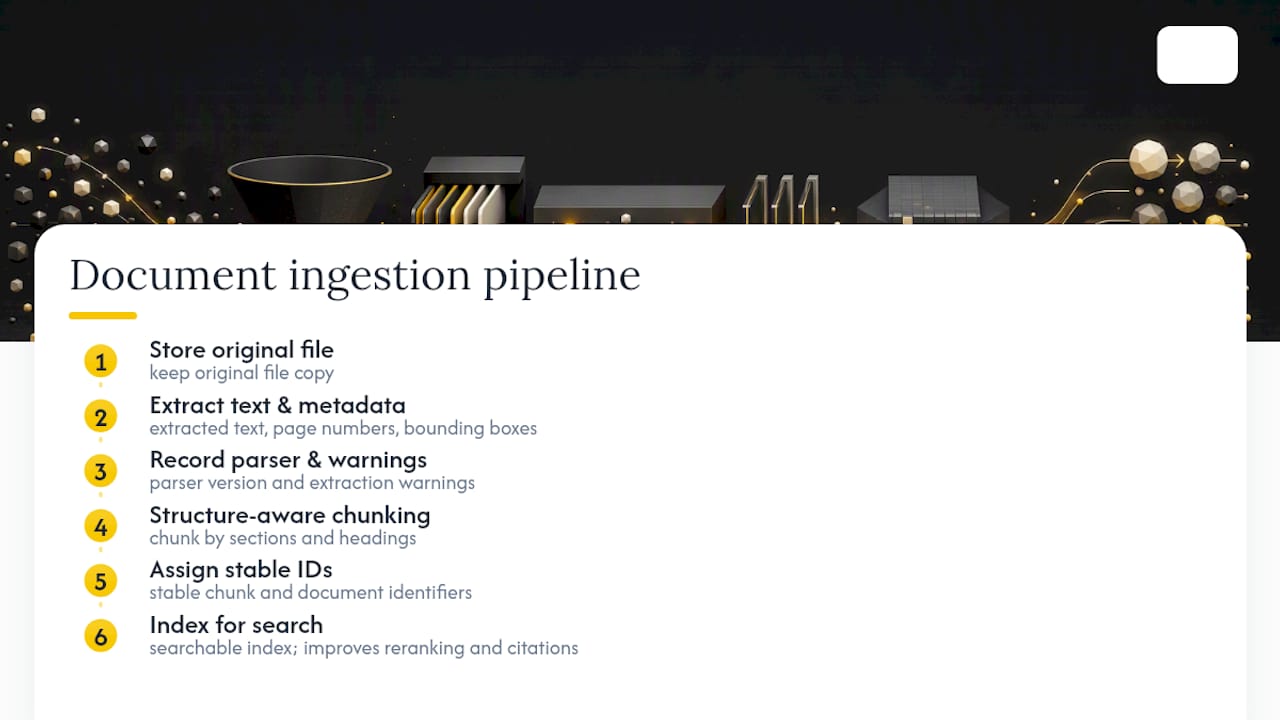
Chunk by structure, section and heading boundaries, not by arbitrary token counts. Layout-aware chunking keeps a clause or paragraph intact instead of slicing it across two chunks, which directly improves reranking and citation accuracy. Assign stable chunk and document IDs so that when a file gets updated, old citations don't silently point to deleted content.
What metadata and access control does document indexing need?
Index more than raw text. Effective document indexing features capture file type, language, author, effective date, version, tenant, sensitivity level, and source URL. That metadata does double duty: it powers filters, and it drives deduplication and freshness ranking so a superseded contract doesn't outrank the current one.
Access control is not a layer you bolt on after search works, it has to run before ranking. Google Cloud's connector guidance recommends filtering by tenant, owner, and sensitivity at query time, not display time. An otherwise-perfect textual match is a defect if the wrong user can see it. Test revoked-access scenarios explicitly: remove a user's permission, then confirm the document actually disappears from their results instead of just getting hidden in the UI.

How do you measure if search results are actually good?
Precision and recall pull in opposite directions, and the right target depends on the task. Contract search needs high recall, missing one relevant clause is expensive. A support bot answering customer questions needs high precision on the first result, since nobody scrolls to result six. NIST's TREC evaluation framework is the standard reference for measuring both properly, rather than leaning on a single accuracy number that hides which failure mode you actually have.
Build a judged test set of dozens to over a hundred real queries, then score average precision, recall, and whether the first result was actually useful. Track latency, index freshness, and, critically, the unauthorized-result rate. That last metric belongs on the same dashboard as accuracy, not treated as a separate security checkbox.
Local index, hosted service, or custom RAG: which fits your case?
A local full-text index gives you privacy and low latency for single-tenant or desktop use, but it won't scale to multi-tenant permissions or semantic search without real engineering.
Hosted managed services handle connectors and permission syncing out of the box, trading some architectural control for faster setup. They're a reasonable fit when your corpus is small and privacy constraints are light.
Custom hybrid RAG pipelines earn their cost when you need semantic answers with verifiable citations and strict tenant isolation, the kind of thing generic connectors weren't built for. Read more on architecture trade-offs for B2B SaaS before committing. Start with a small, representative corpus and iterate. Locking into one architecture before you've tested real queries against real files is the most common expensive mistake I see.
How do you set up and test a document search feature quickly?
- Collect a representative set of difficult files, scanned contracts, mixed-language documents, tables, and label 50 to 150 golden queries against them.
- Run extraction on the full set, inspect every warning the parser throws, and fix text-layer issues before anything gets indexed.
- Index with full metadata, enable hybrid search, and enforce authorization filters at query time, not after.
- Evaluate on precision, recall, first-result usefulness, latency, and unauthorized-result rate, using the same judged query set every time you change the pipeline.
Pro Tip: Build your golden query set before you write a single line of search code. Teams that skip this end up "evaluating" a search feature by typing a few queries and eyeballing the results, which catches almost nothing. A structured golden-query evaluation playbook turns that guesswork into a repeatable test.
What rebuilding prototypes taught me about document search
Every failed search feature I've inherited failed at extraction or chunking, never at the retrieval model. The pattern repeats: a founder's prototype indexed text without saving page numbers, so results couldn't be verified, or chunks were sliced by character count and split contract clauses in half.
The fix is boring: keep the original file, freeze scope before adding features nobody asked for, and give every result a verification path back to the source page. I'd rather ship a smaller feature that's provably correct than a broad one nobody can audit. My AI evaluation metrics playbook covers this in more depth for teams past the prototype stage.
Custom build or managed connector: how do you decide?
Custom development earns its cost when you need tenant isolation, domain-specific parsing, strict provenance, or a production-ready RAG pipeline, cases a generic connector wasn't designed to handle. If your multi-tenant model needs row-level enforcement, Postgres row-level security is worth understanding before you pick an architecture.
Managed connectors win when your corpus is small and privacy needs are light: faster to launch, less to maintain. For a one-off search feature that needs to ship and stay stable, a fixed-price build often beats a long-term connector contract you'll be paying for every month regardless of usage.
How I can help you build or fix a document search feature
If your prototype's document search returns garbage results, can't verify a match, or leaks documents across tenants, that's exactly the kind of wall a Lovable, Bolt, or Cursor build hits around 70% done. I'm Hanad Kubat, a one-person shop: I write every line myself, no juniors, no agency layer between you and the code.
The flow is simple: a fixed-price Prototype Audit at €1,500, credited against the build, scope frozen at kickoff, then a two-to-four week build starting at €12,000 for a working search feature with real provenance and access control. You own the code from the first commit. An optional care plan covers ongoing support afterward if you want it, no surprise invoices either way. Reach out through Hanadkubat and I'll scope the minimum viable search capability your product actually needs, not a bigger one than you asked for.
— Hanad Kubat
Where to go deeper on document search architecture
For hands-on implementation detail, start with Adobe's PDF search documentation for text-layer and indexing behavior, and OpenAI's retrieval guide for vector store mechanics. On the SEO side of semantic retrieval, this writeup on vector search covers how hybrid retrieval changes discoverability for indexed content.
Sources
- Retrieval | OpenAI API
- About hybrid search | Gemini Enterprise Agent Platform | Google Cloud Documentation
FAQ
How do I search a document effectively?
Use the built-in find function (Ctrl+F or Cmd+F) for exact phrase matches within an open file, or a dedicated document search feature for cross-file, meaning-based queries. For anything beyond a single open document, keyword search alone misses paraphrased results, which is why hybrid search tools perform better across a large document set.
Why can't I find my documents in search?
The most common cause is a broken text layer: scanned files without OCR, or extraction that silently failed during indexing. Check extraction warnings before assuming the search engine itself is at fault, since most retrieval failures start at ingestion, not the search algorithm.
What control or tool do I use to search inside a document?
Inside most applications, it's the Find or Search command, typically triggered by Ctrl+F, which opens a navigation pane with match highlighting and filters like case sensitivity. Modern tools add search-as-you-type and whole-word filters on top of the basic find function.
How can I search for all documents on my computer at once?
Your operating system's built-in indexer (Windows Search, Spotlight on macOS) covers filenames and some text content, but it rarely handles scanned PDFs or cross-format semantic queries well. A dedicated document search feature with OCR and hybrid retrieval closes that gap for mixed file types.
Does a document search feature need to support both keyword and semantic search?
Yes. Keyword search catches exact identifiers and legal terms; semantic search catches paraphrased or conceptual queries that share no exact wording with the source text. Production systems typically run both and merge the rankings through hybrid search rather than picking one.