
Cloudflare Workers are best for lightweight, latency sensitive logic: edge auth, API aggregation, A/B testing, image transforms, full stack apps backed by D1 and R2, and serverless AI inference. The pattern that works across all of them is small units of code running close to the user instead of one server far away. The one caveat worth knowing before you write a line of code: Workers have hard limits on CPU time and can't run native C libraries, so heavy processing still belongs somewhere else.
TL;DR:
- Cloudflare Workers excel at handling lightweight, latency-sensitive tasks such as APIs, auth, personalization, and image transforms, but are limited by CPU time and lack native C library support.
- Use Workers as the front door for TLS termination, security checks, and caching to offload basic workloads from backend servers or databases.
- Pair Workers with Durable Objects, Workers KV, D1, and R2 to build small applications, real-time analytics, or multi-tenant routing without managing servers.
- Heavy processing tasks, long-running jobs, or operations requiring native binaries should be handled by traditional cloud services like Lambda or dedicated servers.
- Deploy first with staging, start with simple use cases like auth or KV lookups, and only then expand to more complex full-stack apps or AI inference pipelines.
Table of Contents
- Cloudflare Workers Use Cases That Ship in Production Today
- How to Actually Wire Up Each Use Case
- Designing Around the Edge, Not Just On It
- Where Workers Stop Making Sense
- Deploying Your First Worker: A Short Runbook
- Real Time Data and Analytics at the Edge
- Security and Edge Firewalls Built on Workers
- Personalizing Content Without Slowing Anyone Down
- Pairing Workers With the Rest of Cloudflare
- Industry Examples: E-Commerce, Gaming, and IoT
- How I Decide Whether Workers Belong in an MVP
- Fixed Price Builds That Use Workers Where They Actually Fit
- Where to Verify These Patterns Yourself
- Sources
- FAQ
Cloudflare Workers Use Cases That Ship in Production Today
Some of these you can deploy this afternoon. Others take a weekend. None of them require you to manage a server.
-
Scalable edge APIs and aggregation. Put a Worker in front of three backend services, merge their responses into one payload, and your client makes one request instead of three. This also centralizes auth checks so your origin never sees unauthenticated traffic.
-
Edge auth and JWT validation. Verify a JSON Web Token at the edge before the request touches your origin. Bad tokens get rejected in milliseconds, close to the user, with zero load reaching your backend.
-
A/B testing and personalization. Use Workers KV to bucket users into test groups on the first request. Cold starts are near zero, so there's no flicker or delay while the experiment decides which version to serve.
-
Image resizing and content transforms. Combine Cloudflare's image transform APIs with the Cache API so a resized image gets computed once and served from cache for every subsequent request, anywhere in the world.
-
Full stack apps with D1 and R2. Deploy a Next.js or React app on Workers, back it with D1 for relational queries and R2 for object storage, and you get full CRUD without provisioning a database server.
-
Background jobs with Queues and Workflows. Scheduled tasks, retries with backpressure handling, and multi-step workflows that need reliable execution can be implemented.
-
Serverless AI inference at the edge. Pair Workers AI with a vector database for semantic search, and you skip managing GPU infrastructure entirely for many common inference tasks.
-
Routing and multi tenant storefronts. Workers KV handles high read volume routing decisions well, which makes it a solid fit for multi tenant apps that route by subdomain or path.
That's a lot of ground for one runtime to cover, and it's exactly why "Cloudflare Workers examples" pulls such a wide range of search traffic. The common thread: small, fast, stateless logic that doesn't need a full server behind it for every request.
How to Actually Wire Up Each Use Case
Picking a use case is the easy part. Wiring the bindings correctly is where projects stall.
- Add D1 for relational data, R2 for file and object storage, KV for fast key value lookups, and Workers AI for inference, all declared in your
wrangler.tomland accessed throughimport { env } from 'cloudflare:workers'. - Turn on
nodejs_compatwhen you're porting an existing Express or Next.js app that expects Node APIs. Without it, plenty of npm packages simply won't run. - Use the Cache API with explicit
Cache-Controlheaders for anything that doesn't change per user, and bypass the cache deliberately for authenticated or personalized responses. - Route long or scheduled work through Cron Triggers, Queues, or Workflows instead of trying to do it inline during a request, since Workers aren't built for open-ended execution.
- Test locally with Wrangler before deploying, and start from an existing template rather than a blank file. Cloudflare's Express.js tutorial walks through deploying a full CRUD API with
nodejs_compatand D1 bindings, prepared statements included.
Pro Tip: Run your first deploy against a staging domain, not production, even for a "simple" edge function. The failure mode that bites people isn't the Worker crashing, it's a cache header that's wrong for three days before anyone notices.
Designing Around the Edge, Not Just On It
The mistake I see most often is treating Workers as a replacement for every backend service instead of a front door to them. That distinction decides whether your architecture holds up under real traffic.
- Use Workers as the global ingress: terminate TLS, run WAF-style logic, validate tokens, and cache responses before anything reaches origin.
- Split the workload deliberately: Workers handle auth and caching, a regional function or your existing backend handles heavy database writes and reporting queries.
- Reach for Durable Objects when you need low latency coordinated state, like a chat room, a rate limiter, or a single source of truth for a live session.
- Propagate trace headers from the edge through to your origin so a slow request can be followed end to end in your logs, not just guessed at.
This is also where "Cloudflare Workers vs AWS Lambda" stops being a pricing argument and becomes an architecture one. Lambda functions live in a specific AWS region next to your database. Workers run everywhere at once, which is a strength for stateless logic and a liability the moment you need a single, consistent data store nearby.
Where Workers Stop Making Sense
Workers cap CPU execution time per request, and that ceiling changes the math for anything computationally heavy.
- Long running jobs, batch processing, and multi minute transformations belong on a platform built for sustained compute, not an edge runtime billed for burst work.
- No native C libraries means heavy image or video processing, complex PDF generation, and similar workloads usually belong on Lambda or a dedicated service instead.
- If your Worker has to call a single remote database on every request, the latency of that round trip can erase most of the edge advantage. Co-located databases or cached reads fix this; a lone centralized database rarely does.
- Billing models diverge fast once compute gets heavy. At high request volumes, Workers pricing and Lambda@Edge pricing produce very different bills, and the gap widens further once you're running sustained compute rather than short bursts.
For workloads that genuinely need heavy native binaries or long durations, treat regional serverless as the workhorse and Workers as the lightweight layer in front of it.
Deploying Your First Worker: A Short Runbook
Getting from idea to a deployed Worker doesn't need to take long if you follow the steps in order.
- Map which bindings you actually need (D1, R2, KV, Workers AI) and pick a starting template through Wrangler, the dashboard, or the C3 CLI rather than starting from a blank project.
- Turn on
nodejs_compatif you're reusing an existing Node based framework, then run it locally before touching production. - Add basic observability and rate limiting, and stand up a staging domain with a real end to end test suite before anyone else touches it.
- Deploy through templates.workers.dev, run your test suite against it, then promote to production once it's clean.
Cloudflare's own quickstart flow backs this up: templates deploy from any Git repo in a matter of hours, with automatic scaling and no capacity planning required on your end.
Pro Tip: Keep your first Worker boring. Ship the auth check or the KV lookup before you attempt the full AI pipeline. A working small thing beats a half finished ambitious one every time.
Real Time Data and Analytics at the Edge
Workers are well suited to processing events as they happen rather than batching them for later. A Worker sitting in front of your app can log request metadata, user actions, or transaction events and push them into Queues for downstream aggregation without ever touching your main application server.
This matters most for dashboards that need to feel live. Instead of polling a database every few seconds, a Worker can stream updates through Durable Objects, which hold state in memory close to the user and push changes out immediately. Analytics pipelines built this way tend to look less like "run a report every hour" and more like "watch the number change while you're looking at it."
The trade-off is durability. Workers aren't a data warehouse. The practical pattern is: capture and lightly transform events at the edge, then hand them off to Queues or a Workflow that writes to a proper analytics store. Trying to do the heavy aggregation math inside the Worker itself runs straight into the CPU time limit covered earlier, so keep the edge layer thin and push anything with real computation downstream.
Security and Edge Firewalls Built on Workers
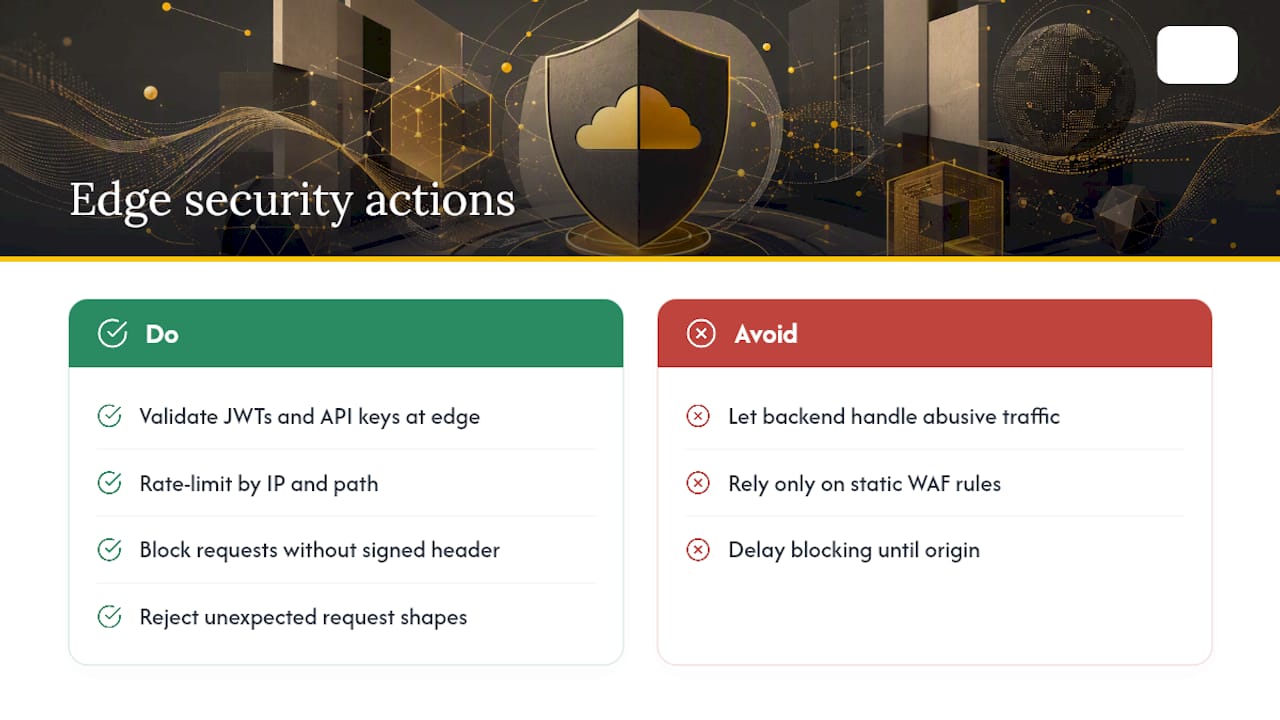
A Worker can act as a programmable firewall that runs before a request ever reaches your infrastructure. That's different from a static WAF rule set: you get to write actual logic. Rate limit by IP and path, block requests missing a valid signed header, or reject anything that doesn't match an expected request shape, all before your origin server spins up a single process.
JWT and API key validation is the most common security use case in practice. A Worker checks the token's signature and expiry, and only forwards the request if it passes. Bad actors get rejected at the edge, which means your backend spends zero compute on traffic that was never going to succeed anyway.
You can layer this further with Cloudflare Access for authenticated internal tools, so a Worker checks both a valid session and a valid Access policy before letting a request through. For public APIs, combining edge rate limiting with token validation stops a large share of abusive traffic without writing a single line of backend code to handle it. This is one of the clearer cases where "edge functions vs serverless" isn't really a debate: the edge is simply closer to the attacker, so it makes sense to stop bad traffic there first.
Personalizing Content Without Slowing Anyone Down
Personalization usually costs you speed, because most systems fetch a user profile from a database before deciding what to render. Workers flip that order. A Worker can read a cookie or header, look up a bucket or preference in Workers KV, and rewrite the response, all within the same request that would otherwise have gone straight to a static cache.
This is where HTMLRewriter earns its keep. Instead of generating a personalized page from scratch on every request, a Worker can take a cached, mostly static HTML response and swap in the personalized fragments: a name in a greeting, a region specific price, a locale specific currency symbol. The bulk of the page stays cached and fast; only the small personalized slice gets computed per request.
Geo-based personalization follows the same logic. A Worker reads the request's country or region data, automatically available at the edge, and serves different pricing, language, or promotional content without a round trip to a central server. For e-commerce sites running promotions in different markets, this removes an entire category of "which region sees which banner" logic from the main application.
Pairing Workers With the Rest of Cloudflare
Workers rarely do their best work alone. The real leverage shows up when they're paired with other pieces of Cloudflare's platform instead of trying to reinvent what those pieces already do well.
Durable Objects solve the one thing stateless Workers can't: coordinated, low latency state. A chat room, a collaborative document, a rate limiter shared across requests, all need one authoritative place to hold state, and Durable Objects give you exactly that without standing up a dedicated server.
Cloudflare Access turns a Worker into a real authentication gatekeeper for internal tools. Instead of building your own login system for an admin dashboard, a Worker checks an Access session token and only serves the page to verified users.
Workers KV and D1 cover the two most common data needs: KV for fast, eventually consistent reads like feature flags or routing tables, and D1 for relational data that needs real queries. R2 rounds it out for anything that's a file rather than a row, images, exports, backups, with no egress fees eating into the savings.
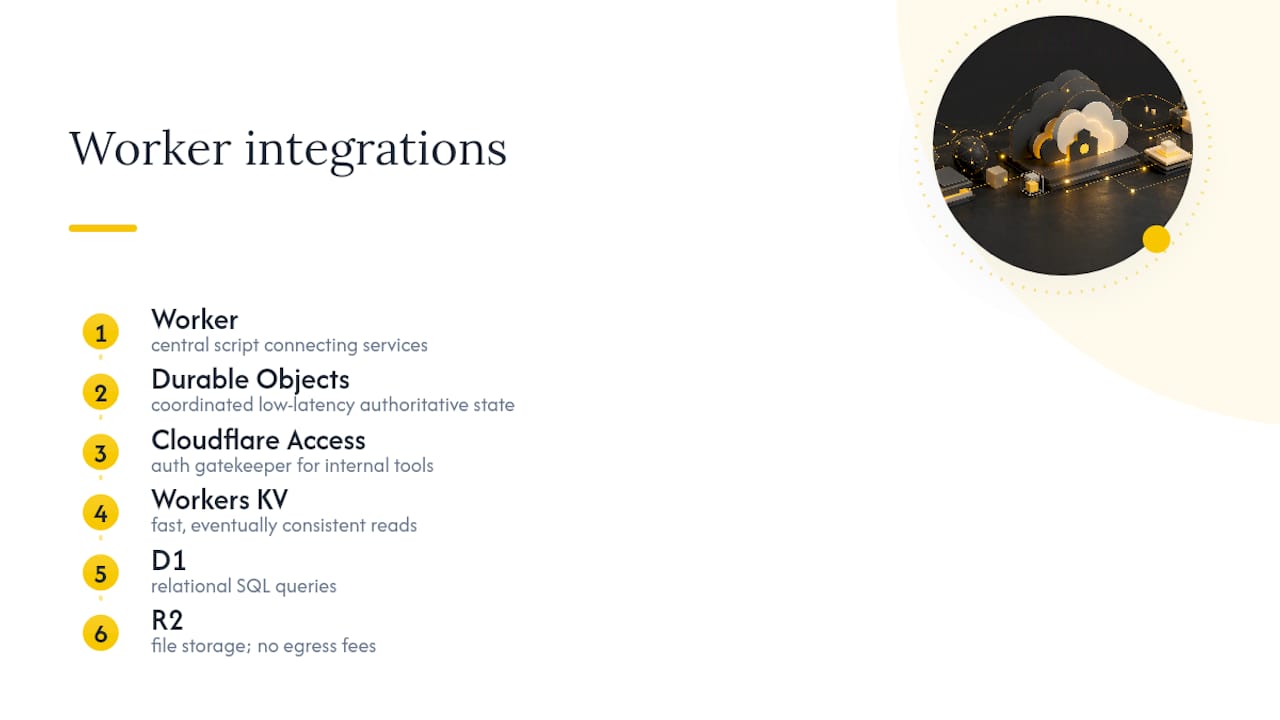
Stacked together, these services turn a single Worker script into something closer to a small application platform, not just a request handler.
Industry Examples: E-Commerce, Gaming, and IoT
E-commerce storefronts use Workers for exactly the personalization and routing patterns already covered: regional pricing, A/B tested checkout flows, and multi tenant storefronts where one codebase serves many brands through KV based routing. Flash sales are a particularly good fit, since Workers absorb traffic spikes at the edge instead of forwarding every request to an origin that would otherwise need to scale up in real time.
Gaming platforms lean on Workers for matchmaking metadata, session state through Durable Objects, and leaderboard updates that need to feel instant across regions. A player in Tokyo and a player in Berlin both need low latency reads, and an edge runtime handles that far better than a single regional server ever could.
IoT use cases tend to center on ingestion. Devices send small, frequent payloads, and a Worker can validate, lightly transform, and route that data into Queues or a database without needing a dedicated ingestion server running around the clock. Given how many devices send data in short unpredictable bursts, an edge runtime that scales automatically avoids the classic problem of over-provisioning a server for traffic that mostly isn't there.
How I Decide Whether Workers Belong in an MVP
I reach for Workers when the core workflow is lightweight and latency sensitive: auth, routing, an API layer. I skip them when a founder needs heavy processing or one central database, and I say so before writing code. What I hand over either way: production ready code, a boring maintainable stack, one name on the contract.
— Hanad Kubat
Fixed Price Builds That Use Workers Where They Actually Fit
Hanad Kubat is the alternative to a traditional agency for founders whose prototype hit a wall at the login, the payments, or the parts that have to be right. I don't add a project manager layer or an offshore markup: the price is fixed, the scope is frozen at kickoff, and you own the code from the first commit. When Workers fit the workflow, edge auth, routing, a full stack app on D1 and R2, they go in the build. When they don't, I say so instead of forcing the stack to fit a trend. Every line is written by me, no juniors, delivered in weeks, not months, milestone by milestone. If your prototype is the spec I need, start with the fixed-price Prototype Audit to see exactly what a real rebuild involves.
Where to Verify These Patterns Yourself
The Workers overview covers bindings and the full feature set. The examples library has working code for AI inference and HTMLRewriter. The Express.js tutorial shows a real CRUD deployment, and the templates repository has starter projects with E2E tests already wired in.
Sources
- Overview · Cloudflare Workers docs
- Deploy an Express.js application on Cloudflare Workers · Cloudflare Workers docs
FAQ
What Can Cloudflare Workers Be Used For?
Workers handle edge APIs, auth and JWT validation, A/B testing, image transforms, full stack apps with D1 and R2, background jobs, and serverless AI inference, all running close to the user instead of on a single regional server.
Who Uses Cloudflare Workers?
Developers building latency sensitive APIs, technical founders shipping MVPs on a fixed timeline, and teams running e-commerce, gaming, or IoT platforms that need to scale without provisioning servers ahead of demand.
What Are the Main Use Cases for Cloudflare?
Beyond Workers, Cloudflare's broader platform covers CDN caching, DNS, and WAF protection, but the use cases specific to Workers center on programmable edge logic: personalization, routing, background jobs, and AI inference at the edge.
What Are the Limitations of Cloudflare Workers?
Workers cap CPU execution time per request, can't run native C libraries, and lose much of their latency advantage when every request still has to call one distant centralized database.
Should I Use Workers or a Traditional Backend for My MVP?
It depends on the workflow: lightweight, latency sensitive logic fits Workers well, while heavy processing or a single relational database with complex queries often still needs a traditional backend or regional serverless function alongside it.