

TL;DR:
- App stabilization ensures applications remain reliable and crash-free as they scale, directly impacting revenue and user retention.
- Metrics like crash-free session rate, OOM termination rate, and frame rate guide stability, with benchmarks encouraging continuous improvement.
App stabilization is the process of keeping an application reliable, crash-free, and performant as it grows to meet increasing user demand. The role of app stabilization for scaling is not a secondary concern. It is the foundation that determines whether growth creates revenue or destroys it. 83.4% of users consider app stability extremely or very important, and 15.4% uninstall after a single crash. At scale, those numbers translate directly into lost customer lifetime value and compounding churn that no feature release can offset.
What metrics define app stabilization and how do they influence scaling?
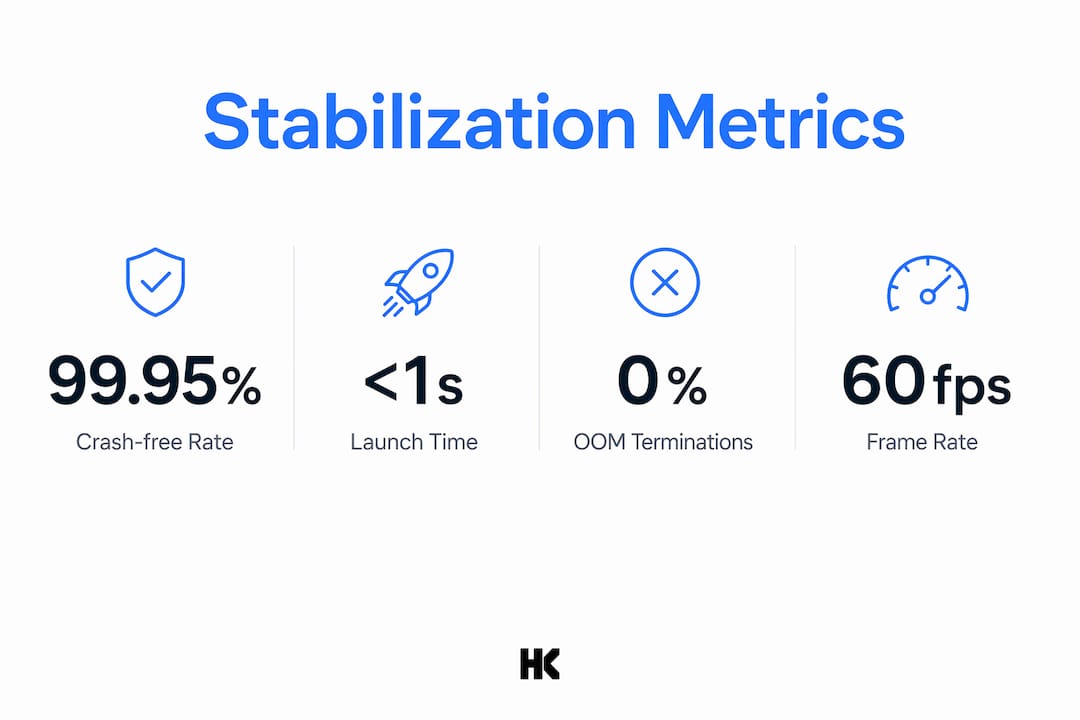
Crash-free session rate is the primary metric for measuring app stabilization. Top-rated apps maintain crash-free rates near 99.95%, and rates below 99.85% constrain app store growth. A 0.1% improvement in crash-free rate prevents thousands of poor user experiences every month at scale. That is not a rounding error. It is a retention lever.
Out-of-memory (OOM) terminations are the second critical metric, and they are frequently invisible. OOM failures correlate with abrupt termination during onboarding and checkout flows, the exact moments where user trust and revenue are highest. Standard crash monitoring tools often miss OOM events entirely, leaving engineering teams blind to a major failure source.
Launch time and frame rate round out the core stability picture. Cold start time should stay under 1 second, and frame rate must hold at a minimum of 30 fps to avoid a 50% increase in user abandonment. A 1% improvement in scroll smoothness correlates with 2% higher revenue and 3% greater engagement. These are not abstract performance goals. They are business metrics.
| Metric | 2026 benchmark | User impact |
|---|---|---|
| Crash-free session rate | 99.95% or higher | Below 99.85% limits store growth |
| OOM termination rate | As low as possible | Invisible exits during onboarding and checkout |
| Cold start time | Under 1 second | Longer times increase abandonment |
| Frame rate | 30 fps minimum | Below threshold causes 50% more abandonment |
| Scroll smoothness | Continuous improvement | 1% gain yields 2% revenue increase |
Pro Tip: Track crash rate, OOM rate, and frame rate together. Monitoring only one metric hides the root cause of scaling failures until they are already affecting users.
What common stability challenges emerge during application scaling?
Technical debt is the most underestimated threat to stability during growth. Technical debt often manifests as "feature friction" that degrades overall app performance incrementally. Each new feature added without architectural discipline compounds the problem. By the time a team notices the regression, the codebase requires significant surgery to fix.
Real-time features introduce a separate category of scaling risk. Event-driven features create backpressure and connection management challenges that require idempotent writes and session resumption logic. Reconnection spikes without any network change on the client side indicate a systemic server issue. Without careful backoff design, those spikes cascade into full outages.
The five most common stability pitfalls during scaling are:
- OOM blindspots. Standard crash tools miss memory terminations, leaving teams without signal during the most critical user flows.
- Monolith fragility. A single large codebase means one unstable module can degrade the entire app under load.
- Uncontrolled feature velocity. Shipping features faster than the stability baseline can absorb creates compounding regression.
- Missing reconnection logic. Real-time features without session resumption fail silently when server load spikes.
- No performance budget. Without defined thresholds in the CI pipeline, regressions ship undetected to production.
Each of these pitfalls is preventable. None of them are inevitable. They are the result of treating stability as a post-launch cleanup task rather than a design constraint.
How do architectural choices support app stabilization for scaling?
Architecture determines how far a team can scale before stability becomes a crisis. A modular monolith is the right starting point for most startups. It keeps deployment simple while allowing teams to isolate unstable modules without taking down the entire application. Microservices add genuine value at scale, but they also add distributed systems complexity that small teams often cannot manage safely.

Cloud-native design patterns address the infrastructure side of stability. Load balancing distributes traffic so no single instance becomes a bottleneck. API gateways enforce rate limits that protect backend services from traffic spikes. Containerization with tools like Docker and Kubernetes makes it possible to restart failed instances automatically, reducing mean time to recovery.
Observability is where most teams underinvest. Monitoring only crash rates misses early signals. Combining metrics, structured logging, and distributed tracing gives engineering teams the shared context needed to diagnose failures before they escalate. An alert on a rising OOM rate is far cheaper to act on than a post-mortem after a checkout flow collapses.
CI/CD performance budgets are the operational mechanism that keeps architecture honest. Performance budgets integrated into CI pipelines prevent stability regressions and stop technical debt from accumulating silently. A build that exceeds a defined cold start threshold should fail the same way a failing unit test fails. This is how teams achieve sustainable app performance without burning out the engineering team.
Pro Tip: Implement predictive observability by setting alert thresholds below your crash-free floor, not at it. By the time you hit 99.85%, you have already lost users. Alert at 99.90% and investigate before the damage compounds.
What practical steps operationalize app stabilization during scaling?
Stability governance starts with treating crash-free thresholds as a growth gate. Stable apps require governing crash-free thresholds as a first gate for scaling growth. This means a product release that drops crash-free rate below the defined threshold does not ship. That policy requires alignment across engineering, product, and leadership, which is exactly why most teams do not have it.
Continuous monitoring must connect stability metrics to product metrics. A spike in OOM terminations during onboarding is not just an engineering problem. It is a conversion problem. When engineering and product teams share the same dashboard, the response is faster and the fix is better prioritized.
User communication after a technical incident is a retention tool that most teams ignore. Prompt, personalized communication to crash-affected users improves retention significantly compared to silence. A direct message acknowledging the issue and providing a clear timeline costs almost nothing. The alternative is losing users who assume the product is simply broken.
The table below contrasts reactive and predictive approaches to stability management:
| Approach | Trigger | Response time | User impact |
|---|---|---|---|
| Reactive | User reports or store reviews | Hours to days | Users already churned |
| Predictive | Metric threshold breach in CI/CD | Minutes | Issue caught before user impact |
| Reactive | Post-release crash spike | After release | Rating damage already done |
| Predictive | Performance budget failure in pipeline | Pre-release | Regression blocked at build stage |
Balancing feature velocity with reliability requires a concrete policy, not a cultural aspiration. Teams that create scalable apps with stability gates built into their release process ship fewer incidents and recover faster when incidents do occur. The investment in process pays back in reduced incident response cost and higher retention.
Key Takeaways
App stabilization is a revenue function. Teams that govern it with the same rigor as feature delivery protect customer lifetime value, reduce churn, and scale without compounding technical risk.
| Point | Details |
|---|---|
| Crash-free rate is a growth gate | Apps below 99.85% crash-free rate face constrained store growth and accelerated churn. |
| OOM terminations need dedicated tracking | Standard crash tools miss OOM events; add explicit OOM monitoring to your observability stack. |
| Architecture determines scale ceiling | Modular design and CI/CD performance budgets prevent stability regressions before they reach users. |
| Predictive beats reactive | Alerting below your crash-free floor catches issues before user impact, not after. |
| User communication retains churned users | Personalized outreach after an incident recovers users that silence permanently loses. |
Why I think most teams get stability backwards
I have worked on production systems at BMW, Deutsche Bahn, and Bundesrechenzentrum Austria. I have also built and shipped my own SaaS products from scratch. The pattern I see consistently is this: teams treat stability as an engineering problem to solve after growth, not a business constraint to design around before it.
The framing matters enormously. Treating app stability as an engineering problem rather than a revenue issue leads to underinvestment in reliability engineering. When a CTO frames a crash-free rate drop as a technical incident, it gets a bug ticket. When they frame it as a customer lifetime value risk, it gets a war room. The second framing is correct, and it changes how fast the organization responds.
The teams I respect most set their crash-free threshold as a release gate before they hit scale. They instrument OOM events from day one. They build performance budgets into CI before the codebase is large enough to make it painful. That early investment costs almost nothing compared to the cost of retrofitting observability into a fragile monolith under production load.
The uncomfortable truth is that most stability failures during scaling are not technical surprises. They are the predictable result of decisions made months earlier, when the team chose feature velocity over architectural discipline. You can recover from that choice, but it is expensive. Starting with stability as a design constraint is cheaper every time.
— Hanad
How Hanadkubat supports stability and scaling for B2B SaaS teams
Engineering teams that need to stabilize a fragile codebase or build scaling architecture from the ground up work directly with Hanad, not a project manager or junior team. Hanadkubat's rescue and scale engagements start at €4,500 and are scoped to fix specific stability problems: OOM blindspots, missing observability, CI/CD performance gates, and architectural fragility.
For teams building a new SaaS product, fixed-price MVP builds (from €18,000) include stability architecture from the first sprint, not as an afterthought. Every engagement ships in weeks, not months. If your app is hitting scaling limits or your crash-free rate is trending the wrong direction, see what Hanadkubat offers and book a strategy sprint to scope the fix before the next release cycle.
FAQ
What is app stabilization in software development?
App stabilization is the practice of maintaining reliable, crash-free performance as an application grows in users and complexity. It covers crash-free session rate, OOM termination rate, launch time, and frame rate as core metrics.
Why does app stabilization matter for scaling?
Crash-affected users churn 2.5x to 4x more than stable-app users, making stability a direct driver of customer lifetime value and sustainable growth.
What crash-free rate should a scaling app target?
The 2026 benchmark for top-rated apps is 99.95% crash-free. Rates below 99.85% constrain app store growth and accelerate user churn.
How do OOM terminations differ from standard crashes?
OOM terminations bypass most crash-handling tools, making them invisible to standard monitoring. They require dedicated tracking because they frequently occur during high-value flows like onboarding and checkout.
How do performance budgets prevent stability regressions?
Performance budgets set defined thresholds in the CI/CD pipeline. A build that exceeds cold start time or frame rate limits fails automatically, blocking regressions before they reach production users.