
Pick native SDKs when your app is video-first or DRM-heavy and needs every bit of device-level performance. Pick a web or cross-platform stack when speed to market and coverage across multiple TV brands matter more than squeezing out the last few milliseconds of playback performance. That's the whole decision tree in one sentence, and almost every smart TV app development project traces back to it.
Millions of households in the US now watch through a connected TV rather than cable, and that scale is exactly why connected TV usage keeps climbing on Statista's tracking. Video-first apps chase that audience with the Tizen TV SDK on Samsung sets and Android Leanback UI (or the newer Compose for TV) on Google TV and Android TV. Interactive or utility apps often skip a chunk of that native overhead entirely by going web-first.
Here's your next move, regardless of which path you pick:
- Choose your primary platform by matching your content type and audience data to platform reach, not by guessing which SDK looks easiest.
- Build a small prototype that proves out remote navigation and playback before writing another line of business logic.
- Test on at least two physical devices and start assembling your store submission assets (banners, icons, certificates) well before you think you're ready. Samsung's Seller Office portal and the Google Play Console both reject apps for missing assets more often than for bugs.
Key Takeaways
Native SDKs win on performance and DRM depth, while web and cross-platform stacks win on speed to market across multiple TV brands, and the right choice depends entirely on your content type and audience reach.
| Point | Details |
|---|---|
| Match platform to content type | Video-first and DRM-heavy apps favor native SDKs; interactive or utility apps favor web-first builds. |
| Design for ten feet and four directions | Follow Samsung's grid alignment and focus-state rules to pass certification and avoid navigation dead ends. |
| Test on real hardware, not just emulators | Emulators miss remote input lag, thermal throttling, and low-memory crashes that only show up on physical TVs. |
| Build EU compliance in from the start | Minimal telemetry, short consent screens, and documented data flows keep GDPR and EU AI Act exposure low. |
| Start single-platform, prove it, then expand | Hanadkubat delivers fixed-price MVP builds in 4 to 12 weeks and AI integration sprints in 2-week cycles with EU-resident inference built in. |
Table of Contents
- Which Smart TV Platform Should You Build for First?
- How Is Smart TV UX Different From Mobile or Web?
- Native, Web, or Cross-Platform: Which Approach Fits Your Build?
- What Do You Need to Know About Streaming and DRM on TV?
- How Should You Test a Smart TV App Before Launch?
- What Are the Packaging and Submission Requirements for Each Store?
- How Do You Optimize a Smart TV App for Low-Power Hardware?
- What Does GDPR Compliance Look Like for a Smart TV App?
- How Long Does It Take and What Does It Cost to Build a Smart TV App?
- What Belongs on Your Pre-Launch QA Checklist?
- How I Approach Smart TV and SaaS Platform Projects
- Need a Fixed-Price Partner for Your Smart TV Build?
- Platform Docs and Toolkits Worth Bookmarking
- Sources
- FAQ
Which Smart TV Platform Should You Build for First?
The honest answer is: it depends on where your audience already watches, and how much DRM and performance headroom your content needs. Six platforms cover almost the entire connected TV market, and each has a distinct enough technical profile that picking wrong costs you real rework.
Android TV / Google TV runs on hardware from Sony, TCL, Hisense, and dozens of other manufacturers, plus the Google TV interface layer on newer sets. It uses Kotlin or Java with the Leanback library, or increasingly Compose for TV for a more modern declarative UI. Distribution runs through Google Play, which has mature developer tooling but a review process that checks TV-specific manifest flags closely.
Samsung Tizen owns a meaningful share of smart TV sets sold worldwide and supports both a Tizen Web stack (HTML, CSS, JavaScript) and Tizen.NET for C# developers. Samsung's own design principles documentation is unusually thorough, which makes onboarding easier than most competing platforms.
LG webOS is a close cousin technically. It runs a web engine under the hood, so a lot of Tizen Web code ports over with moderate effort, though don't expect a drop-in port. webOS has its own quirks around app lifecycle and remote input handling that trip up teams assuming full parity with Tizen.
Roku takes the most divergent path of the group. It runs BrightScript, a proprietary scripting language, through the Roku SDK, and while that means no code reuse from your web or mobile stack, Roku's audience skews heavily toward streaming-first households, which makes it a strong single-platform bet for pure video apps.
Amazon Fire TV runs on Android under the hood, so most Android TV code and APKs port over with modest changes, mainly around Amazon's own app store guidelines and Fire TV remote button mapping.
Apple tvOS uses Swift and SwiftUI through Xcode, distributed exclusively through the Apple App Store. It's a smaller install base than the others but a highly engaged one, and Apple's review process is famously strict about focus behavior and remote interaction patterns.
As a rule of thumb: if your product is fundamentally a video catalog, start with whichever platform your analytics show your audience already owns, then expand. If it's an interactive or utility app with lighter media needs, a cross-platform web approach lets you cover three or four platforms with one codebase before you've even shipped a native build.
How Is Smart TV UX Different From Mobile or Web?
TV interfaces get judged from ten feet away, controlled by a five-button remote, and shared by multiple people in a household who never logged in or out. That combination breaks almost every mobile UX assumption a team brings into a first TV project.
Samsung's own guidance sets the baseline: design for a viewing distance around 3 meters, roughly 10 feet, which means body text needs to run noticeably larger than anything comfortable on a phone or laptop screen. Navigation has to work in exactly four directions, up, down, left, right, with no swipe gestures, no hover states, and no assumption of a pointer. Every interactive element needs a visible, unambiguous focus state, because the user has no other way to know where they are on screen.
Samsung's UX checklist gets specific about this: focusable elements need to align to a grid, icons need defined minimum sizes, and scroll indicators need to be visible whenever content extends beyond the screen. Reviewers check for these details during app certification. A surprising number of rejected Tizen submissions fail on layout grid alignment alone.
Do:
- Design grid-based layouts where focus moves predictably in straight lines.
- Make the back button return to the previous logical screen, every time, with no exceptions.
- Keep primary text at a size that reads clearly from across a living room, not a desk.
- Design for shared-device use. Assume no one is logged into a personal account by default.
Don't:
- Rely on hover, tooltips, or fine-grained pointer targets.
- Bury critical actions in nested menus that require more than two or three remote clicks.
- Assume users read TV screens the way they read a phone; TV attention spans are shorter and more passive.
- Ship without checking what happens when focus reaches the edge of a grid. Dead ends frustrate users fast.
Pro Tip: Print your screen mockups at actual TV scale, tape them to a wall ten feet from your couch, and walk through the navigation with an actual remote-shaped object in hand before you write a line of UI code. Teams that skip this step almost always discover their body copy is too small and their focus indicators too subtle once they see it on real hardware instead of a laptop screen at arm's length. The principles behind this kind of legibility and contrast testing apply just as directly to TV screens as they do to any other interface.
Native, Web, or Cross-Platform: Which Approach Fits Your Build?
Three technical paths lead to a working smart TV app, and the right one depends on how much of your product depends on raw performance versus how fast you need to cover multiple platforms.
Native development means writing directly against each platform's SDK: Tizen.NET or Tizen Web for Samsung, Compose for TV or Leanback for Android TV, BrightScript for Roku, Swift for Apple tvOS. This gets you the deepest access to hardware-level APIs, the tightest DRM integration, and the best performance ceiling. The cost is obvious: every platform is a separate codebase, a separate QA cycle, and a separate release calendar. A team targeting Samsung, LG, and Roku natively is maintaining three unrelated projects, not one product with three targets.
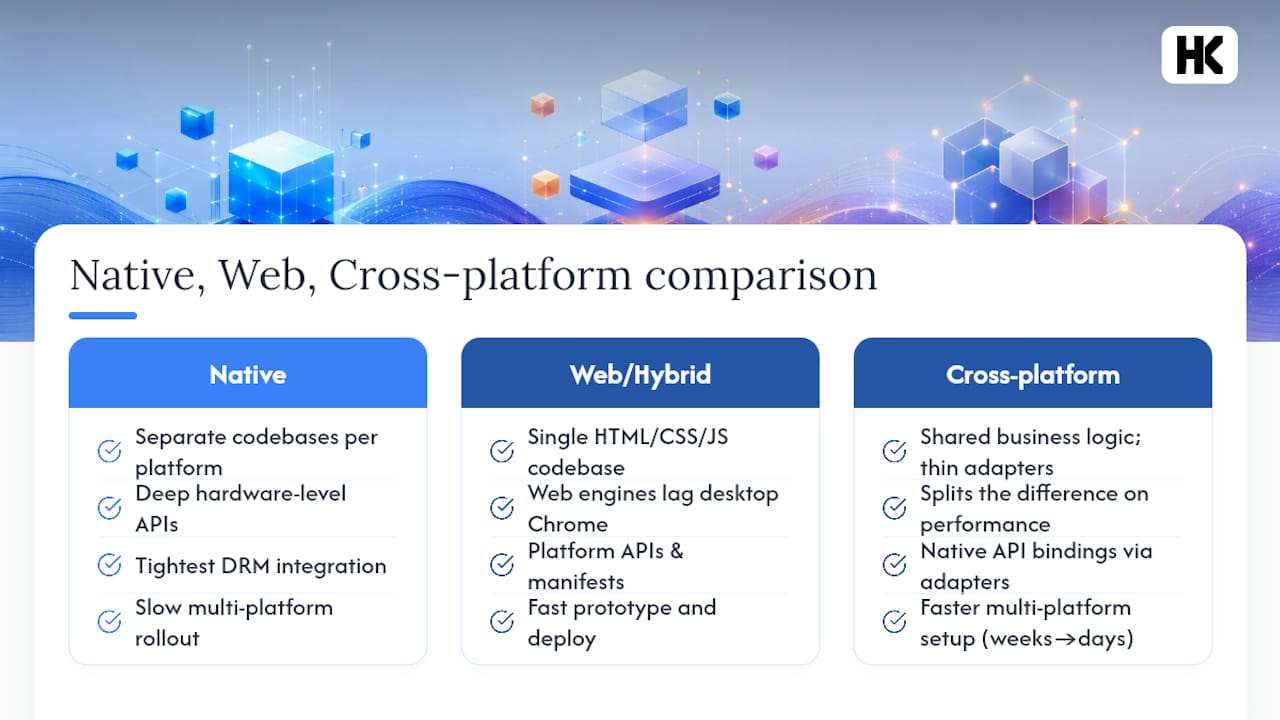
Web and hybrid apps run on the web engines built into Tizen and webOS. A single HTML, CSS, and JavaScript codebase can deploy to both with moderate platform-specific adjustment, and Samsung's own quick-start guide documents the Tizen Web project structure, the required config.xml manifest, and platform APIs like TVWindow and TVAudioControl in enough detail to get a working prototype running fast. The tradeoff is real: older TV web engines run several generations behind desktop Chrome in JavaScript performance, so animation-heavy or state-management-heavy apps can feel sluggish unless you budget carefully for it.
Cross-platform toolkits built on React and TypeScript try to split the difference. A toolkit like @smart-tv/ui bundles TV-specific navigation and focus management, video player integration, and a CLI scaffold that can shrink initial setup from weeks to days. These toolkits work best when your app's business logic (catalog browsing, search, account management) is shared across platforms, with a thin platform adapter layer underneath handling the differences in input handling and native API bindings.
Structuring code this way matters more than most teams expect going in. Keep business logic, data fetching, and state management in a shared layer, then isolate platform-specific concerns, DRM bindings, remote input mapping, native player APIs, behind adapter interfaces. This is the same architectural discipline that pays off in any modular app architecture, and it's what lets a team add a fourth platform in weeks instead of months once the first three are stable.
What Do You Need to Know About Streaming and DRM on TV?
Playback reliability makes or breaks a smart TV app faster than any other single factor, and it's the one area where cutting corners shows up immediately in user reviews.
Adaptive bitrate streaming through HLS or DASH is standard on every platform. The question is which player API handles it. Samsung's native AVPlay API gives you the tightest integration with Tizen's hardware decoding and DRM stack. For web-based builds, standard HTML5 video combined with Shaka Player covers most cross-platform needs, handling adaptive bitrate switching, subtitle rendering, and DRM license requests through a single, well-documented library that works across Tizen Web, webOS, and most Chromium-based TV browsers.
DRM adds a layer of complexity that's easy to underestimate during planning. Widevine, PlayReady, and FairPlay each have different native support levels across platforms, and licensing content through a major studio almost always mandates a specific DRM scheme, which in turn constrains your player choice. This is one of the strongest reasons to nail down content licensing requirements before locking in your technical stack. In several cases, secure playback genuinely requires the platform's native API rather than a web-layer workaround, particularly for premium HD or 4K content where studios mandate hardware-level content protection.
Before shipping playback, work through this checklist:
- Define a buffering strategy that tolerates network drops without stalling the entire playback session.
- Tune adaptive bitrate thresholds specifically for your target device tier, not just for a high-end reference TV.
- Handle subtitle rendering and timing across every codec and container your content library uses.
- Map remote control play, pause, and scrub behavior explicitly. TV remotes send different key codes than mobile touch events.
- Instrument playback telemetry (start time, rebuffer count, bitrate switches) from day one, not after your first wave of complaints.
Pro Tip: Cap your video buffer size deliberately rather than letting the player default to whatever the library ships with. Low-memory TV models, and there are a lot of them still in active use, will throttle or crash under buffer sizes tuned for a flagship device. A buffer that's too generous on a three-year-old budget TV causes more playback failures than a network that's genuinely too slow.
How Should You Test a Smart TV App Before Launch?
The practical flow runs in four stages: unit tests for business logic, UI tests on platform emulators or simulators for layout and focus behavior, end-to-end testing on physical lab devices for the scenarios that only show up on real hardware, then a limited pilot release to a small group of real users before a full rollout. Skipping straight from emulator to full launch is where most smart TV app development projects run into trouble post-release.
Here's a test matrix worth copying directly into your QA plan:
- Focus navigation across every screen — Priority: critical. Environment: emulator plus at least one physical TV. Pass criteria: focus never gets stuck, never disappears, and always moves in a logical direction.
- Remote input edge cases (long-press, double-press, back button from every screen) — Priority: critical. Environment: physical device. Pass criteria: no unhandled input states, no crashes.
- Playback interruption handling (channel change, HDMI source switch, incoming call on a paired mobile device) — Priority: high. Environment: physical device. Pass criteria: playback resumes or fails gracefully with a clear message.
- App suspend and resume — Priority: high. Environment: physical device, real-world standby cycle. Pass criteria: state restores correctly, no memory leak on repeated cycles.
- Low-memory and low-end device behavior — Priority: high. Environment: oldest supported TV model in your device matrix. Pass criteria: no crash, graceful degradation of non-critical features.
- Firmware update regressions — Priority: medium. Environment: physical device post-firmware update. Pass criteria: app launches and core flows work unchanged.
- Store certification dry run — Priority: critical. Environment: staging build submitted to platform review tools. Pass criteria: passes automated and manual review checks before public submission.
Automate what you reasonably can, unit tests, UI snapshot tests, basic navigation flows, on emulators and continuous integration. Reserve physical devices for the scenarios that genuinely require hardware: remote input timing, thermal behavior under sustained playback, and memory pressure on your oldest supported model. Guides on TV app testing workflows consistently flag real-device testing as the step teams skip under deadline pressure, and it's almost always the step that comes back to bite them.
What Are the Packaging and Submission Requirements for Each Store?
Every platform store has its own manifest requirements, asset specifications, and signing process, and getting any one of them wrong is the single most common reason first submissions get bounced back.
For Android TV, Google requires your app to declare CATEGORY_LEANBACK_LAUNCHER in the manifest so the platform knows to surface it in the TV launcher, and the official Android TV setup guide walks through the exact manifest structure, the required home screen banner dimensions, and icon asset specifications. Missing or incorrectly sized banner assets are a frequent rejection cause.
For Samsung Tizen, the process runs through the Samsung Seller Office portal, and it requires a signed certificate tied to your developer account before you can submit a build for review. Samsung's quick-start documentation covers the certificate generation process, the config.xml manifest structure, and the emulator and simulator tools you'll use to validate a build before submission.
For webOS, LG requires localized banner assets if you're targeting multiple regions, and the submission review checks navigation and focus behavior closely, similar in spirit to Samsung's UX checklist but with its own distinct rejection patterns around app lifecycle handling.
Roku and Amazon Fire TV each run their own store review processes, with Roku's Channel Store focusing heavily on playback stability and Amazon's Appstore review checking remote input handling and Fire TV-specific UI guidelines.
The most common rejection reasons across every platform cluster around three issues: incomplete or missing focus states on interactive elements, incorrectly sized or missing localized assets, and navigation dead ends where a user gets stuck with no way back. Catch all three in your own pre-submission QA pass and you'll clear most first-round reviews.
Once you're past initial approval, treat releases as an ongoing operational concern rather than a one-time event. Stage rollouts to a percentage of your user base where the platform supports it, version your builds clearly, and keep a rollback plan ready for the first 48 hours after any release. TV app update cycles move slower than mobile, since users don't check for updates as actively, so a bad release lingers longer if you don't catch it fast.
How Do You Optimize a Smart TV App for Low-Power Hardware?
TV hardware runs years behind flagship phones on raw compute, and a huge share of active smart TVs are running SoCs that were mid-range at best when they shipped. Budgeting for that gap from day one saves you a painful optimization pass later.
Expect limited CPU headroom, a JavaScript VM on older web engines that runs meaningfully slower than desktop Chrome, constrained GPU capability for animations and transitions, low available memory (often under 1.5GB usable for your app), and thermal throttling on devices that run hot during long playback sessions.
Concrete tactics that actually move the needle:
- Set a hard asset size budget per screen and enforce it in your build pipeline, not just in code review.
- Lazy-load screens and data rather than initializing your entire navigation tree on app launch.
- Cut animations that don't serve a functional purpose. Every unnecessary transition costs frame budget you don't have.
- Virtualize long lists and grids so you're never rendering more items than fit on screen at once.
- Target 30fps as your baseline for most UI work, reserving 60fps ambitions for hardware you've confirmed can sustain it.
Track startup time, time-to-first-frame for video, frame drop rate, and memory pressure as your core performance metrics. These four numbers tell you more about real-world app health than almost anything else you could instrument.
Pro Tip: Build your telemetry pipeline to collect aggregate performance metrics without attaching them to a persistent user identifier unless you have explicit consent for that level of tracking. Lightweight, privacy-respecting telemetry, tracking timing and error rates without personal data, tells you almost everything you need operationally, and it keeps you clear of consent complications under GDPR without slowing down your data pipeline. This kind of lean instrumentation approach maps directly to the monitoring practices that keep any app stable as it scales.
What Does GDPR Compliance Look Like for a Smart TV App?
A smart TV app collecting any user data, viewing history, account information, even anonymized usage analytics, falls under GDPR if it has EU users, and the shared-device nature of TVs adds wrinkles that mobile apps don't have to solve.
The core legal constraints that matter in practice: you need a clear, on-screen consent mechanism before collecting anything beyond strictly necessary functional data, you need to minimize what you collect to only what the feature actually requires, and you need a defined data retention policy rather than storing everything indefinitely by default. Where the app processes data through AI features, EU AI Act risk categorization and EU-resident inference become relevant considerations for how and where that processing happens.
On a TV screen, consent UX needs its own approach. Long legal text that works fine on a phone becomes unreadable at ten feet and unusable with a four-direction remote. Keep consent screens short, present a clear binary choice rather than a nested settings maze, and make privacy settings reachable again later without burying them three menus deep.
Operationally, a few defaults protect you. Ship with minimal telemetry on by default and let users opt into more, not the reverse. Document exactly what data flows where, especially if any processing happens outside the EU. And build consent flow testing into your standard release QA checklist rather than treating it as a one-time launch task, since UI changes downstream can silently break a consent flow that worked fine at launch.
Pro Tip: On multi-user TVs, always show which profile or account is active somewhere persistent on screen, not buried in a settings menu. Shared-device households run into privacy and personalization problems fast when the app can't clearly signal whose viewing history or preferences are currently in play, and that ambiguity creates real GDPR exposure around whose consent actually applies to what's being collected in that session.
How Long Does It Take and What Does It Cost to Build a Smart TV App?
An MVP that proves out core navigation and basic playback on a single platform typically moves through three milestones: a navigable prototype, then basic playback integration, then a store-ready build with the required assets and certificates in place. A production release layers on full device QA, DRM integration, localization, and analytics on top of that foundation, which is why the jump from MVP to production release is usually bigger than teams expect going in.
Budget drivers worth planning around before you scope a project: how many platforms you're targeting in parallel, DRM licensing costs if your content requires them, video CDN and streaming infrastructure costs, the device lab or physical hardware needed for real QA, and the balance of design hours versus engineering hours your app actually needs. Certification effort varies by platform too. Tizen and webOS submissions generally take longer to clear review than Android TV given the manual UX checklist review Samsung runs.
The highest-leverage places to invest budget are navigation reliability and playback stability, not visual polish. A beautifully designed screen that stutters on playback or loses focus state on a remote press gets uninstalled fast. A plainer screen that never breaks navigation earns patience. If you're choosing between a single-platform MVP and a parallel multi-platform launch, the single-platform path almost always wins for validating a concept, since it lets you catch the expensive lessons, DRM licensing surprises, performance ceilings, review process friction, once instead of three times simultaneously.
What Belongs on Your Pre-Launch QA Checklist?
Before any submission or pilot release, run through this list end to end rather than spot-checking the areas you're most confident about.
- Confirm every interactive element has a visible, distinct focus state, tested on the actual TV, not just in a browser preview.
- Walk the complete navigation map and confirm the back button behaves predictably from every screen.
- Verify all icon, banner, and localized asset sizes against the exact specifications for each target platform.
- Test playback stability across every codec and DRM configuration your content library actually uses.
- Confirm remote, voice, and gamepad input all behave correctly wherever your app supports them.
- Check basic accessibility: text contrast, minimum readable font sizes, and screen reader support where the platform offers it.
- Verify your consent flow triggers correctly and that privacy settings remain reachable after initial setup.
For your actual rollout, start with a small pilot group rather than a full public release, watch crash and error telemetry closely for the first week, and keep a rollback build ready so a bad release doesn't sit live for days while you scramble to patch it.
How I Approach Smart TV and SaaS Platform Projects
Smart TV projects fail less often because of bad code and more often because of scope creep across too many platforms at once before the first one is proven. That's the pattern I watch for most closely when a founder or technical lead comes to me with a multi-platform TV ambition on day one.
My delivery model is built around fixed-price tracks rather than open-ended hourly work, because open scopes are exactly what let TV projects balloon across five platforms before any of them actually ship. Production-ready features move through 2-week sprints. Full MVP builds run 4 to 12 weeks depending on scope, with a clear milestone structure from prototype to store-ready build. Every EU-facing project gets built with GDPR-aware architecture and EU AI Act categorization baked in from the start, not retrofitted after a compliance review flags it.
Having shipped platform work for organizations like BMW, Deutsche Bahn, IBM, and Bundesrechenzentrum Austria, and having built my own SaaS products end-to-end, I've learned the projects that go smoothly are the ones where scope gets locked to one platform, one core flow, and one proof of remote-first usability before anything else gets greenlit. You can see the full range of engagement tracks and proof points at Hanadkubat.
Need a Fixed-Price Partner for Your Smart TV Build?
If you're a technical founder or CTO trying to decide between a native Tizen build and a cross-platform prototype, the fastest way to de-risk that decision is a short scoping engagement rather than another week of internal debate. Hanadkubat runs SaaS MVP builds from €18,000 on a 4 to 12 week fixed-price timeline, with a strategy sprint (€1,500) available first if you need the platform decision and technical scope validated before committing to a full build.
For teams that already have a SaaS product and need AI features, RAG-based search, agentic workflows, cost-optimized inference, layered into an existing platform, that runs through the AI integration track: production-ready features shipped in 2-week sprints at €4,500 each, or an AI audit with a prioritized roadmap for €1,500 if you need clarity on where AI actually pays off before you commit engineering budget. Every engagement is EU AI Act aware and built around EU-resident inference where data sovereignty matters to your client base.
The next step is a scoping call: bring your target platform list and your DRM or content licensing constraints, and walk away with a concrete platform recommendation and a milestone plan. Hanadkubat to get a fixed price and a delivery date before you write a single line of code.
Platform Docs and Toolkits Worth Bookmarking
Keep these open in a tab through your entire build cycle, since you'll return to most of them repeatedly during development, testing, and submission.
- Samsung Design Principles — the core reference for TV-specific layout, legibility, and navigation rules.
- Samsung UX Checklist — the exact requirements Samsung's review team checks during app certification.
- Samsung Quick-Start Guide — manifest structure, certificate signing, and emulator setup for Tizen Web.
- Android TV Developer Guide — manifest flags, launcher declarations, and Leanback/Compose for TV setup.
- @smart-tv/ui toolkit — a React and TypeScript component set for cross-platform navigation and player integration.
- Singleclic on system interface design — general interface principles that translate directly to grid-based TV layouts.
Sources
FAQ
How Do I Build a Smart TV App?
Start by picking a primary platform based on where your audience already watches, then build a prototype that proves out four-direction navigation and basic playback before writing additional features. Test that prototype on a physical device early, since emulators miss remote input lag and memory constraints that show up only on real hardware.
How Do You Develop Apps for Different TV Platforms?
Native development means writing separately against each platform's SDK (Tizen, Android TV's Leanback or Compose for TV, BrightScript for Roku, Swift for tvOS), while web and cross-platform approaches share one codebase across Tizen Web, webOS, and similar web-engine platforms. Most teams start with the platform their audience already owns, then decide whether to expand natively or through a shared cross-platform layer.
Do Smart TVs Come With Apps Already Installed?
Most smart TVs ship with a preloaded app store and a set of default streaming apps installed by the manufacturer. Beyond that, users add apps from the built-in store the same way they would on a phone or tablet.
Can You Add New Apps to a Smart TV After Purchase?
Yes. Every major smart TV platform, including Samsung Tizen, LG webOS, Android TV, Roku, Amazon Fire TV, and Apple tvOS, includes an app store where users install additional apps after setup, provided the app has been submitted and approved through that platform's review process.
How Long Does Smart TV App Development Take?
An MVP that proves out core navigation and playback on one platform typically moves through a prototype phase, a playback integration phase, and a store-ready phase before submission. A full production release with DRM, localization, and analytics takes meaningfully longer, since certification and device testing add time that a single-platform prototype doesn't need to account for.