
TL;DR:
- Press
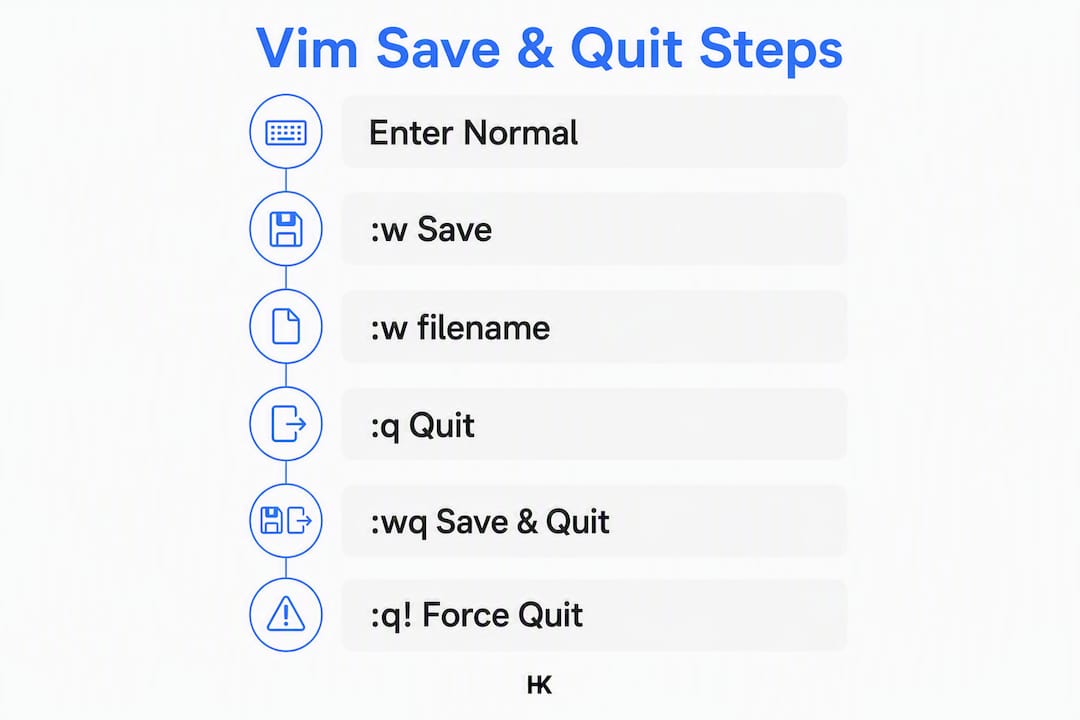
Escto switch to Normal mode before issuing any exit command. Use:wq,ZZ, or:xto save and quit, or:q!andZQto discard changes and exit. When multiple buffers are open,:wqasaves all and exits, while:qa!force-quits everything.
Press Esc first — always. That single keystroke moves you from Insert mode to Normal mode, where every exit command actually works. From there, type :wq and hit Enter to save and quit. If you want to discard changes, type :q! instead. For the fastest possible exit, skip the colon entirely: ZZ saves and quits, ZQ quits without saving, both requiring no Enter.
:wq— write and quit (standard)ZZ— save and exit without the colon or Enter key:q!— force quit, discard all changesZQ— same as:q!, two keystrokes
Pro Tip: If you're unsure which mode you're in, press Esc two or three times. It's harmless in Normal mode and will always pull you out of Insert mode. The -- INSERT -- indicator at the bottom of the screen disappears when you're back in Normal mode.
Press
Esc, confirm the status bar is clear, then issue your exit command. That three-second check prevents 90% of "why won't Vim quit" moments.
Table of Contents
- Vim save and quit: the full command reference
- Why you can't quit and what to do about it
- Why Vim blocks quitting and when to force it
- Practical workflows for dev teams
- About the author
- Key Takeaways
- Vim exit commands in production: a candid note
- Useful sources
- FAQ
Vim save and quit: the full command reference
The table below covers every common scenario. One command per row, no ambiguity.
| Command | What it does |
|---|---|
:w | Save (write) without exiting |
:w backup.conf | Save to a different filename |
:wq | Save and quit current buffer |
:x or ZZ | Save only if changed, then quit |
:q | Quit if no unsaved changes exist |
:q! or ZQ | Force quit, discard changes |
:wa | Save all open buffers |
:wqa | Save all buffers and quit |
:qa | Quit all buffers (no unsaved changes) |
:qa! | Force quit all buffers, discard everything |
:w !sudo tee % | Write a root-owned file opened without sudo |
A note on :x vs :wq: both save and quit, but :x writes only if changes were made, preserving the file's modification timestamp when nothing changed. In audit-sensitive environments, that distinction matters.
Pro Tip: :w backup.conf saves the current buffer to a new file without closing the original. Useful before making risky edits.
Why you can't quit and what to do about it
Most Vim exit failures fall into four categories. Here's how to diagnose and fix each one.

Stuck in Insert mode. The -- INSERT -- indicator shows at the bottom. Press Esc (or Ctrl-) repeatedly until it disappears, then issue your exit command. Typing :wq while in Insert mode just inserts the literal text :wq into your file.
E37: No write since last change. Vim is blocking the quit because you have unsaved edits. Two options: type :wq to save and exit, or :q! to [discard and exit. There's no middle ground.
Read-only file or permission denied. If you opened a system file without sudo, :wq will fail. Use :w !sudo tee % to pipe the buffer through sudo and write it as root. If you have write permission but the file is flagged read-only, :wq! forces the write.
Swap file warning on open. Vim found a .swp file from a previous crashed session. If you want to recover the previous edits, choose R at the prompt. If you want to start fresh, choose D to delete the swap file, or quit with :q! and delete the .swp file manually.
Multiple buffers open. :q closes only the current buffer, not the session. Use :qa to quit all buffers cleanly, or :qa! to force-quit everything. To close a single buffer without quitting Vim, use :bd (buffer delete). The distinction between :q and :qa trips up developers working with split windows constantly.
Mistyped Ex command. Press Ctrl-C to abort whatever you started typing at the : prompt and return to Normal mode.
When Vim refuses to quit, it's not broken. It's protecting you from data loss — a deliberate design choice, not a bug.
Why Vim blocks quitting and when to force it
Vim's refusal to exit with unsaved changes is intentional. The editor forces an explicit choice: save or discard. No silent data loss.
When to force-quit with :q! or :qa!:
- You opened the wrong file by accident
- You're aborting a Git commit message (
:q!returns you to the Git prompt without committing) - You made experimental edits you don't want
- Emergency shutdown of a multi-buffer session
When to save first with :wq or :w:
- Edits are intentional and part of a deploy or commit step
- You're confirming a Git commit message (
Escthen:wq) - You're writing a config change that needs to persist
One detail worth knowing: :wq always writes the file, even if nothing changed, which updates the modification timestamp. If that timestamp matters for your audit trail or build system, use :x or ZZ instead.
Practical workflows for dev teams
Small conventions here prevent real friction in Git flows and production ops.
- Always Esc-check before typing Ex commands. Make it a reflex. One extra
Esccosts nothing; typing:wqinto a file costs a revert. - Standardize Git commit handling. Write the commit message, press
Esc, then:wqto confirm. Use:q!to abort. Document this in your onboarding checklist — it's the most common place new engineers get confused. - Use
:bdfor buffer management. When editing multiple files, close individual buffers with:bdrather than:q. Reserve:qafor ending the session. - Run
:wabefore test runs. If your test runner watches files, unsaved buffers won't trigger it.:wasaves everything in one keystroke. - Document
:w !sudo tee %in your runbooks. Engineers forgetsudobefore editing/etc/files more often than anyone admits. A one-liner in the ops runbook saves a full re-open.
Pro Tip: Keep .vimrc mappings minimal. Aggressive auto-commands that override quit behavior (like auto-saving on BufLeave) can mask real errors and make debugging harder in production environments.
About the author
Hanad Kubat is a senior independent engineer based in Vienna, delivering AI integrations and SaaS MVPs for B2B SaaS companies across the US and DACH region. His engineering background spans BMW, Deutsche Bahn, and Bundesrechenzentrum Austria. He has built and shipped his own SaaS products end-to-end.
Standardize one quit/save convention across your team, document
:w !sudo tee %in your ops runbook, and your engineers will spend zero time debugging Vim exits in production.
- Full service details and fixed-price engagements at hanadkubat.com
- US and DACH teams: production onboarding docs should reflect your governing market's compliance requirements
Key Takeaways
Pressing Esc before any exit command is the single habit that prevents most Vim exit failures.
| Point | Details |
|---|---|
| Always enter Normal mode first | Press Esc (or Ctrl-) before typing any exit command. |
| Save and exit | Use :wq or ZZ; use :x when preserving timestamps matters. |
| Quit without saving | Use :q! or ZQ to discard changes and exit immediately. |
| Multiple buffers | Use :wqa to save all and quit; :qa! to force-quit everything. |
| Root-owned files | Use :w !sudo tee % when you opened a system file without sudo. |
Vim exit commands in production: a candid note
Every team I've seen onboard engineers to a Linux-heavy stack hits the same wall: someone gets stuck in Vim during a live incident, panics, and either kills the terminal or corrupts a config. The fix isn't a Vim tutorial. It's two lines in the onboarding doc and one line in the Git commit guide. Treat :wq, :q!, and :w !sudo tee % as operational knowledge, not editor trivia, and you'll never lose time to this again.
Useful sources
- [Vim help: editing.txt — official reference for buffer, window, and session quit commands (
:q,:qa,:wqa,:bd) - Linuxize: How to Save a File and Exit Vim — covers
:wq,:q!, and thesudo teewrite pattern with clear examples - Devcrea: How to Save and Exit Vim — explains
:xvs:wqand the timestamp difference; good for audit-sensitive workflows - Stack Overflow: How do I exit Vim? — community-sourced edge cases including Ex mode behavior and
Ctrl-Cabort - Linuxconfig: Save and Exit in Vim — concise basics reference for
:w,:wq, and:q!
FAQ
What is the fastest way to quit and save Vim?
Press Esc to enter Normal mode, then type ZZ (Shift+Z twice). This saves and exits without a colon or Enter key, making it the fewest keystrokes of any save-and-quit method.
How do I quit Vim without saving changes?
Press Esc, then type :q! and hit Enter. The ! forces Vim to exit and discard all unsaved modifications.
What does :wq do differently than :x?
:wq always writes the file, even if nothing changed, updating the modification timestamp. :x writes only if changes were made, leaving the timestamp untouched when no edits occurred.
How do I quit Vim when multiple files are open?
Use :wqa to save all open buffers and quit, or :qa! to force-quit all buffers without saving. Plain :q only closes the current buffer.
How do I save a root-owned file I opened without sudo?
Type :w !sudo tee % in Normal mode. This pipes the buffer through sudo tee and writes it as root, prompting for your password in the terminal.