

Context management is the deliberate assembly and lifecycle control of every token an LLM sees during a task. Done right, it gets you three things: fewer hallucinations from context rot, lower inference cost per task, and agents that stay coherent over hundreds of turns instead of dozens. The levers that get you there are compaction, retrieval, demand paging, and KV cache optimization. Every one of them is covered below.
TL;DR:
- Effective context management involves systematically assembling, summarizing, and evicting tokens to prevent context rot and reduce costs, especially in long sessions.
- Organizing memory into four levels—current window, working set, summaries, and persistent storage—clarifies what information is retained and when to retrieve it.
- Techniques like compaction, demand paging, and KV cache compression help optimize throughput, lower latency, and control token volume at scale.
- Using just-in-time retrieval for large or variable data minimizes token waste and improves agent relevance, while static documents are best preloaded.
- Transitioning from prompt tweaks to system-level context engineering is crucial for maintaining agent reliability beyond a few dozen turns.
Table of Contents
- What Is LLM Context Management, and How Does It Differ From Prompt Engineering?
- Why Context Rot and Cache Misses Quietly Wreck Agent Reliability
- The Four Layers of LLM Memory Every Agent Architecture Needs
- How to Decide What Gets Retrieved and When
- Compaction, Paging, and KV Compression: The Core Techniques
- Frameworks Built for Long-Horizon Agents
- A Sprint-by-Sprint Checklist for Shipping Context Management
- What Actually Breaks When Prototypes Go to Production
- Where to Focus in the Next One to Three Sprints
- How I Handle Context Management on Client Projects
- A Fixed-Price Way to Fix Context Problems Without Hiring a Team
- Sources
- FAQ
What Is LLM Context Management, and How Does It Differ From Prompt Engineering?
Prompt engineering optimizes a single string. Context management engineers a system: what enters the window, what gets summarized, what gets evicted, and what persists across sessions. Anthropic's engineering team frames context engineering as the successor to prompt engineering, treating the model's entire state as the surface you design, not just the instruction at the top.
You know you've crossed from prompt tweaking into context engineering territory when any of these apply:
- The agent runs multiple turns and needs to remember decisions from ten steps ago.
- It calls tools whose outputs must feed back into later reasoning without bloating the window.
- A single session can run for hours or spans multiple sessions tied to one user or project.
Here's where prompt fixes fail. A support bot that summarizes a ticket well on turn one starts contradicting itself by turn thirty, because nobody built a mechanism to compress or prune the growing history. A coding agent that writes clean code on a small repo starts hallucinating file paths on a large one, because the context window filled with stale tool output nobody evicted. Rewriting the system prompt doesn't fix either problem. Rewriting the pipeline that assembles the context does.
Why Context Rot and Cache Misses Quietly Wreck Agent Reliability
Context rot is what happens when a model's attention degrades as the input grows, even within a technically valid window. Instructions buried at token 40,000 get followed less reliably than the same instructions at token 4,000. I've watched an agent ignore a hard constraint stated early in a 60,000 token session simply because eight tool calls buried it under noise by the time the model needed to use it.
The cost side compounds this. Every extra token in your context increases KV cache size, which increases memory pressure and latency on the decode step—tools like the LLM Readability Checker can help optimize token density and reduce token volume. Repeated system prompts and unchanged tool headers on every turn are the most common structural waste I trace in production systems.
Statistic callout: In a preliminary evaluation, a database-inspired context assembly pipeline called ContextPipe reduced total token volume, reduced LLM calls, and improved response time compared with naive append-only context construction. That's the gap between "it works in the demo" and "it works at scale," and it comes entirely from how context gets assembled, not from a bigger model.
The Four Layers of LLM Memory Every Agent Architecture Needs
Every serious context system I've built or audited maps onto four memory levels, and confusing them is the single most common architecture mistake I see in handed-off prototypes.
- L1, the generation window: the literal tokens the model attends to on this call, including system prompt, recent turns, and any injected retrieval results.
- L2, the working set: the curated subset of session history and tool results the agent actually needs right now, held outside L1 until it's pulled in.
- L3, session summaries: compacted representations of earlier turns, generated once and reused instead of replaying raw transcript.
- L4, cross-session persistent store: durable memory tied to a user, project, or account that survives beyond a single session, usually backed by a database or vector store.
The KV cache sits underneath L1 as a performance layer, not a memory tier: it caches the key/value projections for tokens already processed so the model doesn't recompute them on every new token. This is why dynamic memory management techniques like vAttention report up to roughly 1.97x faster token generation and up to 3.92x faster prompt processing compared to older paged-attention baselines. Cache-friendly context assembly, meaning stable prefixes and minimal mid-context edits, is a throughput lever, not just a cost lever.
Map your agent's actual components onto these levels and the design gets obvious fast: system prompt and active tool schema live in L1 permanently, recent tool results live in L2 until compacted, older turns get pushed to L3 as summaries, and anything the user would expect the agent to "remember next time" belongs in L4.
How to Decide What Gets Retrieved and When
Pre-loading context (stuffing likely-relevant documents into the prompt upfront) is simpler to build but wastes tokens on anything the model doesn't end up needing. Just-in-time retrieval, where the agent calls a search or lookup tool mid-task, costs an extra round trip but keeps L1 lean. I default to just-in-time for anything beyond a handful of small, static reference documents.
- Pre-load only what's small, stable, and needed on nearly every turn, like a short style guide or a fixed set of business rules.
- Retrieve just-in-time for anything large, variable, or query-dependent, such as document search or database lookups tied to the current user question.
- Pin to L1 only after a retrieval result proves relevant across multiple turns, not on the first hit.
Tool output design matters as much as retrieval strategy. A tool that returns a raw JSON dump of a database row wastes tokens on fields the model never uses. Structure the return shape around what the model actually needs to reason with, not around what's convenient for your backend to emit. LangChain's own context engineering documentation covers middleware hooks that let you intercept and trim tool output before it ever reaches the model, which is the cleanest place to enforce this discipline.
Pro Tip: Rank retrieval candidates by recency and by how often they've been useful in past turns, not just by semantic similarity score. A document that scored well on cosine similarity but never got referenced in the last five turns is a strong eviction candidate.
Compaction, Paging, and KV Compression: The Core Techniques
Compaction comes in two flavors. Model-initiated compaction lets the agent itself decide when to summarize, which aligns compression with the agent's actual reasoning state instead of a fixed schedule. Scheduler-initiated compaction fires on a fixed rule, like every ten turns, which is simpler to implement but compresses at arbitrary moments that might cut off a chain of reasoning mid-thought.
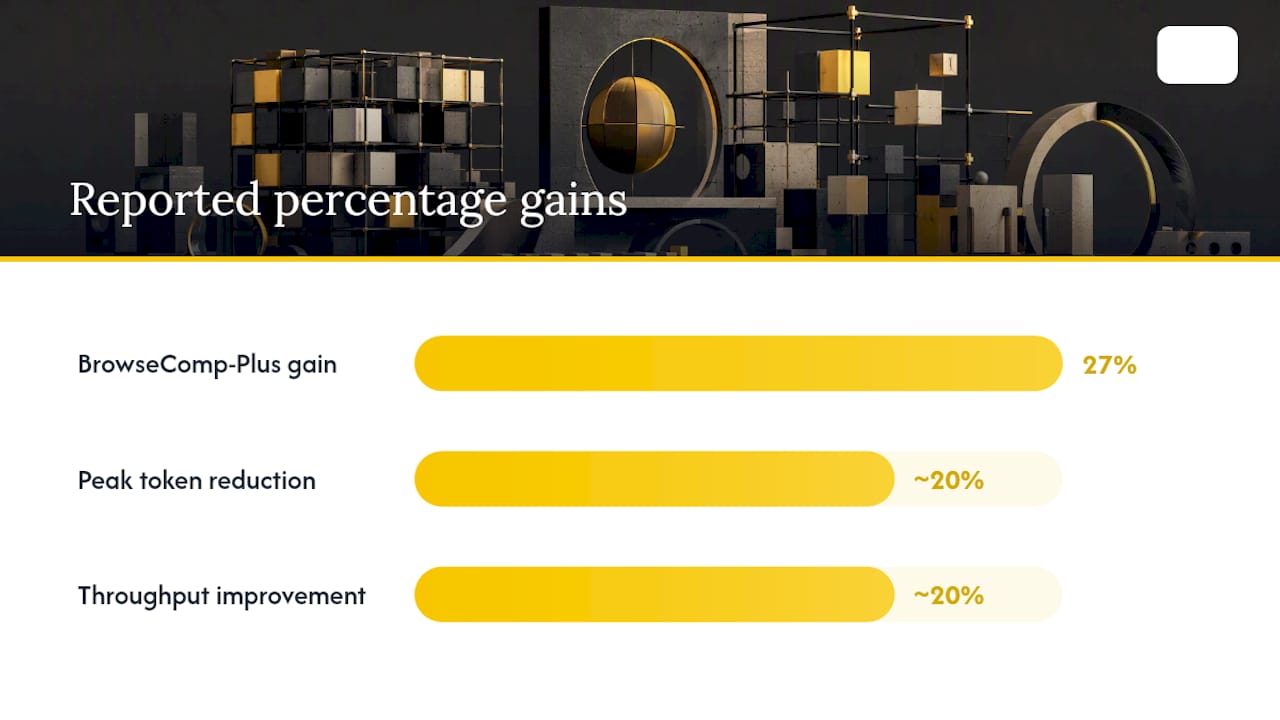
Agentic Context Management (ACM) is the clearest published pattern for this. The agent calls explicit tools, typically something like manage_context or query_memory, and the framework preserves raw messages in an external store while summaries carry back links to those identifiers. That's a lossless offload design: nothing is discarded, it's just moved out of the active window with a pointer left behind. Reported results are strong: a 27% relative gain on the BrowseComp-Plus benchmark and roughly a 20% reduction in peak token usage.
Demand paging borrows directly from operating systems. A proxy layer sits between the agent and the model, detects when content is "faulted in" (needed but not present) or can be evicted (present but unused), and manages the working set accordingly. Cooperative cleanup tags let the model itself flag content it no longer needs, which is more precise than any fixed eviction policy.
- KV cache compression through quantization or pruning trades a small accuracy cost for real throughput gains.
- Elastic memory approaches that let activations and KV caches borrow memory from each other reported about a 20% improvement in overall throughput.
- Mixture of In-Context Experts (MoICE) is a model-side fix: it routes rotary position encoding angles per token and head, improving positional awareness on long contexts without retraining the whole model.
Each technique targets a different bottleneck. Compaction reduces what you send. Paging manages what stays resident. KV compression reduces what memory each resident token costs. Most production systems eventually need all three.
Frameworks Built for Long-Horizon Agents
Three research directions are worth studying directly if you're building anything that runs for more than a few dozen turns.
- ACM (Agentic Context Management) gives the agent tools to compress and offload its own context losslessly, using a teacher-student training pipeline so the compression policy improves over time rather than following a fixed heuristic.
- ContextPipe treats context assembly like a query plan: a Plan, Bind, Optimize, Execute, Feedback pipeline that produces EXPLAIN ANALYZE-style traces, letting you audit exactly which retrieval step or history slice consumed which share of your token budget.
- Demand-paging proxies, in the style of the Pichay architecture, sit between agent and model and evict or fault in content based on live usage, with cooperative cleanup tags that let the model participate in its own memory management. Production replay evaluations in this line of research have reported context consumption reductions up to 93% in specific deployment scenarios, though that ceiling depends heavily on how repetitive the underlying workload is.
What ties these together: none of them treat context as a single growing string. They treat it as a managed resource with an audit trail, which is exactly the shift you need to make in your own architecture before any of these techniques will pay off.
A Sprint-by-Sprint Checklist for Shipping Context Management
Sequence this by risk and payoff, not by what sounds impressive.
- Sprint 0: instrumentation, not architecture. Add token accounting to every LLM call, centralize prompt assembly into one function instead of scattering string concatenation across the codebase, and build a minimal EXPLAIN-style trace that logs what went into each call and why.
- Sprint 1: cheap wins. Implement short-term compaction on your longest-running conversations, tune your retrieval prompts to pull fewer, more relevant chunks, and measure the KV cache hit rate before and after. This is also where prompt caching pays off fastest, since a stable prefix across calls is nearly free to cache.
- Sprint 2: structural bets. Prototype an L2 pinning layer for your highest-value retrieval results, or a basic demand-paging proxy if your workload has clear "hot" and "cold" content. Run replay-based fault tests against real historical sessions before trusting either in production.
Operational controls belong in every sprint, not just the last one: set hard throttles on maximum context size per call, define retention windows for L3 and L4 stores so old summaries don't accumulate forever, and periodically test summary recall by asking the agent questions only answerable from compacted history. If it can't answer, your compaction is lossy in ways you haven't noticed yet. Pairing this with real production monitoring is what catches drift before a client does.
Pro Tip: Run your EXPLAIN-style trace against last week's most expensive session before you optimize anything else. You'll almost always find one repeated tool header or unchanged system block eating a third of the token budget, and fixing that single thing beats a week of architecture work.
What Actually Breaks When Prototypes Go to Production
The failure patterns repeat across projects: unbounded conversation history that grows until it silently truncates mid-reasoning, duplicated system prompts injected by both the framework and a custom wrapper, and tool results returned as ambiguous free text the model has to re-parse every time. None of these show up in a demo with five test messages. All of them show up by message fifty.
The fixes are small and high-leverage: strict, typed tool output contracts, aggressive prompt caching on anything static, and reproducible traces you can replay when a client asks why the agent did something odd last Tuesday. I recommend a fixed-price audit when a team already has a working prototype and needs someone to find and fix these specific rot points fast, rather than a slow internal rebuild.
Where to Focus in the Next One to Three Sprints
Cut obvious token waste first: dedupe system prompts, cache stable prefixes, trim tool output. That alone often recovers real cost with zero risk. Mid-term, prototype compaction and an L2 pinning layer to extend your agent's effective horizon. Invest in model-side changes like MoICE or custom KV compression only once instrumentation shows the window itself, not your assembly logic, is the bottleneck.
How I Handle Context Management on Client Projects
I run context work as a fixed-scope engagement: an audit first, using traces to find where tokens and reliability are actually leaking, then a working prototype of the fix, then handover. Scope gets frozen at kickoff, so there are no surprise invoices halfway through a compaction rewrite. Every line is written by me, no juniors, and you own the code from the first commit.
I don't promise a specific latency number or cost reduction before I've seen your traces. What I do promise is a working system, deployed, with the reasoning behind every architectural choice documented so your team (or the next developer) can maintain it. If that fits what you're dealing with, my contact page is the fastest way to start.
— Hanad Kubat
A Fixed-Price Way to Fix Context Problems Without Hiring a Team
If your agent is rotting past turn twenty or your token bill is climbing faster than your user count, you don't need to hire a platform team to fix it. Hanad Kubat runs a fixed-price audit that traces exactly where your context assembly is wasting tokens, then delivers a working prototype of the fix, not a slide deck of recommendations. The Prototype Audit runs €1,500 over three to five days and gets credited against the full build if you continue. Full context management rebuilds start at €12,000, priced that way because there's no agency overhead, no project-manager layer, and no offshore markup between you and the person writing the code. You get one name on the contract and demos, not decks, at every milestone. Start with the audit if you want a straight answer on where your token budget is actually going.
Sources
FAQ
Which LLM has the biggest context window?
Context window sizes change frequently as providers release new models, and the largest advertised window isn't always the one that performs best at that length due to context rot. Check each provider's current documentation rather than relying on a fixed number, since this shifts every few months.
How do I build context for an LLM?
Assemble it in layers: a stable system prompt and active tools in L1, a curated working set of relevant history and tool results in L2, and summaries or retrieval calls pulling from L3 and L4 only when needed. Avoid dumping full transcript history into every call by default.
Why is LLM context limited?
Every additional token increases the size of the KV cache the model must hold and process during generation, which increases both memory use and latency. Even within a technically supported window, attention to distant tokens degrades, which is why bigger windows don't eliminate the need for context management.
What is context rot in an LLM?
Context rot is the drop in a model's ability to follow instructions or recall facts as the context grows longer, even when the total token count is well under the stated window limit. It's most visible when an instruction placed early in a long session gets ignored later, buried under subsequent turns and tool output.
Should I use RAG or a long context window?
Long context windows handle small, static reference sets well but get expensive and rot-prone as inputs grow. Retrieval-augmented generation scales better for large or frequently changing knowledge bases because it pulls only the relevant slice into context on each call instead of holding everything permanently.