

A working app needs four things before anything else: an interface people can navigate without thinking, performance that doesn't lag or crash, authentication that protects user data, and analytics that tell you whether any of it worked. Everything else — push notifications, personalization, AI assistants, social sharing — is negotiable until those four are solid.
That's the whole verdict. Product teams that treat feature lists as a menu to work through, rather than a hierarchy to defend, ship late and ship bloated. Microsoft's guidance on app quality narrows a "good app" down to five traits: a well-designed interface, fast load time, strong data protection, responsive support, and useful integrations. Notice what's missing: no mention of AI, no mention of gamification, no mention of a slick onboarding carousel.
Here's the prioritized list to copy into your first spec:
- Core user flow — the one thing your app does, stripped of everything adjacent to it.
- Performance and stability — no crashes, no force-closes, loads under a few seconds.
- Authentication and session handling — login that works and doesn't leak sessions.
- Data protection and minimal permissions — collect only what the feature needs.
- Basic analytics and error logging — you can't fix what you can't see.
- Accessibility fundamentals — screen reader support and contrast ratios, not an afterthought.
Pro Tip: If you can't explain your MVP's core flow in one sentence, you have too many features already. Cut until the sentence gets easy to say.
Use this list as the spine of your first sprint plan. Anything not on it gets a ticket in a backlog, not a slot in week one.
Key Takeaways
The strongest app feature sets are small, prioritized by user impact and legal risk, and instrumented from the first sprint rather than after launch.
| Point | Details |
|---|---|
| Prioritize four core areas | UI/UX, performance, authentication and privacy, and analytics come before any engagement feature. |
| Load time is a hard constraint | Target around two seconds and treat five seconds as the abandonment threshold. |
| Score features with RICE | Rank reach, impact, confidence, and effort before committing sprint time to any feature. |
| Build GDPR into the spec | Document lawful basis and minimize permissions before writing code, not after a legal review. |
| Get a fixed-price scoping pass | Hanadkubat scopes and builds MVP feature sets with EU AI Act and GDPR-aware architecture from €18,000. |
Table of Contents
- What Are the Must-Have App Features for Any MVP?
- Which Features Add Real Value Once the Core Works?
- When Do AI, AR, and Deep Integrations Earn Their Place?
- How Do You Prioritize Features for an MVP?
- Native, Cross-Platform, or PWA: Which Fits Your Feature List?
- What Privacy and Security Controls Belong in Every Feature Spec?
- Which Metrics Prove a Feature Is Working?
- What Mistakes Break Apps After Launch?
- Feature Checklist You Can Paste Into a Spec
- How I Scope Feature Lists for DACH and EU SaaS Teams
- Need Help Scoping and Shipping the Right Feature Set?
- Sources
- FAQ
What Are the Must-Have App Features for Any MVP?
Users decide whether an app is good within the first few interactions, and they're judging it on stability and utility, not visual polish. Research into how people actually talk about apps found that the features they consider essential cluster around technical reliability, such as data confidentiality, smooth performance, and easy navigation, while aesthetic details like font choice rank as merely moderately important. That ordering should drive your build sequence.
Onboarding and the core flow
Your onboarding should get a first-time user to the app's core value in three screens or fewer. Skip account creation walls where possible; let people try the feature before asking for an email. Acceptance criteria: a new user reaches the primary action within 60 seconds of opening the app, with no more than one required form field before that point.

Interface and navigation
A well-designed UI isn't about visual trends. It's about predictable navigation patterns: a persistent tab bar, consistent back behavior, and touch targets sized for thumbs, not cursors. Complexity here is low if you use platform-native components; it rises fast if you build custom navigation from scratch.
Performance and launch speed
The same Microsoft guidance puts a hard number on this: apps should load quickly, ideally in a couple of seconds, with a maximum limit to avoid user abandonment. That's not a suggestion. Build performance budgets into your CI pipeline so a regression fails the build, not just the user's patience.
The most crucial features for user approval are smooth functioning, purpose-solving ability, performance, ease of use, and avoiding crashes — ranked above every aesthetic factor in structured user research.
Authentication and session management
Use an established auth provider (Firebase Auth, Auth0, or a platform-native solution) rather than rolling your own token logic. Acceptance criteria: sessions expire on a defined timeout, refresh tokens rotate, and failed login attempts are rate-limited. This is medium complexity to build correctly and high risk to get wrong.
Data protection and permission minimization
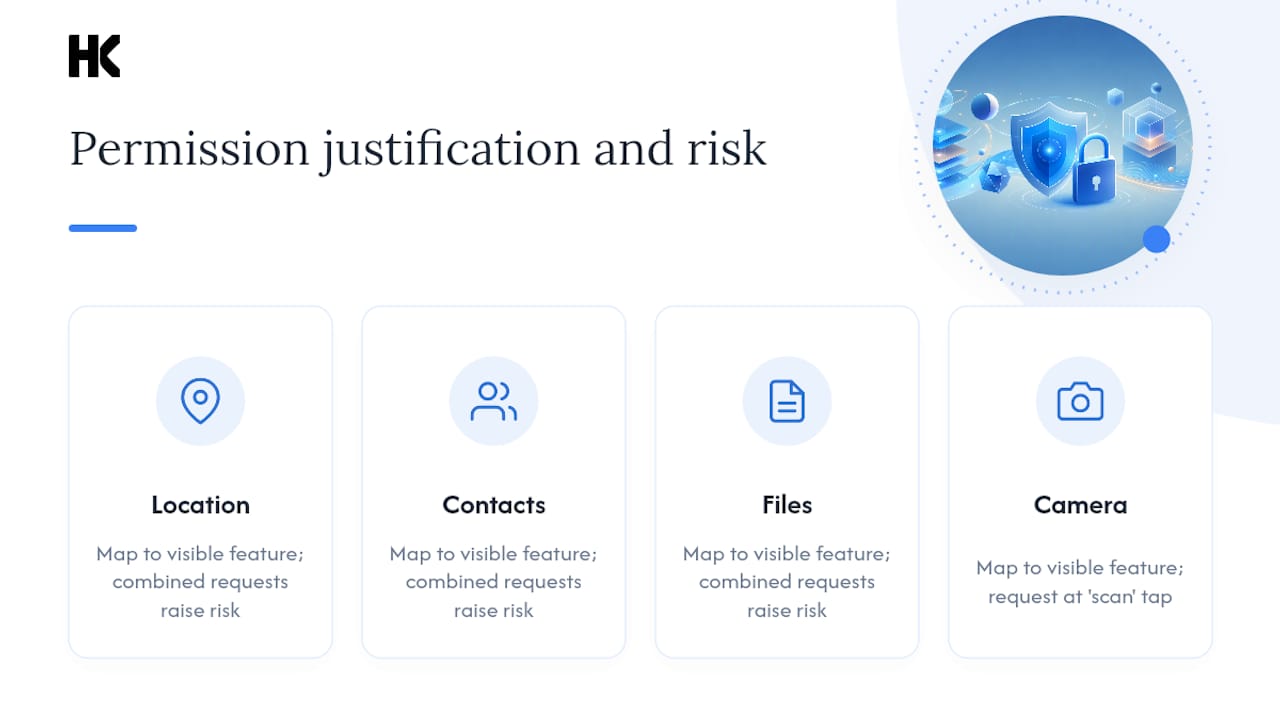
Every permission you request should map to a feature the user can see. Mobile apps that request combined permissions without clear justification, such as location plus contacts plus files, raise both user suspicion and regulatory risk. Ask for camera access at the moment the user taps "scan," not on first launch.
Offline resilience, analytics, and support
Basic offline handling, even just a graceful "you're offline" state instead of a blank screen, prevents the most common one-star review trigger. Pair that with lightweight analytics (Mixpanel, Amplitude, or Firebase Analytics) and structured error logging (Sentry) from day one. You need visibility into crashes before you need visibility into growth.

Accessibility from the start
Building to WCAG 2.1 AA from the first sprint costs far less than retrofitting it later. Minimum bar: sufficient color contrast, screen reader labels on interactive elements, and no interaction that depends solely on color or gesture.
- Onboarding that reaches core value in under 60 seconds
- UI built on native or well-supported component libraries
- Load time under five seconds, targeting two
- Auth with session expiry and rate-limited login attempts
- Permissions requested contextually, not upfront in bulk
- Basic offline state handling and crash logging
- WCAG AA contrast and screen reader labels
Defer anything that isn't on this list. A support chatbot, a referral program, a dark mode toggle: all real features, none of them belong in week one.
Which Features Add Real Value Once the Core Works?
Once your core flow is stable and instrumented, the next layer is about retention, not survival. This is where push notifications, personalization, offline-first architecture, and payments live, and where a mistimed launch does the most damage.
Push notifications are the cheapest engagement lever you have, but only when they're triggered by real user behavior. A notification tied to an abandoned cart or an incomplete task converts; a generic "come back!" blast trains users to disable notifications entirely. Personalization goes further and works better, but it also introduces the most legal exposure on this list. Under GDPR, profiling users based on behavior to tailor content or pricing can require an explicit lawful basis and, in some cases, a documented Data Protection Impact Assessment before you ship it.
In-app messaging, social sharing, and search each solve a narrower problem and can usually wait. Payments are the exception: if your business model depends on a transaction, it's not optional, but it does carry PCI compliance obligations that push complexity higher than most teams expect on first estimate.
| Feature | Effort | Value | Privacy/legal flag |
|---|---|---|---|
| Push notifications | Low | High | Requires opt-in consent |
| Basic personalization | Medium | High | GDPR lawful basis needed |
| Offline full sync | High | Medium | Low |
| In-app messaging | Medium | Medium | Data retention policy needed |
| Payments | High | High (if core to model) | PCI compliance required |
| Social sharing | Low | Low to medium | Low |
| Saved state / search | Low | Medium | Low |
- Ship push notifications behind an opt-in prompt tied to a specific benefit, not a permission dialog on launch.
- Delay full offline sync until you have usage data showing users actually work in disconnected environments.
- Treat personalization as a legal decision as much as a product one; scope the consent flow before the feature.
When Do AI, AR, and Deep Integrations Earn Their Place?
Advanced features are where teams burn budget chasing capability instead of outcomes. On-device AI, AR experiences, and agentic assistant integrations are real and increasingly accessible, but each one adds latency, cost, and a compliance surface that a core CRUD feature never touches.
Android's AppFunctions API is a useful case study in how this should work. It lets an app expose annotated functions so an on-device assistant can discover and execute tasks, booking a slot, searching an inventory, without the user opening the app UI at all. Implementation requires the EXECUTE_APP_FUNCTIONS permission and Jetpack tooling for schema generation and testing, and it runs on-device, which cuts the latency and data-residency headaches of cloud-based agent tooling.
That last point matters under the EU AI Act. An agentic feature that makes autonomous decisions about a user, approving a transaction, filtering content, may fall into a higher risk category than a passive recommendation engine, which changes your documentation and testing obligations before you write a line of code.
- On-device AI: lower latency, better GDPR posture, higher engineering complexity
- AppFunctions/assistant integration: real utility, but needs permission scoping and schema testing
- AR/VR: high build cost, narrow use cases outside retail and gaming
- Deep third-party integrations: fast to demo, slow to maintain long-term
The practical trigger for any of these: add it only when you can name the metric it moves and you already have a compliance categorization in place. "It would be cool" is not a spec.
How Do You Prioritize Features for an MVP?
Feature prioritization fails most often because teams debate opinions instead of scoring them. RICE, reach, impact, confidence, effort, forces a number onto each argument. A simplified MoSCoW pass (must-have, should-have, could-have, won't-have) works well as a first filter before RICE scoring, especially in a planning session with non-technical stakeholders in the room.
- Define the single outcome your MVP needs to prove, in one sentence.
- List candidate features without judging them yet.
- Score each on RICE: reach (how many users touch it), impact (1 to 3 scale), confidence (percentage), effort (person weeks).
- Divide impact-weighted reach by effort to rank features.
- Flag privacy or legal risk on any feature scoring high but touching personal data, and re-score effort upward to account for it.
Here's a compact worked example for a two-week sprint:
Onboarding wins the sprint. Personalization, despite real upside, loses on effort and confidence, exactly the outcome a proper prioritization pass should produce instead of a gut call in a meeting. This is the same frictionless product logic that separates MVPs that ship on time from ones that don't.
Native, Cross-Platform, or PWA: Which Fits Your Feature List?
The platform decision should follow from your feature list, not precede it. If your MVP depends on tight sensor access, background location, or hardware-level performance, native (Swift for iOS, Kotlin for Android) still wins on both speed and device integration. If your features are mostly content, forms, and standard CRUD operations, a cross-platform framework like React Native or Flutter cuts build time roughly in half by sharing one codebase across both platforms.
Progressive Web Apps sit at the other end. PWAs are easier to update and run across devices without app store review cycles, but they still lag native apps on deep device integration and raw performance. For a B2B SaaS tool where users access it mostly through a browser anyway, a PWA can be the right call and a fraction of the cost.
- Native: best performance and device access, highest cost, two codebases to maintain.
- Cross-platform: one codebase, near-native performance for most business apps, weaker for AR or heavy sensor work.
- PWA: fastest to update, no app store gatekeeping, weakest offline and hardware integration.
Backend architecture should match your offline strategy: offline-first apps need conflict resolution logic built in from the start, while server-driven apps can defer that complexity. Either way, monitoring app size, cold start time, and battery draw belongs in your CI checks, not a manual QA pass before launch. A web app versus mobile app comparison is worth running before committing to either path.
What Privacy and Security Controls Belong in Every Feature Spec?
Every feature ticket for a DACH or EU audience should carry a privacy checklist alongside its functional spec, not as a separate compliance pass at the end. GDPR isn't a launch-week task; it's a design constraint from the first wireframe.
- Collect only the data the specific feature needs, not what might be useful someday.
- Document the lawful basis (consent, contract, legitimate interest) before building any data collection point.
- Build consent UX as a genuine choice, not a pre-checked box or a dark pattern.
- Support data subject access, correction, and deletion requests as first-class app functions, not manual support tickets.
- Set explicit data retention periods and automate deletion when they expire.
On the security side, encrypt data at rest and in transit, store auth tokens in platform-secure storage (Keychain, EncryptedSharedPreferences), and apply least-privilege permissions everywhere. Combining permissions unnecessarily — asking for contacts and location together when only one is used — is a common audit failure and a trust killer. Add multi-factor authentication for any feature touching payments or sensitive personal data. Some security-focused features, like the kind of continuous monitoring services offer for dark-web exposure, show how a security capability can become a standalone value proposition once your core app is stable.
Pro Tip: Run your feature spec through a one-line GDPR test before sprint planning: "What personal data does this touch, and can I state the lawful basis in one sentence?" If you can't, the feature isn't ready to build.
Personalization and any agentic or model-driven feature need an additional pass: EU AI Act risk categorization, done before the feature ships, not after a regulator asks about it.
Which Metrics Prove a Feature Is Working?
Instrument before you ship, not after users complain. Track onboarding completion, feature engagement events, error rates, and any conversion step tied to revenue or activation. Anonymize telemetry where possible and gate optional tracking behind consent.
| KPI | What it tells you |
|---|---|
| — | Whether users come back after first use |
| Activation rate | Percentage reaching the core value moment |
| Funnel conversion | Where users drop off in a multi-step flow |
| Error/crash rate | Stability of the shipped feature |
| Engagement depth | How often the feature gets reused, not just opened |
- Capture onboarding completion as a single binary event, not a multi-step funnel you have to reconstruct later.
- Log every crash and force-close with enough context to reproduce it.
- Keep your MVP metric set to five or fewer KPIs; more than that and nobody reviews them weekly.
What Mistakes Break Apps After Launch?
Feature bloat is the most common failure mode, and it's rarely one bad decision. It's twenty small "yes, let's add that too" moments that never got weighed against the core flow. Ignoring error telemetry until users complain, shipping weak session handling, and bolting on unvetted third-party SDKs without a security review round out the usual list.
Stabilization comes from process, not heroics: CI/CD with automated tests, feature flags for progressive rollout, and an on-call rotation that actually gets paged when error rates spike.
Pro Tip: Ship in short cycles and validate with one metric per feature before moving to the next. A two-week sprint that ends with a measurable before-and-after number beats a two-month sprint that ends with an opinion.
- Audit every third-party SDK for the permissions and data it collects before integrating it.
- Use feature flags to roll changes out to 5% of users before a full release.
- Set a hard error-rate threshold that automatically pages someone, not one that gets checked manually.
Feature Checklist You Can Paste Into a Spec
Group every ticket by priority before sprint planning starts.
- Must-have: core flow, auth with session expiry, basic offline state, crash logging, WCAG AA contrast.
- Should-have: push notifications (opt-in), basic analytics dashboard, in-app support link.
- Nice-to-have: personalization, social sharing, advanced search.
Acceptance criteria examples: auth session expires after inactivity and refreshes silently; offline sync resolves conflicts by last-write-wins unless the feature demands otherwise; push notifications require explicit opt-in with a visible toggle in settings. Every ticket needs a localization note (does this string need translation?) and a test coverage minimum before it's marked done.
How I Scope Feature Lists for DACH and EU SaaS Teams
Most feature-scoping conversations I run with B2B SaaS founders start the same way: a list of twenty things they think the MVP needs, and a budget or timeline that supports maybe six. The job isn't adding features. It's cutting the fourteen that don't touch the core outcome and defending that cut when a stakeholder pushes back in week three.
The pattern that actually works: ship the smallest version that proves the core user problem is solved, instrument it properly, and let real usage data justify the next feature instead of a roadmap slide. For EU clients specifically, GDPR and increasingly the EU AI Act aren't afterthoughts bolted onto a finished spec. They shape which features get built first, because a personalization feature that needs a Data Protection Impact Assessment before launch changes your sprint math entirely. Teams that treat compliance as a design input, not a legal review step, ship faster in the long run. The role of UX in early product decisions matters here too: a clean interface with three features beats a cluttered one with ten every time I've seen the two compared head to head.
Need Help Scoping and Shipping the Right Feature Set?
Hanadkubat runs fixed-price engineering, not open-ended retainers, so you know the cost and timeline before work starts. AI integration projects ship in two-week sprints at €4,500 per feature, AI audits with a prioritized roadmap run €1,500, and full SaaS MVP builds start at €18,000 for a four to twelve week delivery, all with EU AI Act categorization and GDPR-aware architecture built in from the first sprint, not bolted on before launch.
A first engagement typically starts with a scoping call to confirm which features actually belong in your MVP, followed by a fixed quote and a sprint plan with weekly checkpoints. Work is delivered by the engineer writing the code, based in Vienna, with a background building government-grade EU infrastructure at Deutsche Bahn, BMW, IBM, and Bundesrechenzentrum Austria. If your feature list needs an outside read before you commit budget to it, book a scoping conversation with Hanadkubat and get a fixed quote instead of a rough estimate.
Sources
- Exploring the importance of mobile app attributes based on consumers' voices using structured and unstructured data
- Characteristics of a Good Mobile App | Microsoft Power Apps
- Mobile Application Essentials: What Are Mobile Apps? | OutSystems
- Mobile App - an overview | ScienceDirect Topics
FAQ
What Are App Features?
App features are the specific functions and capabilities an app provides to solve a user's problem, ranging from core flows like login and navigation to add-ons like push notifications and personalization.
What Are the Key Features Every App Should Have?
The consistent essentials are a well-designed interface, fast load time (under five seconds), strong data protection, reliable authentication, and basic analytics for tracking errors and usage, according to industry guidance.
What Makes an App a "Featured" App?
A featured app, in an app store context, is one an app store editorially highlights for quality, design, or timeliness, which is a distribution and marketing designation rather than a technical feature category.
What Is a Feature List in App Development?
A feature list is the prioritized set of functions a product spec commits to building, typically grouped by priority (must-have, should-have, nice-to-have) so engineering and product teams share one scope of work.
How Do I Decide Which Features to Cut From an MVP?
Score each candidate feature with a framework like RICE (reach, impact, confidence, effort) and cut anything that scores low on impact relative to its effort or introduces privacy risk without a clear lawful basis.